Release Notes - v1.0.2
Summary
This release is a deep pass on the bulk CV pipeline — both the reliability of turning a folder of CVs into candidates, and the visibility into what happened to every file. CV text extraction now runs on Mistral OCR, the resume classifier no longer drops valid CVs when the model's JSON is truncated, and large CVs and late-arriving email attachments process reliably thanks to download retries and orphaned-file cleanup. The Upload History dialog got a full reconciliation and UX overhaul: every submitted file is now accounted for — processed, rejected, failed, still working, or never received — with counts that always sum to the submitted total, plus a compact batch selector, a clear file filter, an expand-to-near-full-screen toggle, and a "View Upload History" jump straight from the Activity panel. Stuck CV-processing jobs can now be cancelled and retried instead of spinning forever. On the assistant side, chat list links are built server-side, the AI-SQL safety-keyword check matches on word boundaries, and deep CV analysis is scoped to the company.
What's New
- Mistral OCR for CV extraction — CV text extraction moves to Mistral OCR, replacing the previous Tesseract + vision pipeline for more accurate, consistent parsing (including Arabic and mixed-language CVs)
- Upload History reconciliation — every file you submit is now accounted for in one place; counts for processed / rejected / failed / in-progress / not-received always add up to the submitted total, and files that never reached the server are surfaced explicitly
- Upload History UX refresh — a compact batch selector, a clear file filter with per-state counts, an expand/collapse (near-full-screen) toggle, and a "View Upload History" link on bulk CV upload items in the Activity panel
- CV processing recovery — stuck CV-processing jobs can be cancelled mid-run and retried, so an interrupted batch no longer stays stuck
Improvements
- Idle Upload History is quiet — the dialog refreshes live only while an upload is actively processing and stops once every file reaches a terminal state, resuming when a new upload starts
- Clearer failure reasons — each failed file shows an actionable reason (e.g. "No email address found in this CV")
Fixes
- CV classifier no longer drops valid CVs — a truncated JSON response from the resume-header classifier no longer causes valid CVs to be silently discarded
- Large CV & late-content email handling — large CVs and emails whose content arrives late now process reliably, with a download retry and cleanup of orphaned S3 objects
- Chat AI assistant — candidate/job list links are built server-side (no more corrupted links), the AI-SQL safety-keyword check matches on word boundaries (fewer false blocks), and deep CV analysis is scoped to the caller's company
Mistral OCR for CV Extraction
More accurate text extraction across CV formats
CV text extraction now runs on Mistral OCR, replacing the previous Tesseract + vision approach. The result is more accurate and consistent parsing across scanned PDFs, exported documents, and mixed English/Arabic CVs — which feeds cleaner data into candidate creation, AI review, and search.
In testing, a batch of 26 real CVs (including scanned and Arabic documents, and PDFs up to ~2 MB) extracted full candidate details — name, email, phone, and address — with the correct values pulled even from right-to-left layouts.
Upload History Reconciliation
Every submitted file is accounted for
The Upload History dialog now reconciles the full lifecycle of a batch. For any upload you can see exactly where every file ended up, and the numbers always add up to what you submitted.
| Bucket | Meaning |
|---|---|
| Processed | Candidate created and reviewed |
| Rejected | Not a CV, wrong format, or duplicate |
| Failed | Could not be processed (with a reason) |
| In progress | Still working |
| Not received | Never reached the server (interrupted upload) |
The counts are derived from the batch's authoritative submitted total, so they always sum correctly — a file can't silently "disappear."
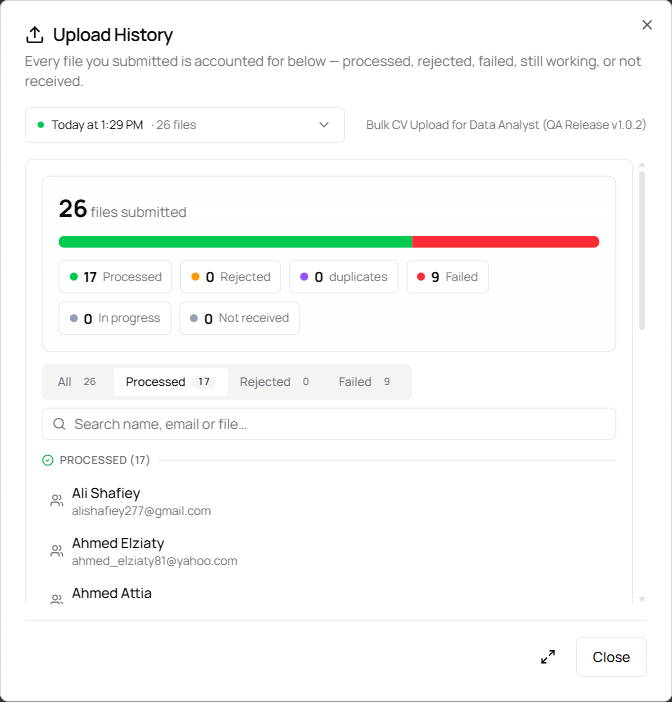
A completed batch: 26 submitted = 17 processed + 9 failed, with a proportional bar and a filter that shows per-state counts
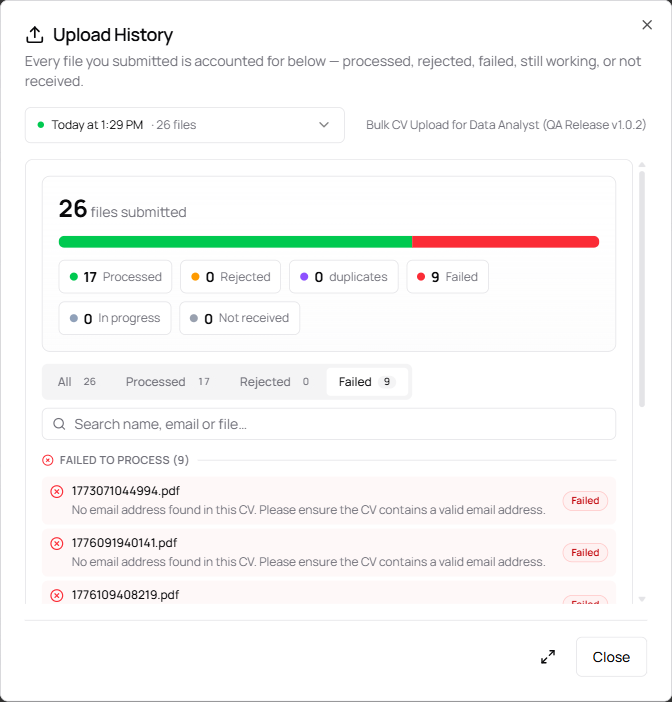
Filtering to Failed shows each file with an actionable reason — here, "No email address found in this CV"
Upload History UX Refresh
Easier to navigate, quieter when idle
The dialog and its Activity-panel entry point got a usability pass.
| Improvement | What it does |
|---|---|
| Batch selector | Pick which upload to view from a compact selector (one entry per batch, most recent first) with a status dot and file count |
| File filter | Filter the file list by state with per-state counts, alongside the search box |
| Expand / collapse | A toggle expands the dialog to near-full-screen for large batches, then restores it |
| Activity deep-link | A View Upload History button on bulk CV upload activity items opens the history focused on that exact batch |
| Quiet when idle | Live refresh runs only while an upload is processing and stops once everything is terminal — no background polling after a batch finishes |
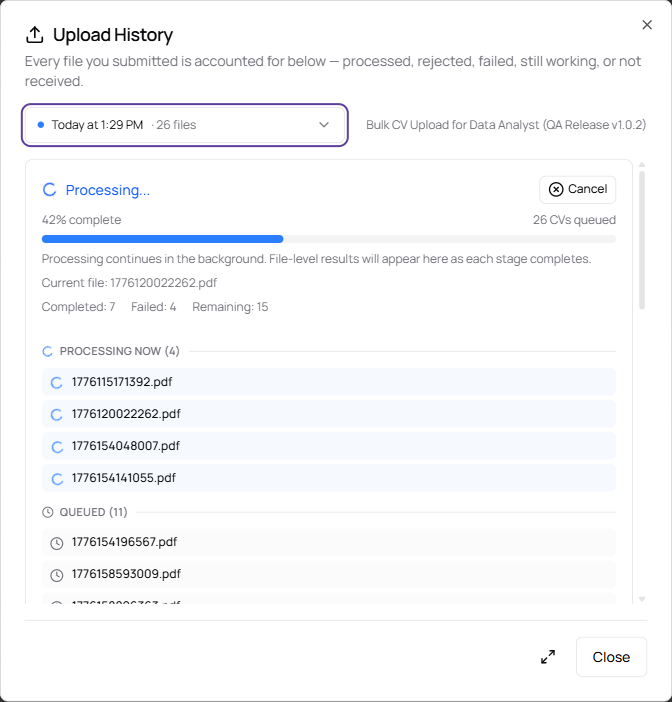
While a batch runs: the batch selector, live per-stage sections (Processing / Queued / Processed / Failed), a running completed/failed/remaining tally, and a Cancel control
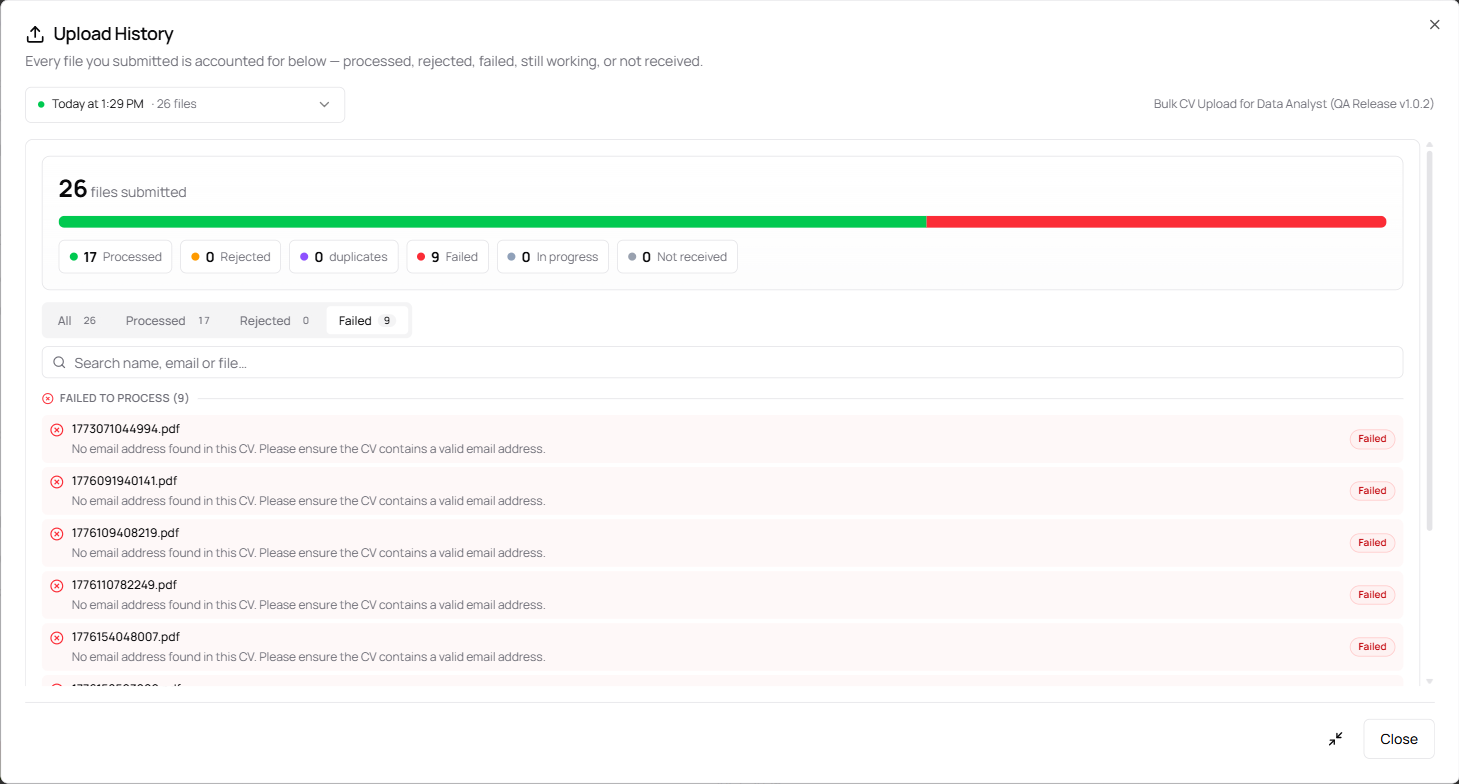
The expand toggle opens the dialog to near-full-screen so large batches are easier to scan; a second click restores it
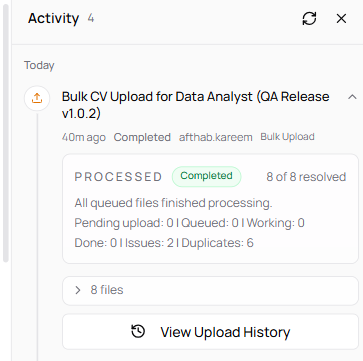
An upload item in the Activity panel expands to a per-file summary with a View Upload History link straight to its batch
CV Processing Recovery
Cancel a stuck batch, retry the rest
If a CV-processing job gets stuck or you want to stop a run partway, you can now cancel it mid-process — files already processed keep their candidates, and the remaining files are skipped. Interrupted or failed processing can be retried so a batch no longer stays stuck with no way forward.
The Cancel control is available both on the bulk-upload activity item and inside the Upload History dialog while a batch is processing.
Reliability & Other Fixes
| Area | Change |
|---|---|
| CV classifier | A truncated JSON response from the resume-header classifier no longer causes valid CVs to be dropped — the classifier tolerates partial output and keeps genuine CVs |
| Large CVs & late emails | Large CVs and emails whose attachment/content arrives late are processed reliably, with a download retry and cleanup of orphaned S3 objects left behind by interrupted uploads |
| Chat — list links | Candidate and job list links are built server-side, so the model can no longer corrupt the underlying IDs/links |
| Chat — AI SQL safety | The SQL safety-keyword check matches on word boundaries, reducing false blocks on legitimate queries |
| Chat — deep CV analysis | Deep CV analysis is scoped to the caller's company, so cross-company candidates are never analyzed |
Released on July 02, 2026
View all releases