Release Notes - v1.0.3
Summary
This release turns the AI Assistant from something that mostly answers questions into something that does the work. You can now book an interview end to end from chat — the assistant previews the booking, you reply "confirm", and the invite goes out with a calendar attachment, with a server-side rule that only shortlisted candidates can be interviewed. You can compare candidates side by side in chat, getting the same job-specific criteria grid, medal ranking and verdict that the job page produces. Deep CV analysis now scores candidates in-house against the job's own threshold and returns a full multi-dimensional breakdown instead of prose. And CVs attached in chat now create a complete candidate — extracted CV text, the original file, and parsed skills are all saved, so that person is immediately searchable and analyzable.
This release also rebuilds candidate search and job matching on stored vector embeddings. Searching now runs across your entire candidate pool in about a second instead of the 100 most recent records, and asking the assistant to find the best people for a role discovers them automatically rather than guessing at names. Rejecting an applicant now captures a structured reason, turning every decision into a record you can review and learn from.
Under the hood, chat no longer depends on an external matching service to work out which job you meant, and the assistant is now grounded in the current date so "next Tuesday" resolves correctly.
What's New
- Semantic search across your whole candidate pool — search now ranks every candidate you have, in about a second, instead of only the 100 most recently active; matches are found by meaning, not just keywords
- Automatic candidate matching for a job — ask for the best people for a role and the assistant discovers them from the entire pool and explains each pick with evidence from the CV, instead of relying on names you supply
- Structured rejection feedback — rejecting an applicant now records a reason from a clear list, so every decision is captured and reviewable instead of being a silent status change
- Book interviews from chat — describe the interview in plain English, review a preview, reply "confirm", and the invite is sent with a calendar attachment; the candidate moves to Interview scheduled automatically
- Shortlist-only interview rule — scheduling is restricted to shortlisted candidates and enforced on the server, so it holds even if the assistant is asked to skip it
- Compare candidates in chat — ask to compare two to five applicants and get a job-specific criteria grid, ranking, per-candidate strength and weakness, interview order, and a closing verdict, inline
- Deep CV analysis with a verdict — a candidate is scored across skills, experience, education, location and potential, with a pass / below-threshold verdict against the job's own cut-off
- Complete candidates from a chat CV — attaching a CV now saves the extracted text, the original file, and parsed skills, experience and education
Improvements
- Search runs in-stack and in about a second — CVs are analysed once when they arrive rather than being re-read on every query, so search returns in roughly a second instead of taking up to a minute
- Job resolution moved in-house — working out which job you meant no longer calls an external service, removing a dependency that could take chat features offline
- The assistant knows today's date — "next Tuesday", "tomorrow", "this week" are resolved against the real current date, so scheduling and date-based questions land on the day you meant
- Honest search results — when the pool doesn't contain a strong match the assistant says so and caveats the results rather than presenting a weak list as confident "top matches"
- Clearer refusals — when the assistant can't do something (candidate not shortlisted, person hasn't applied to the role, name matches several people) it explains why and offers the next step instead of failing silently
Fixes
- CVs attached in chat process reliably — attachments are now kept in the same durable storage as CVs uploaded from the candidate page. They were previously written to the server's own local disk and could not always be read back, so adding a candidate from an attached CV failed with a processing error and the assistant fell back to asking for every detail by hand
- Deep CV analysis no longer fails — the analysis could previously end with "the CV analysis could not be completed right now", or return no answer at all, because the job lookup it depends on was unreachable
- No more silent dead ends — a failed job lookup used to leave the assistant with nothing to say and the conversation unable to accept further messages until the page was reloaded
- Comparisons report real experience — candidate comparisons no longer inflate years of experience by adding up overlapping roles; the figure now comes from the same calculated total shown on the candidate profile
- The assistant replies in your language — a message written in Arabic is now answered in Arabic instead of switching to English
- Interviewers default to you — when no interviewer is named, the invite goes to your own account email instead of an invented placeholder address
- Formatted and code-like messages send cleanly — typing a message containing angle brackets or HTML-looking text now sends and displays as written instead of being silently blocked
Semantic Search Across Your Whole Candidate Pool
Every candidate, ranked by meaning, in about a second
Candidate search has been rebuilt on stored vector embeddings. Each CV is analysed once, when it arrives, and kept ready to search. Asking the assistant to "find me financial analysts with audit experience" now ranks every candidate in your workspace — not just the 100 most recently active — and does it in about a second.
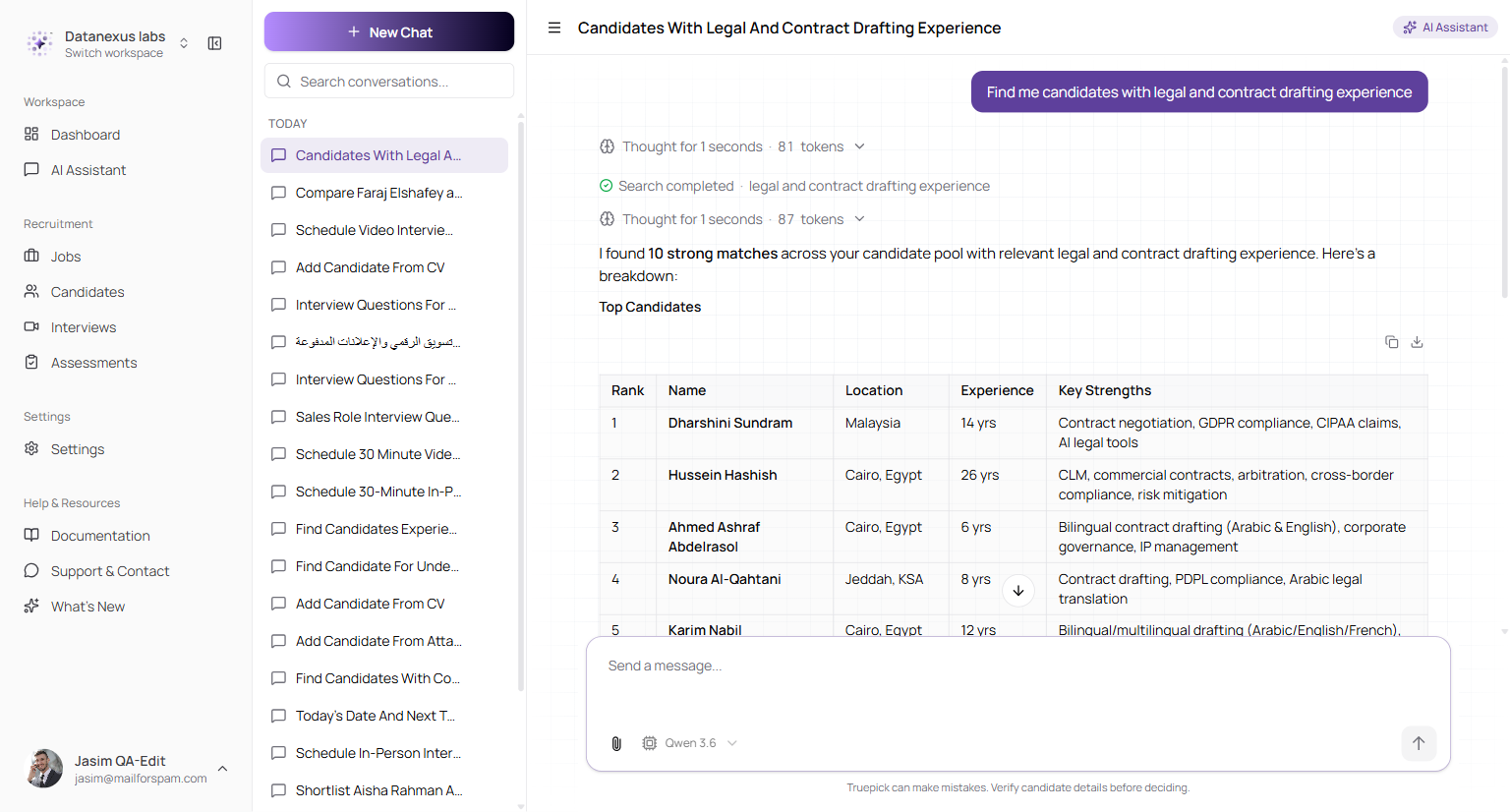
A search returns the strongest matches from the whole pool, each with why they surfaced — ranked by what the CV actually says, not just keyword overlap
The difference is not cosmetic. The previous search only ever looked at the 100 most recently active candidates and ranked within that window, so anyone quieter was invisible while the results were still labelled "top matches". Search now covers the entire pool, matches on meaning rather than exact words, and returns quickly because the heavy analysis already happened at upload time.
| Before | Now | |
|---|---|---|
| Who is searched | The 100 most recently active | Every candidate in the workspace |
| How long it takes | Up to a minute | About a second |
| How matches are found | Keyword overlap, recency-limited | Meaning, across the whole CV |
| When there's no good match | A confident-looking list anyway | An honest "the pool may not contain an ideal fit" |
Search stays inside your workspace — results are always scoped to your own company's candidates.
Find the Best Candidates for a Job Automatically
Point the assistant at a role; it finds the people
Asking for the best candidates for a job — "who are the strongest applicants for the Senior Legal Counsel role?" — no longer depends on you naming anyone. The assistant searches the whole candidate pool for the role, shortlists the closest matches, then ranks and explains them with evidence drawn from each CV.
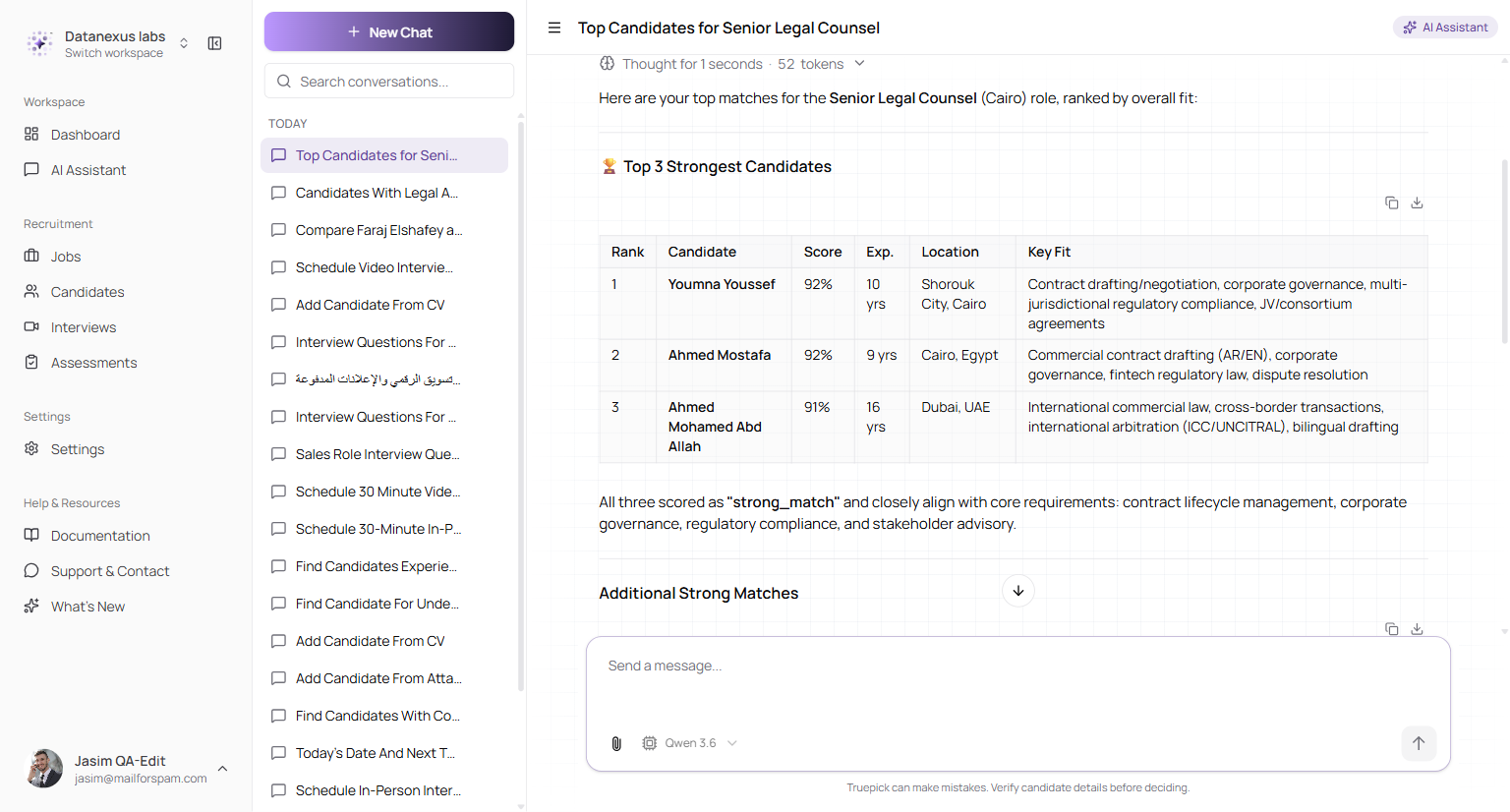
The assistant discovers candidates for the role, ranks them, and gives the reasoning and the CV evidence behind each placement
Previously this feature could only work with candidate names the assistant managed to guess, so anyone it didn't name — including strong candidates who hadn't applied — could never surface. It now discovers them for you.
As with search, when a role has no genuinely strong candidates in the pool, the assistant says so plainly rather than presenting the least-weak options as a confident recommendation.
Structured Rejection Feedback
Every rejection becomes a record, not a silent status change
Rejecting an applicant now asks for a reason. Instead of a free-for-all note or nothing at all, you pick from a clear, consistent list of reasons and can add your own detail — so each decision is captured in a form you can review later and learn from across your hiring.
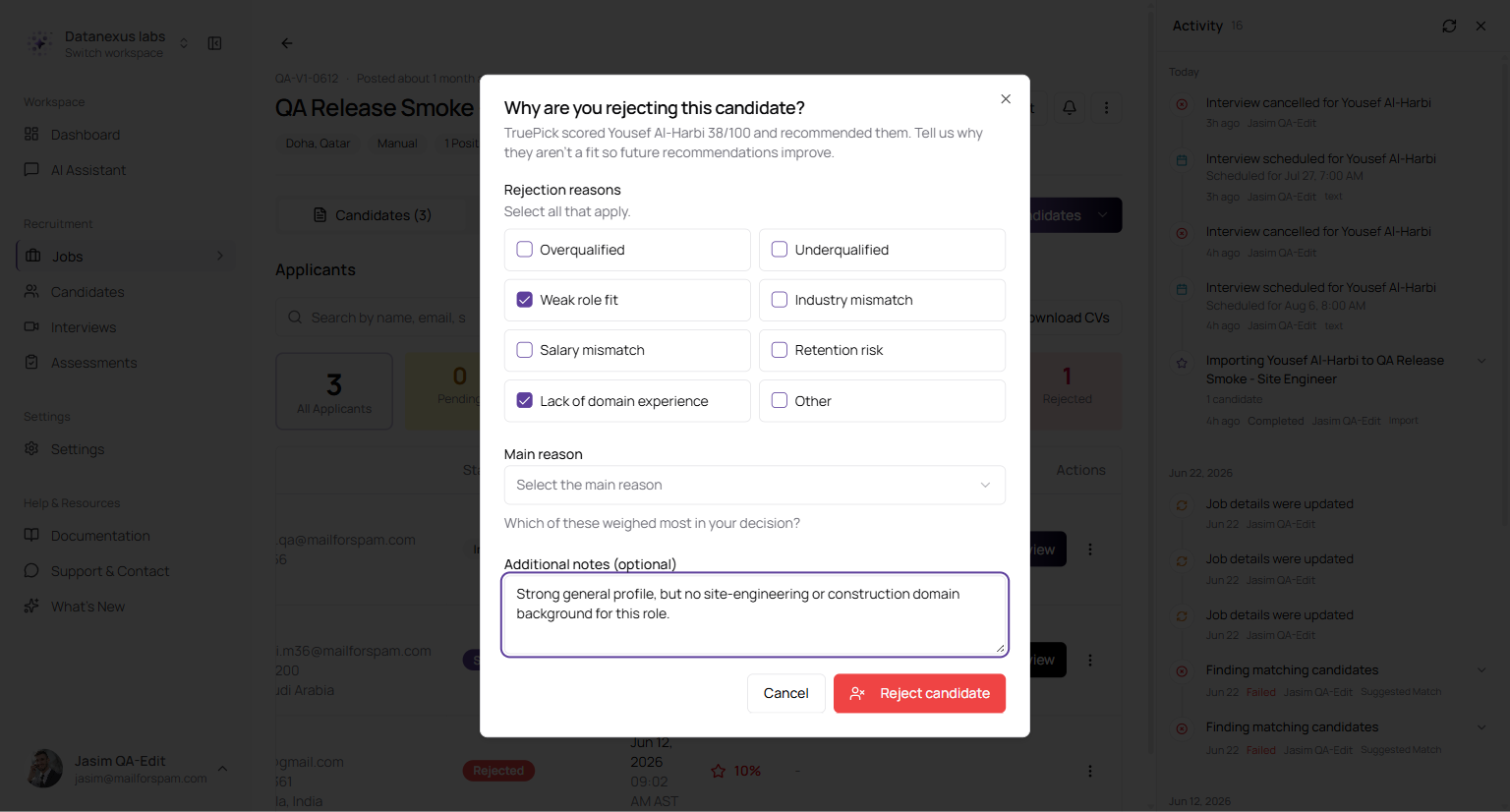
Rejecting an applicant asks for a reason from a consistent list — with the AI's own recommendation shown for contrast — and room for your own notes
The dialog also surfaces what the assistant had recommended, so a rejection is captured against the AI's own call. The recorded reasons are then read back on the applicants list, keeping the decision and its rationale visible to your team.
| Detail | Behaviour |
|---|---|
| A reason is required | Rejecting now requires selecting at least one reason, enforced on the server so it can't be skipped |
| Consistent categories | Reasons come from a maintained list rather than free text, so decisions stay comparable |
| Your own notes | You can add specific detail alongside the selected reason |
| Recruiter-only | Rejection reasons and notes are visible to your team only and are never shown to the candidate |
| Bilingual | The reasons and dialog are available in English and Arabic |
Book an Interview from Chat
Describe it, review it, confirm it
Scheduling an interview no longer means leaving the assistant. Ask in plain English — "Schedule an interview with Sarah for the Senior Legal Counsel role next Tuesday at 2pm" — and the assistant resolves the person, the role and the date, then shows you exactly what it is about to do.
Nothing is booked until you say so.
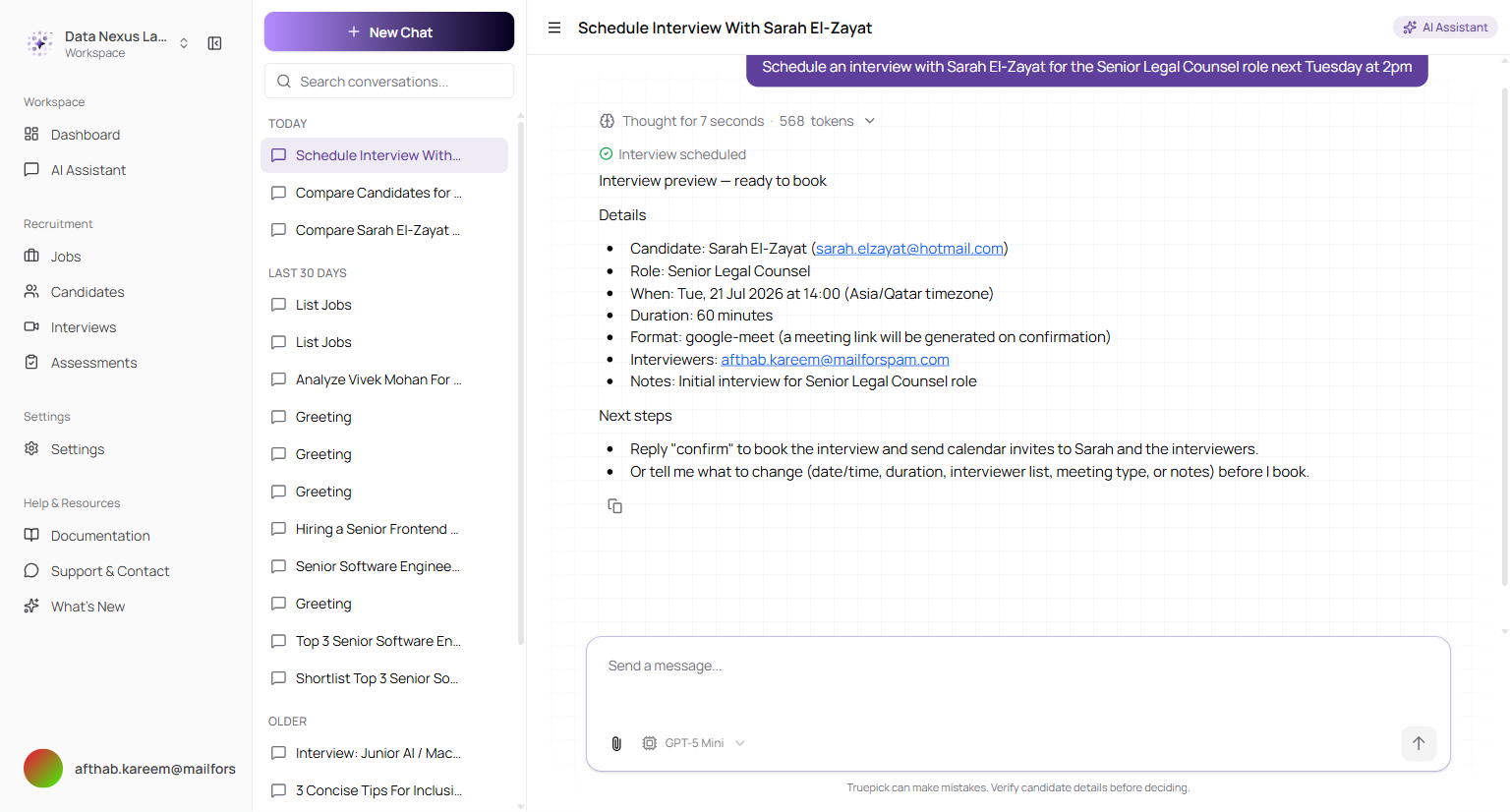
The preview: who, which role, when (in your company's timezone), how long, the format, and who is interviewing — with a clear note that confirming sends the invite
Reply confirm and the interview is created and the invite sent.
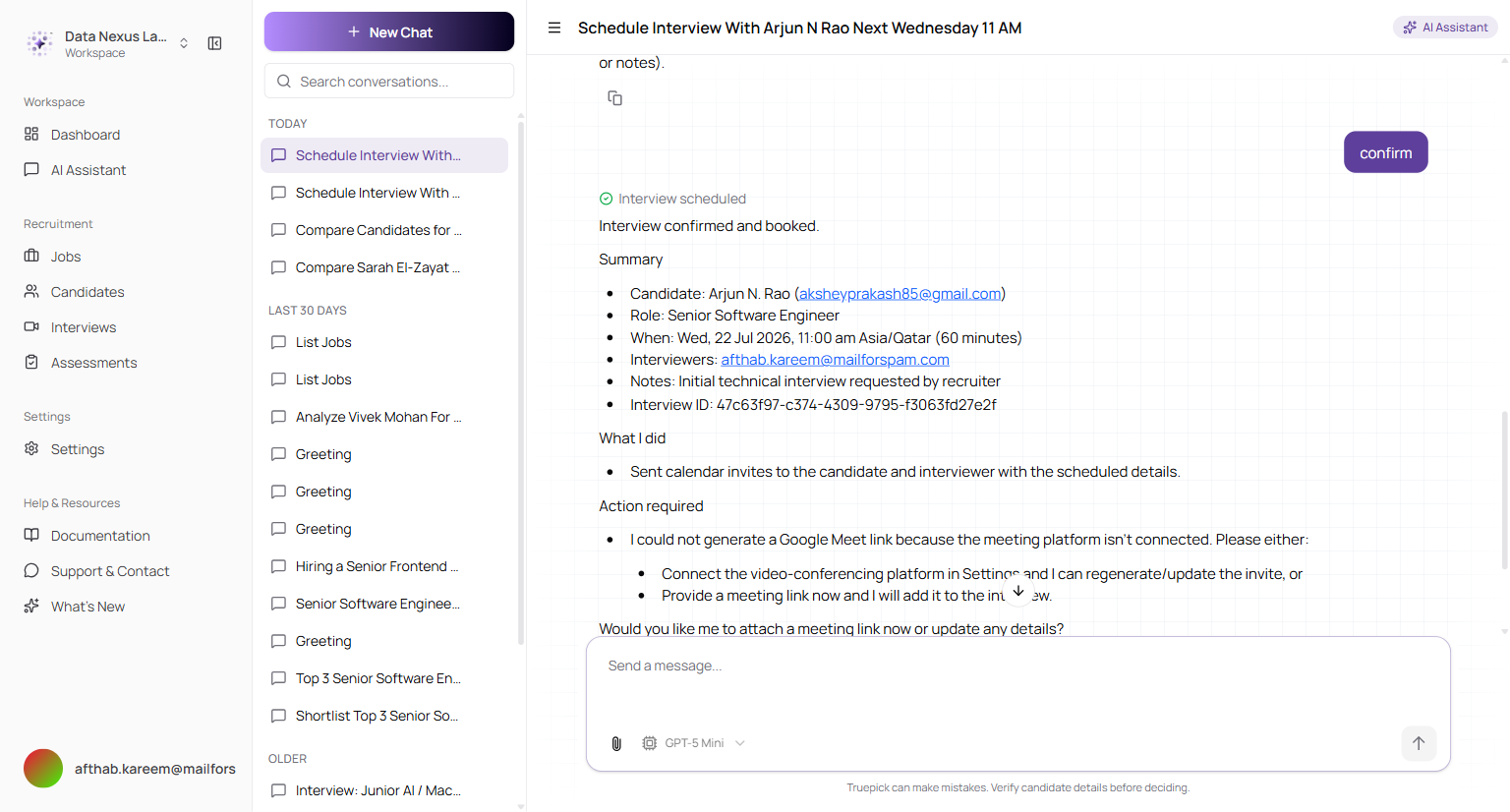
After confirming: the booking is summarised with its interview reference, and calendar invites go to the candidate and the interviewers
The interview then appears in Interviews like any other, and the candidate's application moves from Shortlisted to Interview scheduled on its own.
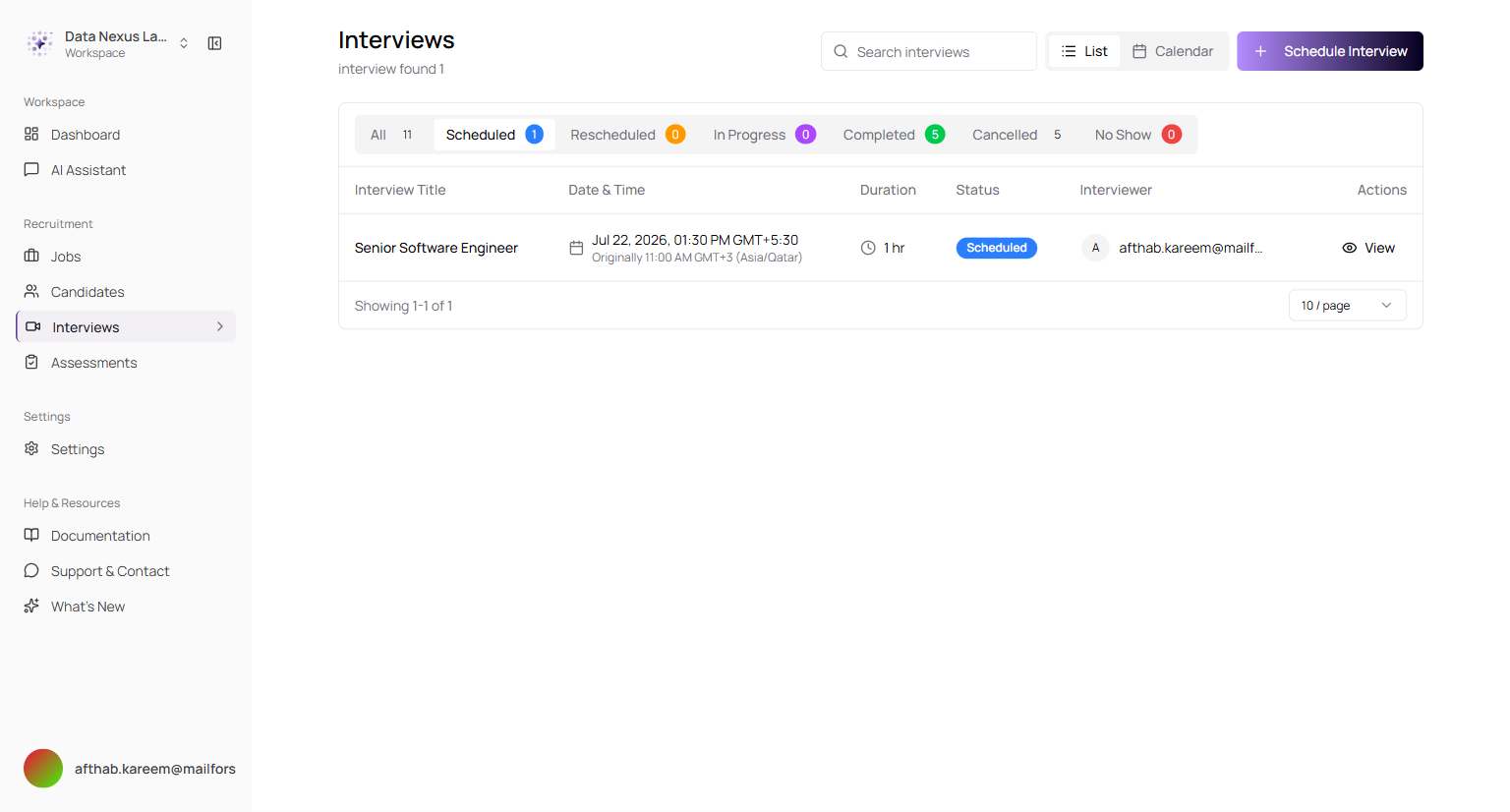
The chat-booked interview in the Interviews list — same row, same statuses, nothing special about how it got there
| Detail | Behaviour |
|---|---|
| Dates in plain English | "next Tuesday at 2pm", "tomorrow morning" — the resolved date and time are echoed back before you confirm |
| Timezone | Times are shown in your company's timezone, and the calendar invite matches |
| Meeting link | Generated when a video platform is connected; if none is, the interview is still booked and the assistant tells you what's missing |
| Cancelling | Say so before confirming and nothing is created and no email is sent |
Only Shortlisted Candidates Can Be Interviewed
The same rule as the Interviews screen, now enforced everywhere
Interview scheduling has always been limited to shortlisted candidates. That rule now applies in chat too — and it is enforced on the server, not merely in the assistant's instructions.
Ask to interview someone who isn't shortlisted and the assistant declines, tells you their actual status, and offers to shortlist them first — no interview is created and no email is sent.
Because the check runs on the server, instructing the assistant to bypass it doesn't work either. Asking it to "book it anyway" produces the same refusal.
Compare Candidates Side by Side, in Chat
The full comparison, without leaving the conversation
Ask to compare applicants for a role — "Compare Sarah and Mohamed for the Senior Legal Counsel role" — and the comparison is built and rendered inline. It's the same engine behind the comparison view on the job page, so the criteria are derived from that specific job description rather than a generic checklist.
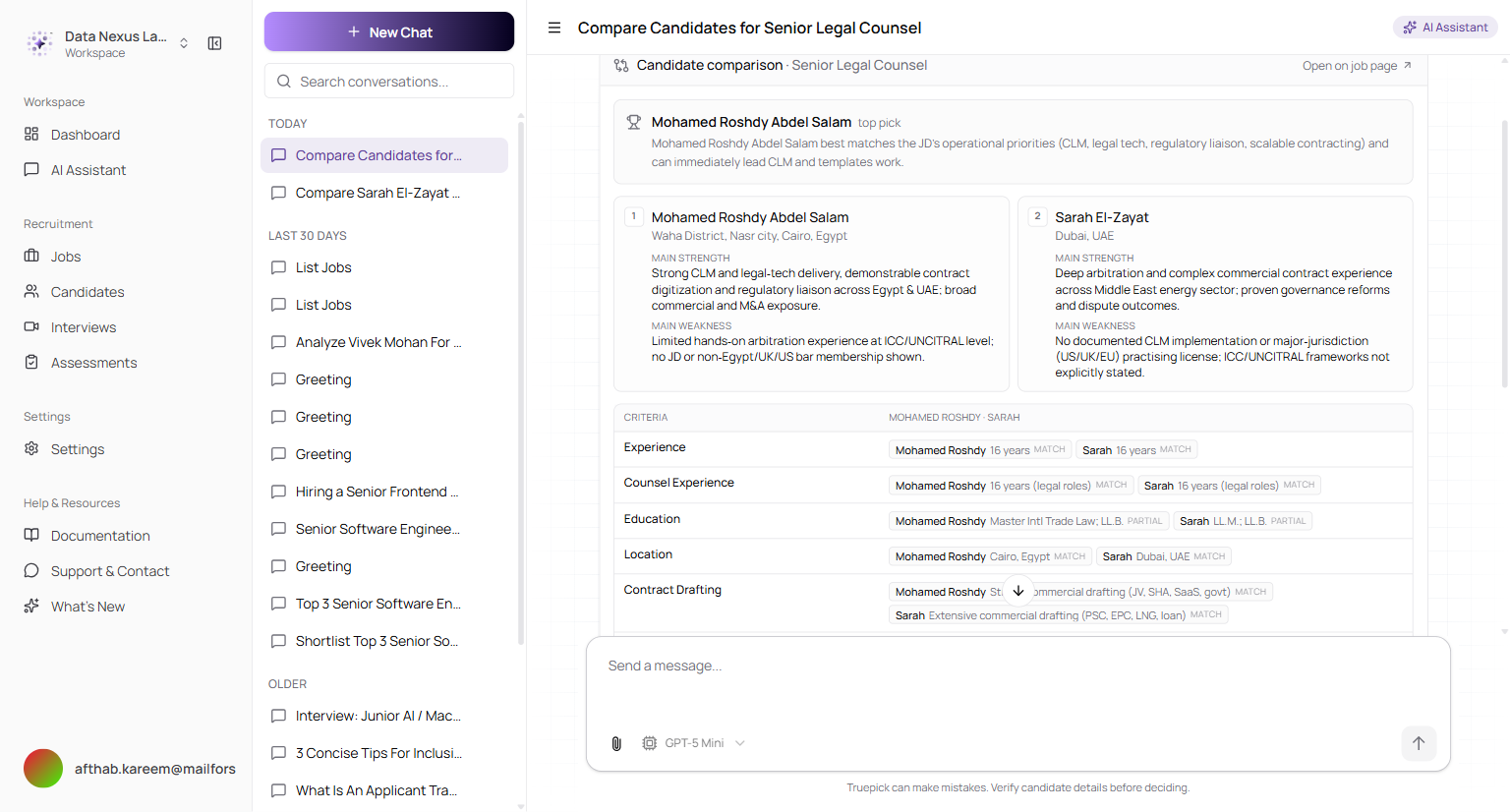
A finished comparison: the top pick with the reasoning, each candidate's main strength and weakness, and a criteria grid scored match / partial / gap
| Part | What it gives you |
|---|---|
| Top pick | The leading candidate and why, in one sentence |
| Ranking | Candidates ordered first, second, third |
| Strength & weakness | The single biggest point for and against each person |
| Criteria grid | Job-specific criteria — for a legal role, things like contract drafting, arbitration and governance — each marked match, partial or gap |
| Interview order | Who to see first, and who second |
| Closing verdict | The summary judgement, expandable |
Comparisons take up to a minute or so on first run, and the assistant shows which candidates it is reviewing while it works rather than leaving you waiting. Years of experience in the comparison now come from each candidate's calculated total, so overlapping roles are no longer double-counted into an inflated figure.
The finished comparison is saved with the conversation and re-appears intact when you come back to it. Running the same comparison again returns the stored result immediately.
Who can be compared: everyone named must have applied to the role you're comparing them for — the comparison scores people against that job through their application. If someone hasn't applied, the assistant says so rather than inventing a comparison. If a name matches more than one person, it lists the matches with their email addresses and asks which you meant rather than guessing.
Deep CV Analysis
A score you can see the reasoning behind
Asking the assistant to analyse a CV against a role now returns a structured assessment rather than a paragraph of prose — and the score is checked against that job's own interview threshold, so you get a verdict, not just a number.
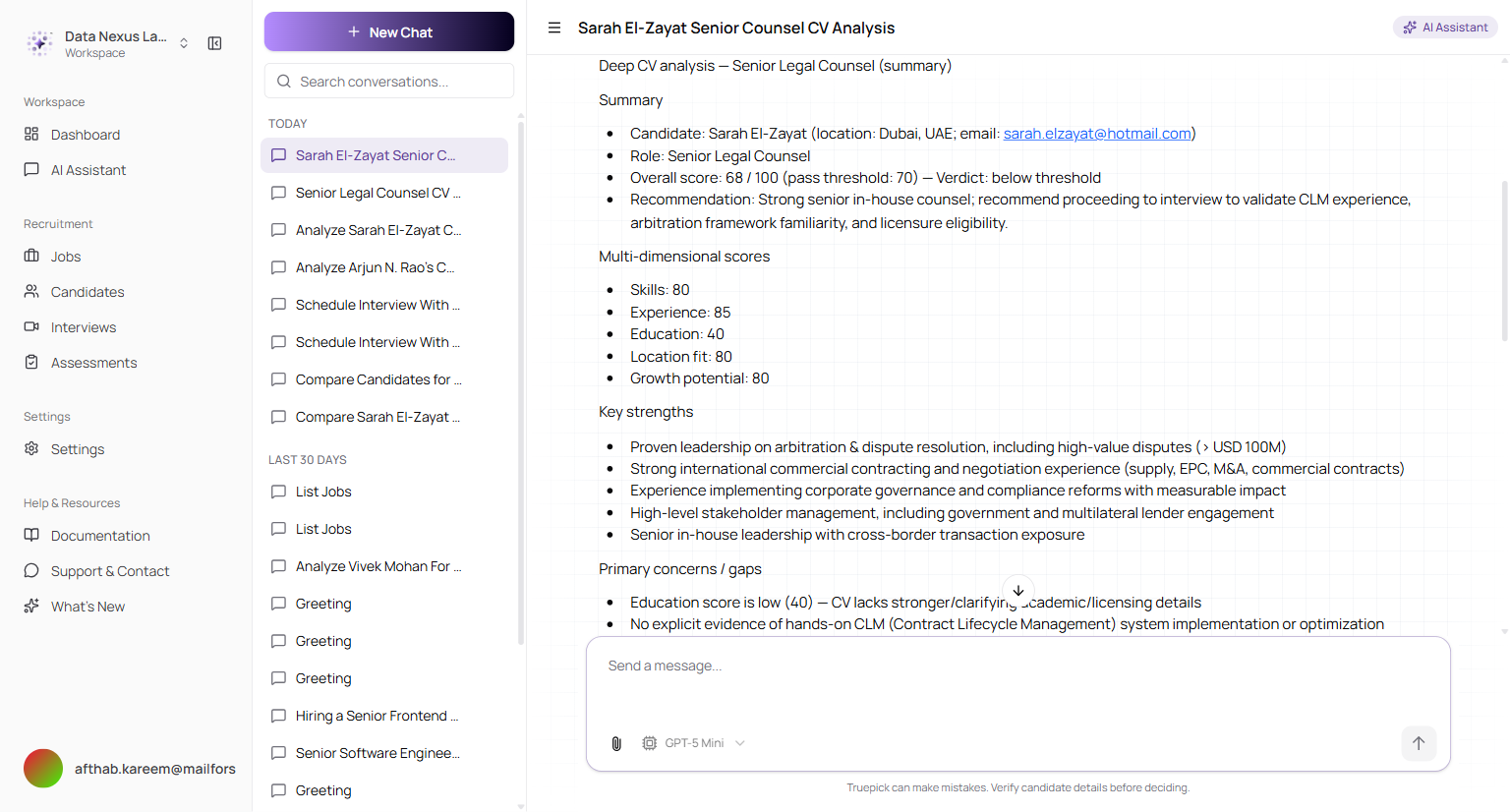
An analysis against the Senior Legal Counsel role: an overall score shown against the pass threshold with a clear verdict, the five dimension scores, and the strengths behind them
| Section | What it covers |
|---|---|
| Overall score & verdict | The score, the job's pass threshold, and whether the candidate clears it |
| Dimensions | Skills, experience, education, location fit and growth potential, scored separately |
| Strengths | The specific evidence in the CV supporting the score |
| Concerns & gaps | Where the CV falls short, including the score impact |
| Missing skills | Required skills with no evidence in the CV |
| Interview focus | What to probe to confirm or rule out the gaps |
Scoring runs on the same in-house scorer the CV pipeline uses, so a candidate is judged the same way whether they arrive through an application or a chat request.
If a candidate has no extracted CV text, the assistant says so and declines to score rather than producing a confident number based on nothing.
Complete Candidates from a Chat CV
Attach a CV, get a real candidate record
Attaching a CV in chat and asking to add the person now produces a full candidate profile. The assistant extracts the details, shows them to you for review, and only writes the record once you confirm.
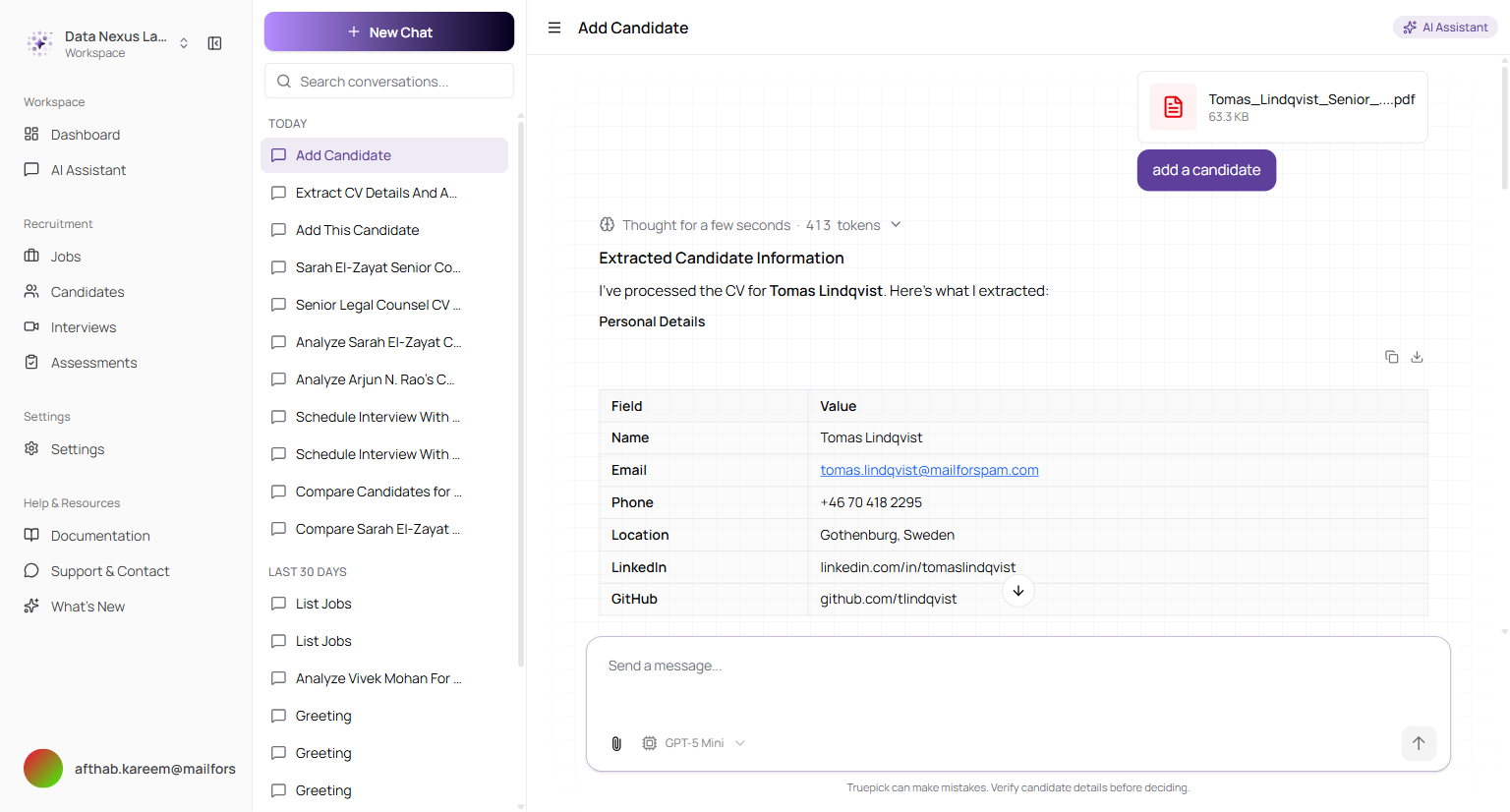
The parsed profile is shown for review first — name, contact details and links pulled straight from the PDF
What gets saved is the important part: the extracted CV text, the original file, and the parsed skills, experience, education and projects. That means the candidate is immediately searchable by skill and can be run through CV analysis and comparison — previously a chat-added candidate was a thin record that later tools couldn't work with.
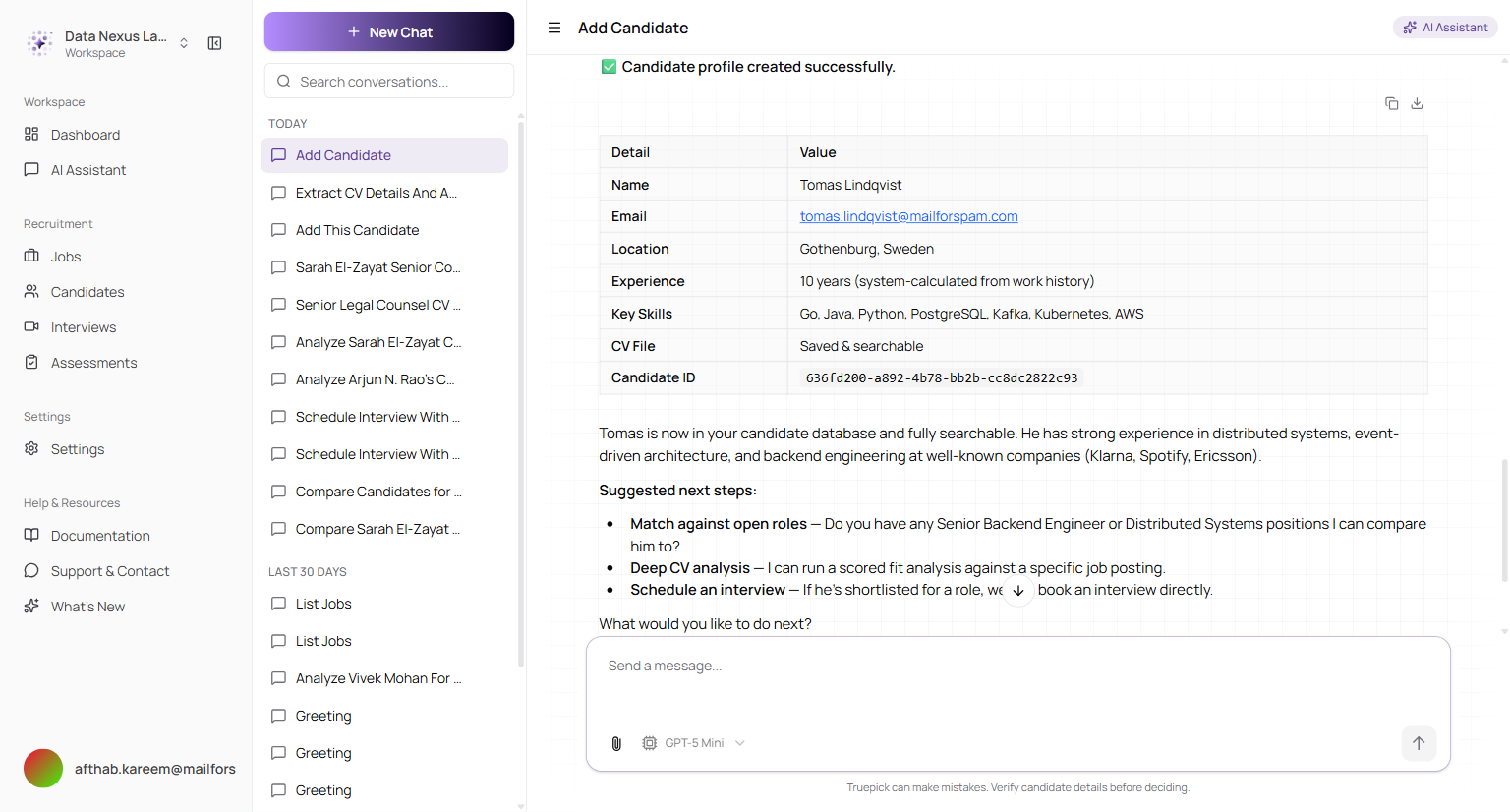
On confirmation the profile is created with the CV saved and searchable, and years of experience calculated from the work history rather than taken from the CV's own wording
The assistant is explicit about what it couldn't find — a missing LinkedIn or GitHub URL is called out rather than quietly left blank.
Released on July 18, 2026
View all releases