Release Notes - v1.0.4
Summary
This release introduces Fraud Shield, a CV authenticity check that runs quietly in the background on every candidate who passes CV screening. It looks for CVs written by copying the job description back at you, checks whether the copied claims are backed up anywhere else in the CV, and compares a candidate's CV against the earlier versions they sent you. Each applicant gets a plain Clear, Review or High risk label, and every label comes with receipts — the exact phrases, the exact reasoning. It is a warning signal only: it never changes a score, never re-orders your shortlist, and never hides anyone.
Interview questions for automated jobs are now reliable. Questions are created as soon as a job is set up for AI interviews rather than waiting for it to be published, generation progress stays visible while you move around the page, and the app tells you when a job's questions no longer match the job description.
The app also gains an in-app language switcher. Until now, only the login page let you choose a language — if you signed in with Arabic selected there was no way back to English without clearing your browser. The switcher now lives in the account menu on every page, keeps you exactly where you were, and remembers your choice for a year instead of forgetting it when you close the browser.
The AI video interview is also back. The on-screen AI interviewer — the video avatar that greets and questions candidates — now runs on LiveKit Cloud with the Tavus avatar, so it connects quickly and runs smoothly for every candidate.
Finally, the AI behind the assistant has been upgraded to DeepSeek V4 Flash, Taqat's own privately hosted model, and the job activity timeline has been rewritten so entries read as sentences and are fully translated.
What's New
- Fraud Shield — every candidate who passes CV screening is checked for a CV written by copying the job description, and gets a clear risk label
- Risk labels on the applicants list — Clear, Review or High risk with a score, right beside each candidate's status, so a problem is visible without opening anything
- Receipts for every flag — the candidate page lists the exact copied phrases, the claims that nothing in the CV supports, and any experience claim that contradicts the dates on the CV
- Verify CV authenticity on demand — a menu action to run the check on applications that arrived before this release, or any time you want a fresh result
- An on/off switch you control — Fraud Shield can be turned off for the whole workspace from AI Settings
- Repeat-applicant comparison — when someone has applied to you before, their new CV is compared with the old one to spot claims that appear only when they suit the job
- Interview questions warning — a job set up for AI interviews now tells you when it has no questions, and offers to generate them
- Outdated questions warning — if the job description, requirements, skills or interview settings change after questions were written, the app says so and offers to regenerate
- Language switcher inside the app — change between English and Arabic from the account menu on any page, without losing the page you were on
- DeepSeek V4 Flash — Taqat's own privately hosted model, available for the assistant and for every AI area in Settings
- AI video interviews restored — the on-screen AI interviewer (video avatar) is back and works reliably, now running on LiveKit Cloud
Improvements
- Generation progress follows you — while interview questions are being written, the progress notice stays on screen when you switch between the Candidates and Job Details tabs
- Questions are generated at the right moment — as soon as a job is set up for AI interviews, rather than only when the job is published, so an automated job is never left without questions
- Accurate question counts — the count beside "Interview Questions" now matches what is actually stored, including on older jobs
- A readable activity timeline — job activity now reads as plain sentences ("Job status changed from Draft to Posted"), groups by day, expands bulk uploads to show each file, and is fully translated into Arabic
- Arabic job pages — job type, seniority, work mode, status and every applicant label on the job page are now translated instead of appearing in English
- Your language sticks — the language you pick is remembered for a year rather than being forgotten when you close the browser
- A proper loading state — opening a job now shows a structured placeholder while it loads instead of a bare line of text
- Chat keeps its thinking panel, scoring keeps its consistency — the AI's reasoning is now used only where it is actually shown. Scoring runs no longer pay for reasoning they discard, and a candidate scored twice against the same job returns the same number
- Attachments work on the default model — the assistant's default is now a model that understands images, so attaching a picture no longer breaks the conversation
- Settings and the assistant agree — the assistant's default model and the default in AI Settings are now the same; previously the two disagreed
- Job pages open reliably — a change in how interview-question status is worked out removed an error that could stop the job page from loading
Fraud Shield
A CV written by copying your job description now shows up before the interview
A common shortcut candidates take is to paste your own job description back at you: the responsibilities become their "experience", the requirements become their "skills", and the resulting CV scores well because it matches the role almost word for word.
Fraud Shield looks for exactly that. It runs on its own after a candidate passes CV screening, and produces one of three labels:
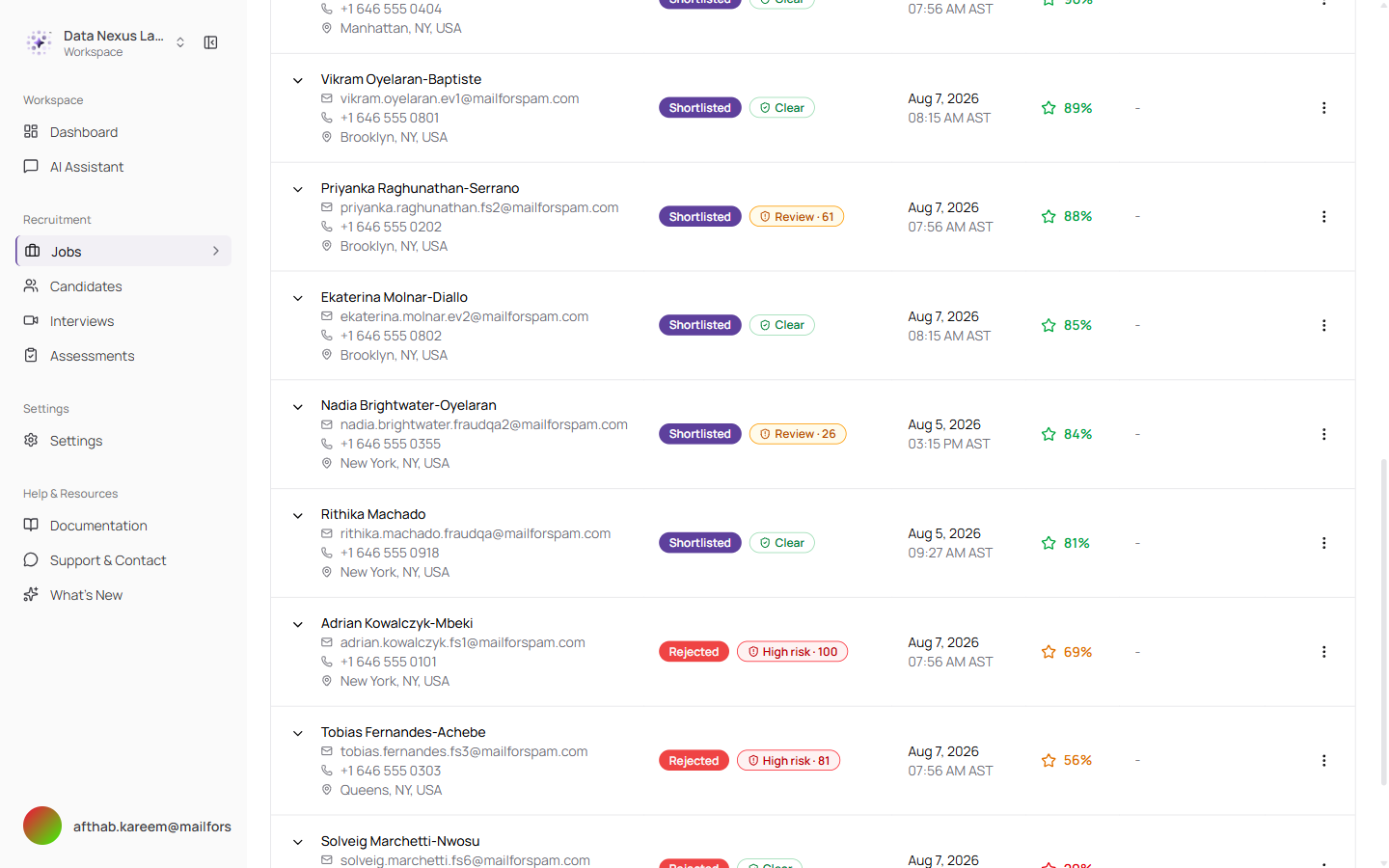
Clear, Review and High risk labels sit beside each applicant's status, with a score — no extra clicks needed to see who is worth a closer look
Clear means nothing was found. Review means some copying was detected and some claims look thin. High risk means substantial copying with claims the rest of the CV does not support.
The most important thing about these labels is what they do not do. A label never changes an AI score, never moves anyone up or down your shortlist, and never hides a candidate from you. It is a note to check something in the interview, nothing more.
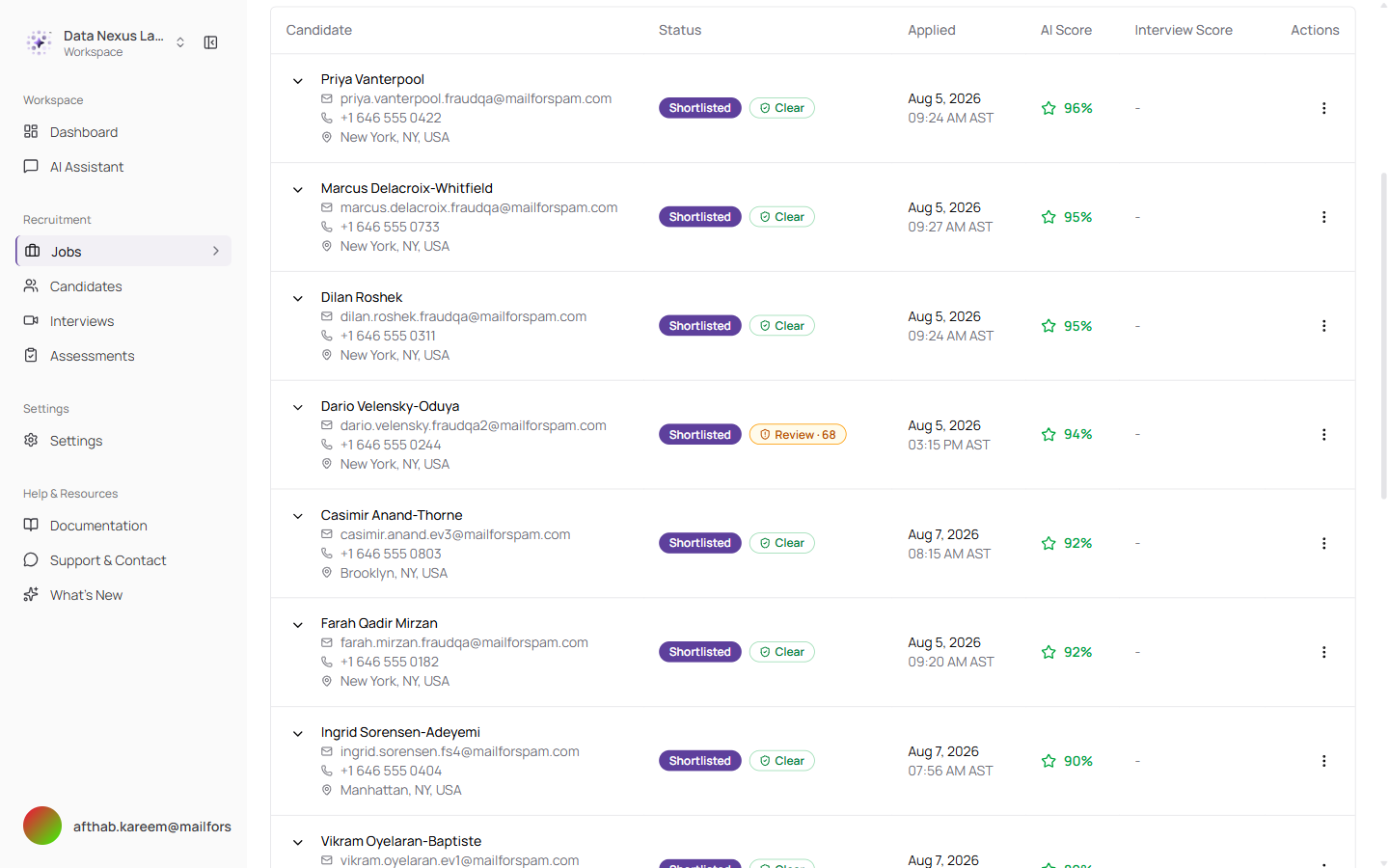
The applicants list works exactly as before — the risk label is simply one more column of information
Every Flag Comes with Receipts
You can see precisely why something was flagged
Nothing is flagged without evidence you can read. Open a candidate and the Fraud Shield panel shows the label for each job they applied to, and how many pieces of evidence sit behind it.
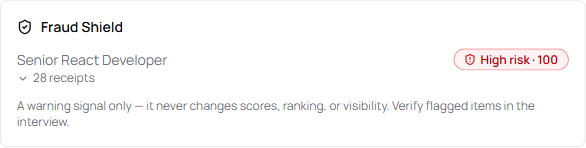
The panel on the candidate page — the label, the number of receipts, and a reminder that this is a warning signal only
Open the receipts and each one names what was found and why.
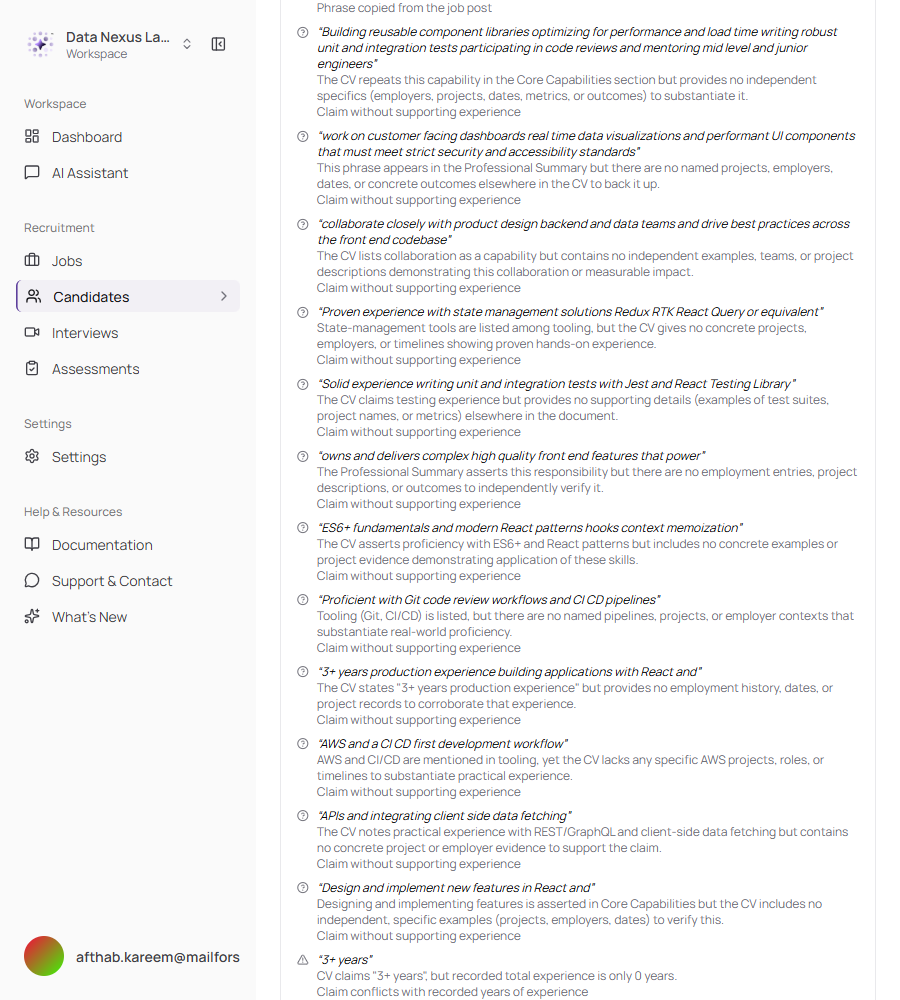
Each receipt quotes the phrase in question and explains the problem in plain language
There are three kinds of receipt:
| Receipt | What it means |
|---|---|
| Phrase copied from the job post | This wording in the CV came from your job description. Where the wording was reworded slightly, the original job post phrasing is shown alongside it |
| Claim without supporting experience | The claim appears in the CV, but nothing else in the CV — no employer, no project, no dates, no outcome — backs it up |
| Claim conflicts with recorded years of experience | The years the candidate claims do not match the dates their own CV gives |
Quotes shown in a receipt are always checked against the real CV text before being displayed, so a receipt can never contain wording the candidate did not actually write.
Checking Older Applications
Applications from before this release can be checked whenever you want
Fraud Shield only runs automatically on candidates who arrive from now on. For anyone who applied earlier, there is a Verify CV authenticity action in the applicant's menu on the job page.
The row shows a "Checking…" state while it works, then settles on the result in place — in the same format as any other candidate's, so an application from months ago ends up looking exactly like one that arrived today.
The same action can be used to re-run a check at any time, for example after a candidate sends you an updated CV.
Repeat Applicants
A CV that changes to suit each role is now noticeable
If a candidate has applied to you before, Fraud Shield compares the CV they have just sent against the ones they sent previously. When a skill, a responsibility or a stretch of experience appears only in the version aimed at a particular role, that is worth knowing before the interview.
The same comparison also checks the story for internal consistency — whether the seniority claimed matches the dates given, and whether a claimed length of experience is supported by the actual employment history on the page.
This evidence never flags someone on its own. It can only strengthen a concern that copying has already raised, and at most by one level.
Turning Fraud Shield Off
One switch, for the whole workspace
Fraud Shield is on by default. If you would rather not use it, there is a single switch in Settings → AI Settings.
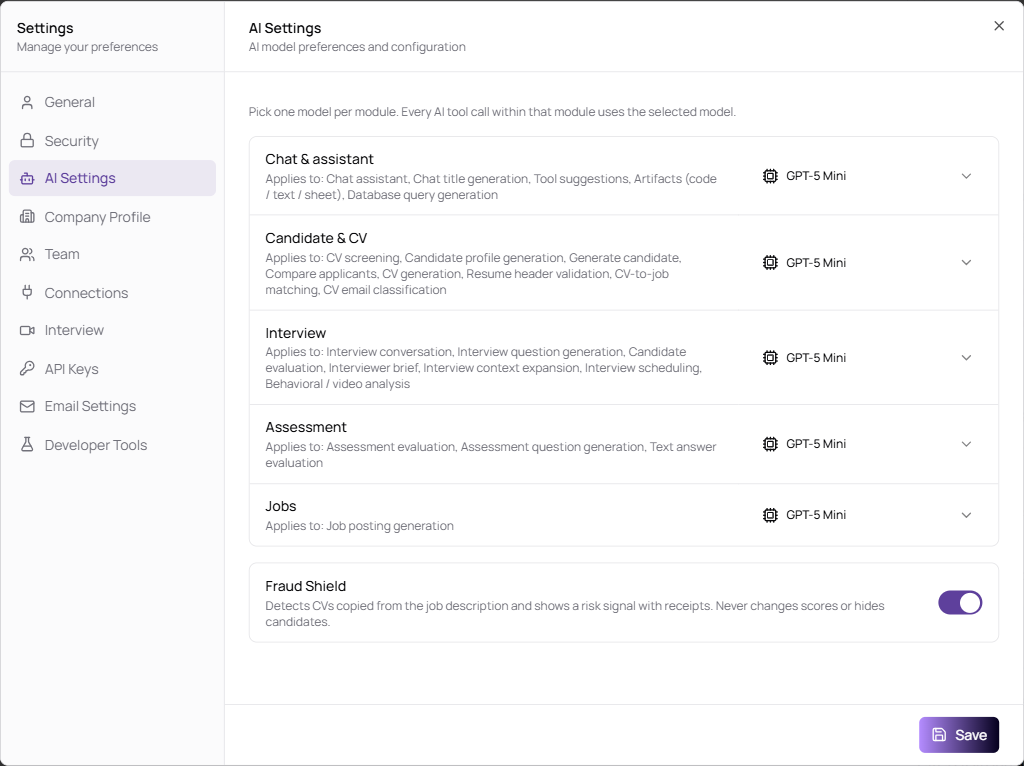
The switch sits below the AI model settings, with a one-line description of what the feature does
Turning it off stops all new checks immediately, everywhere — the job page, the candidate page and the assistant. Existing results simply stop being shown.
Interview Questions for Automated Jobs
Questions are ready when the job is, and you are told when they are not
Jobs set for AI interviews need a set of interview questions. Previously these were tied to publishing, which meant a job could be fully set up for automated interviewing and still have nothing for the AI interviewer to ask. Now the questions are written as soon as the job is set up for AI interviews.
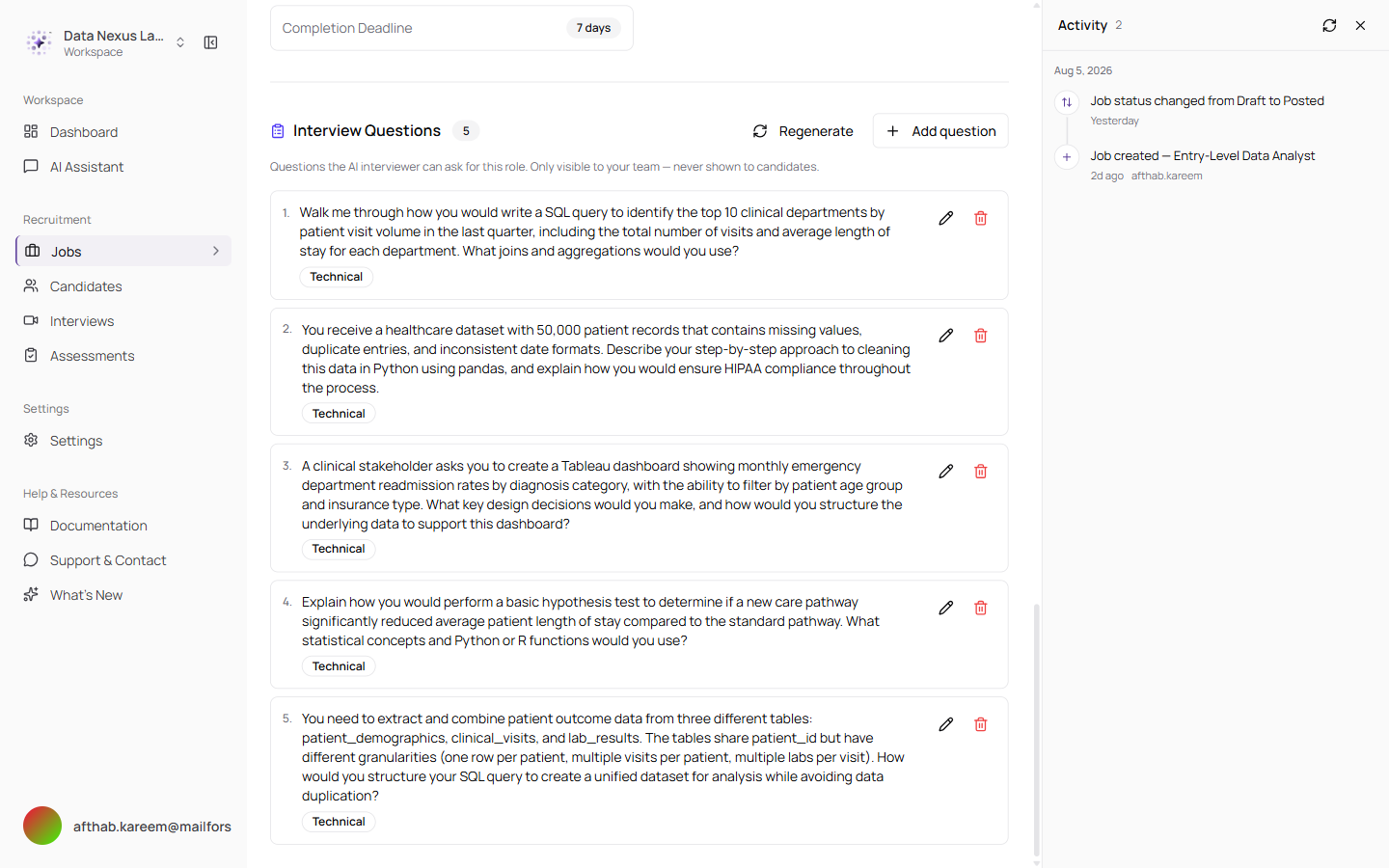
The questions for an automated job, with the option to regenerate them or add your own. These are visible to your team only and are never shown to candidates
While questions are being written, a notice tells you what is happening and that you do not have to wait.
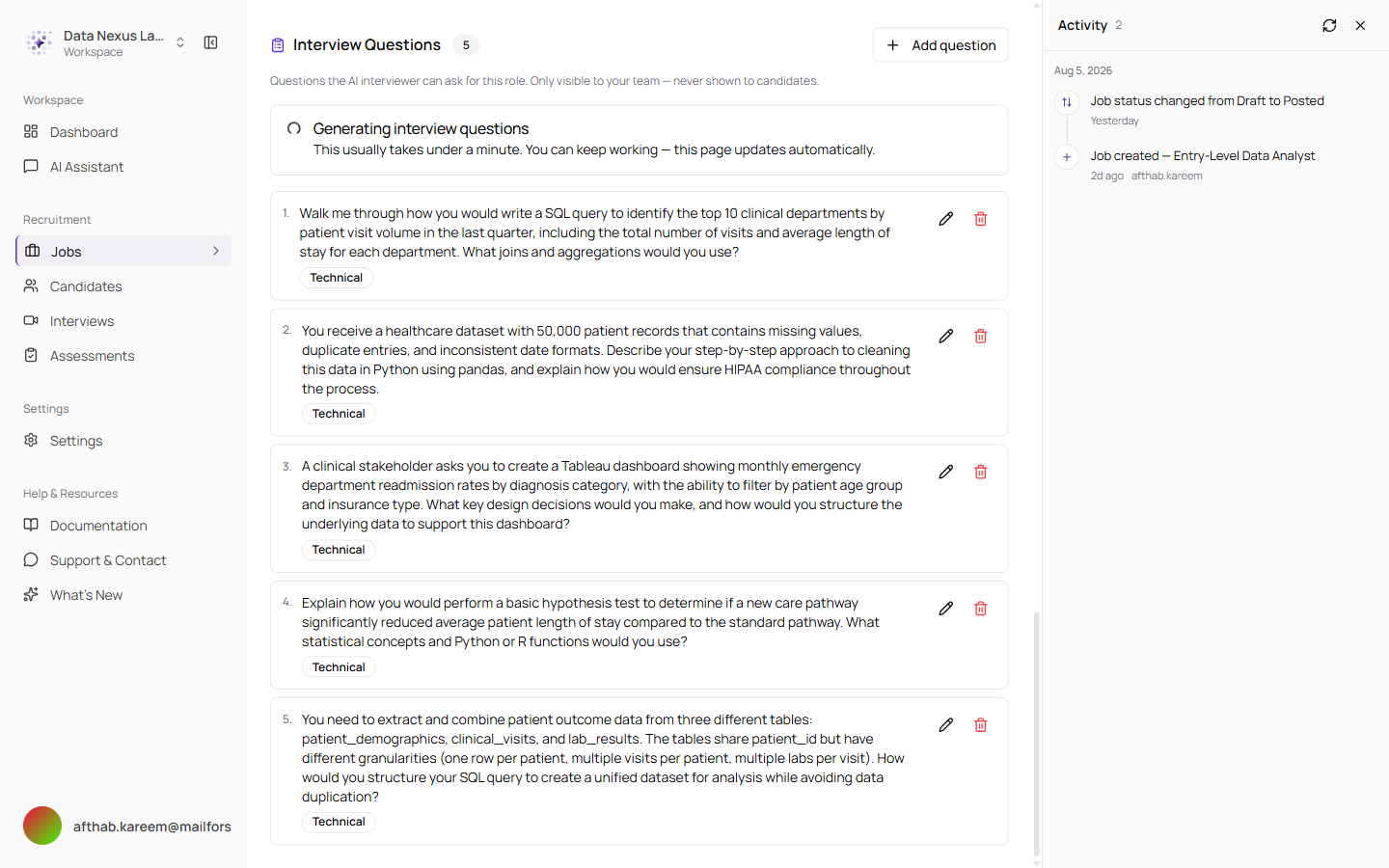
The notice appears in place of the questions while they are being written, and the page updates itself when they are ready
The notice follows you. Switch to the Candidates tab mid-generation and it moves to the top of the page rather than disappearing — previously the progress vanished and you had no way of knowing whether anything was still happening.
Outdated Question Warnings
If the job changes, you find out that the questions no longer match
Editing a job description, its requirements, its skills or its interview settings can leave the existing questions asking about something the role no longer involves. The job page now notices and tells you.
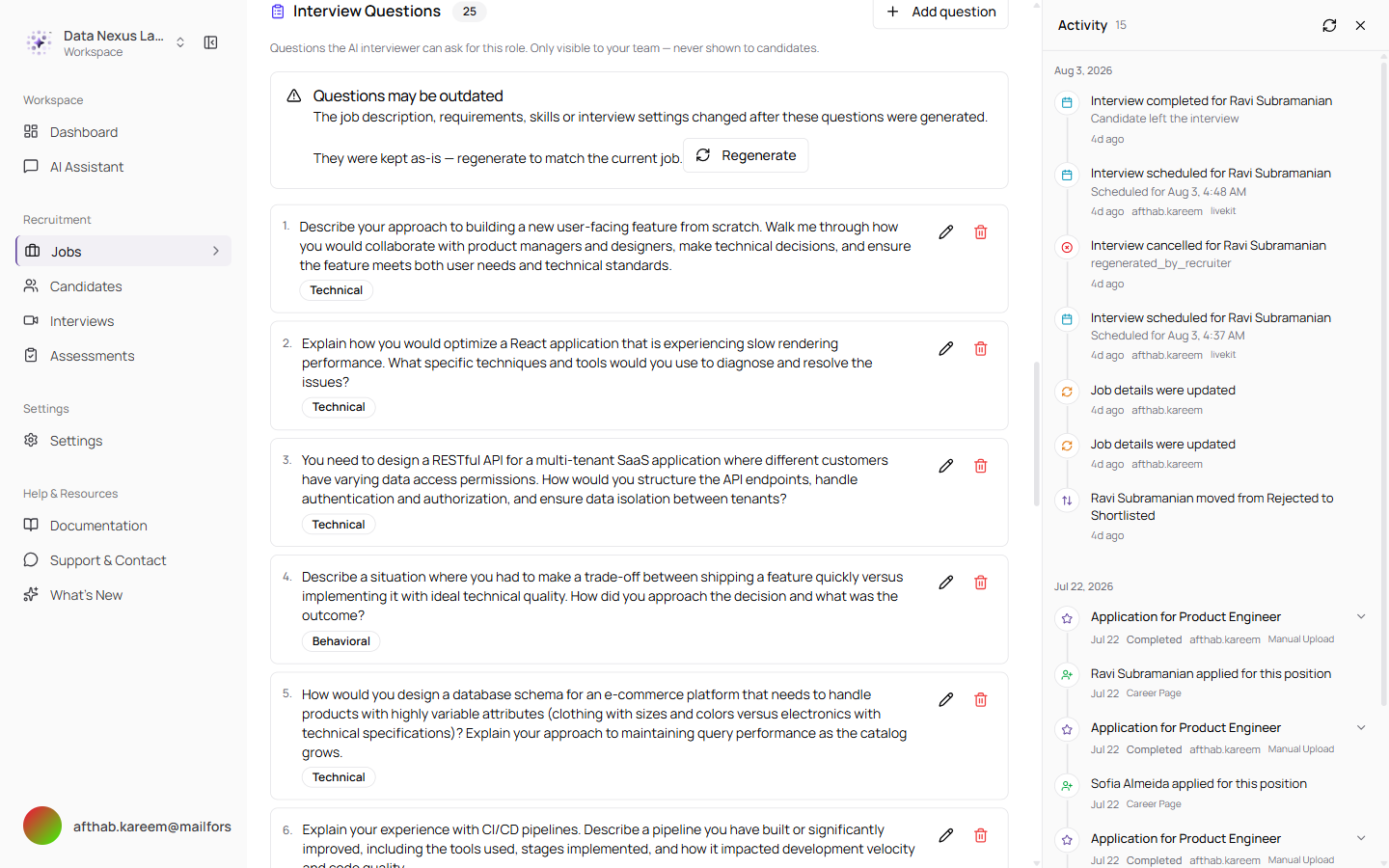
The existing questions are kept exactly as they were — nothing is deleted — with a one-click option to regenerate them against the current job
A job set for AI interviews with no questions at all gets a similar warning, so an automated interview is never scheduled against an empty question set without you knowing.
Switch Language from Anywhere
English and Arabic, from the account menu, on every page
The login page has always had a language choice. The app itself did not — so anyone who picked Arabic before signing in had no way back to English.
The switcher now sits in your account menu at the bottom of the sidebar, on every signed-in page, on desktop and mobile.
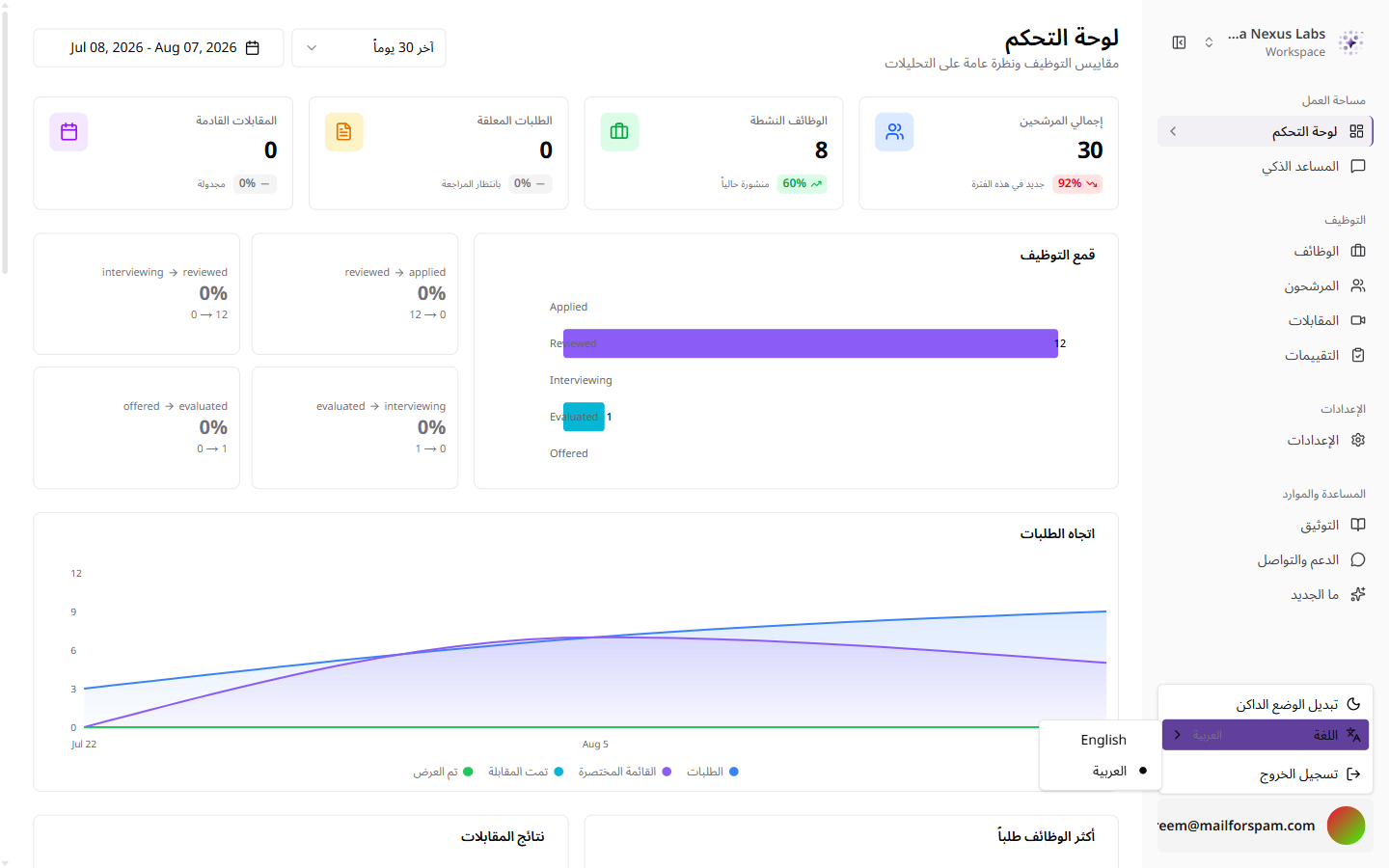
The account menu with the language submenu open, alongside the dark mode toggle
Switching keeps you exactly where you are, including any filters you had applied — a filtered interview list stays filtered. And your choice is now remembered for a year, rather than being forgotten the moment you close the browser.
Job pages have also been translated properly. Job type, seniority, work mode, publication status, applicant statuses and the Fraud Shield labels all appear in Arabic instead of falling back to English.
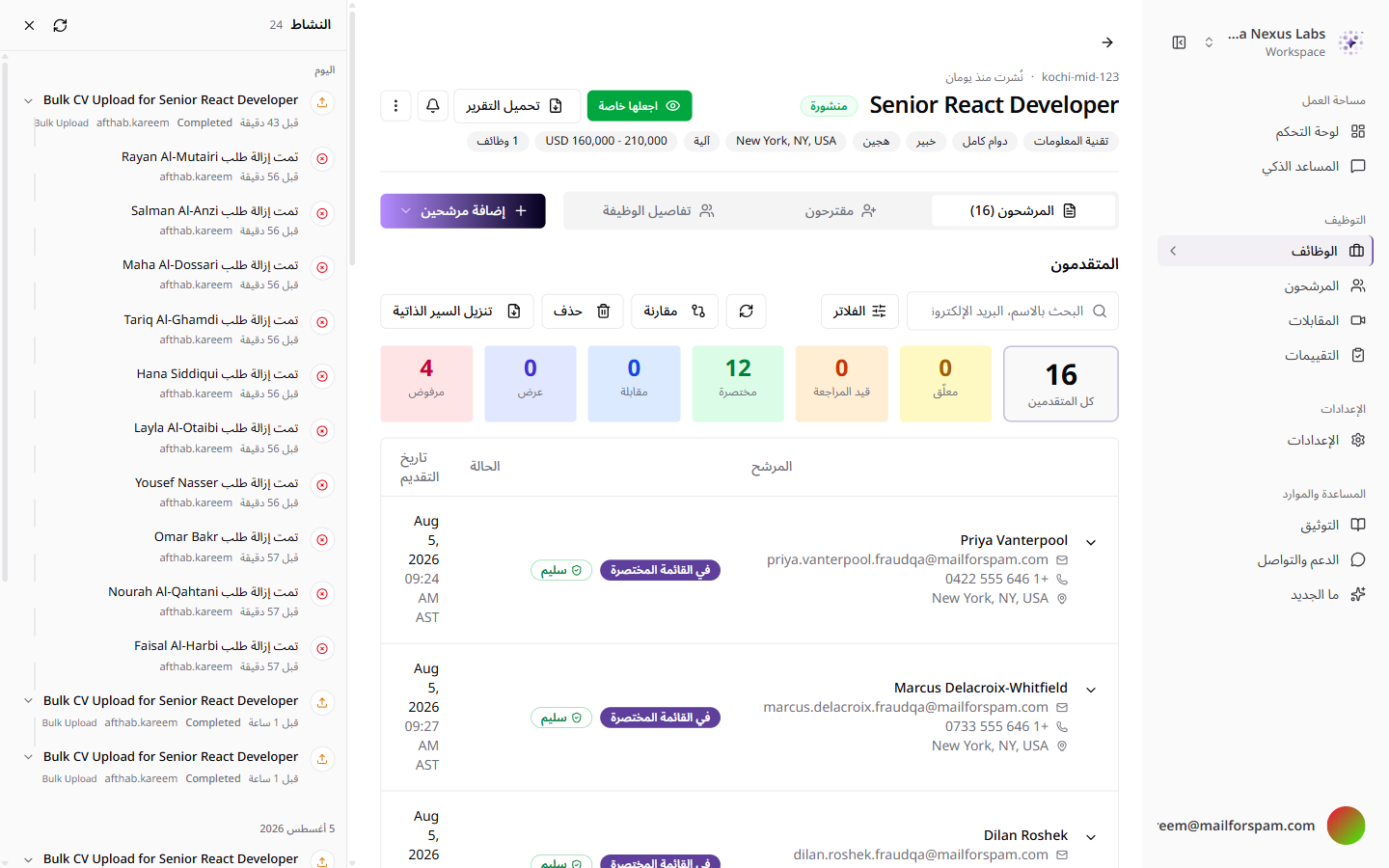
The same job page in Arabic — right-to-left, with every label, status and risk badge translated
A New AI Model
DeepSeek V4 Flash — Taqat's own model, hosted privately
The self-hosted model behind the platform has been replaced with DeepSeek V4 Flash. It appears at the top of the model list wherever a model can be chosen — in the assistant and in each of the five AI areas in Settings — so you can pick it for the work where it helps most and use something faster elsewhere.
In chat it shows its working: how long it thought, what it looked up, and what it found, before giving the answer.
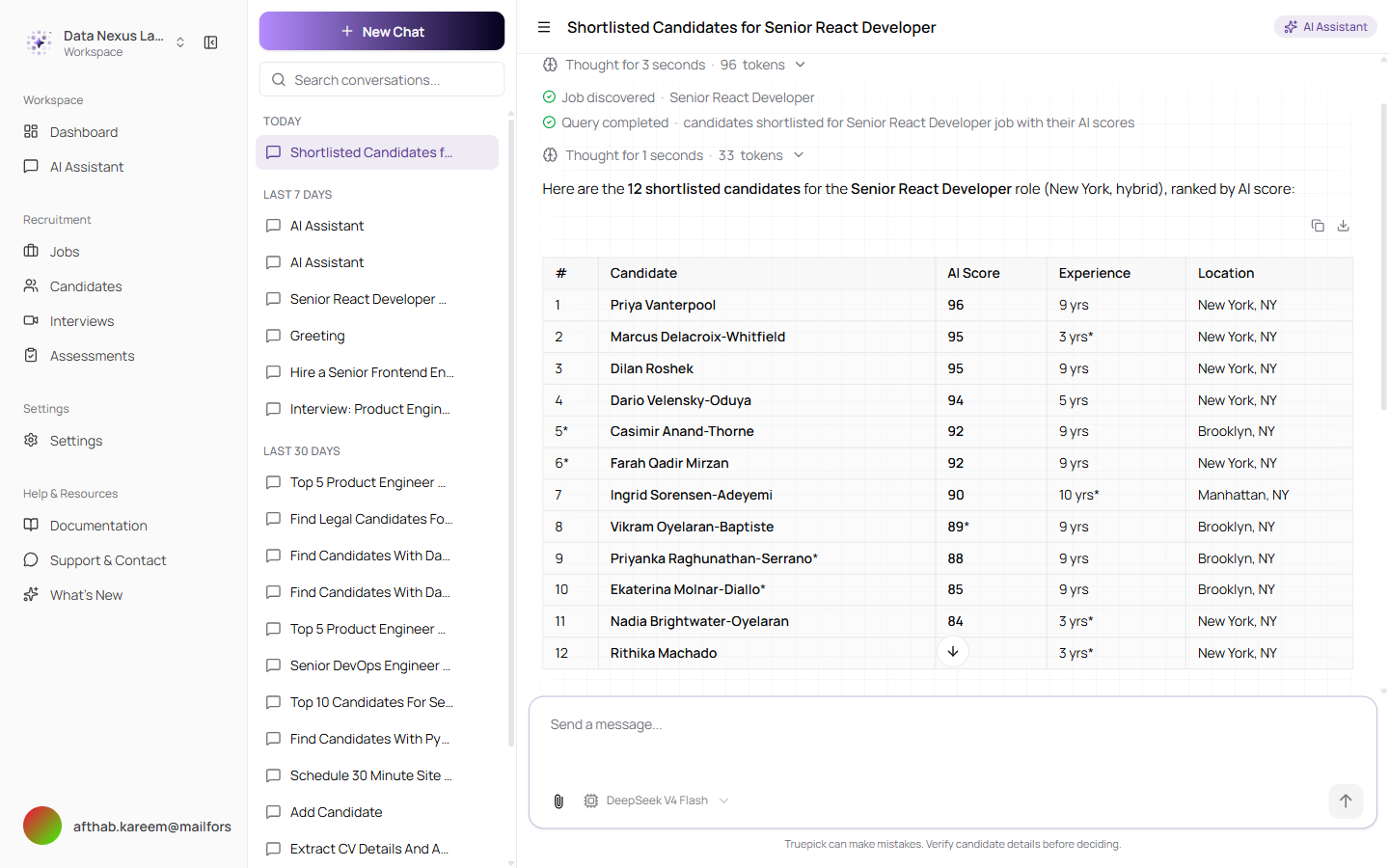
A shortlist request answered end to end — the reasoning steps, the job it identified, the data it looked up, and the finished ranking
Two changes sit behind this. The model's reasoning is now used only in chat, where you can actually see it, so scoring runs no longer pay for reasoning that gets thrown away — and a candidate scored twice against the same job now reliably gets the same score. The assistant's default model was also changed to one that understands images, so attaching a picture to a message no longer breaks the conversation.
AI Video Interviews
The AI video interviewer is back and runs smoothly
The AI-led video interview — where a candidate is interviewed by an on-screen AI avatar rather than filling in text answers — is fully working again.
The real-time video behind it now runs on LiveKit Cloud, and the Tavus video avatar has been reconnected. The practical result: the AI interviewer appears and starts speaking within a few seconds of a candidate joining, and the conversation runs without the connection drops that affected it before.
Nothing changes in how you set up an interview — questions, languages and interview settings all work exactly as they did. Candidates simply get a reliable face-to-face experience with the AI interviewer.
Released on August 07, 2026
View all releases