Release Notes - v1.0.6
Summary
This release gives you more say over two things: what the AI looks for in a candidate, and when an email is sent to one.
The Hiring Brief is the main addition. Every role has requirements that never make it into the job description — the industry experience that is genuinely non-negotiable, the tool the team actually uses, the language a candidate needs. There was nowhere to write these down, so the AI judged candidates against a description that did not say what you meant. Each job can now carry a short brief that only your team can see. The AI reads it when it reviews a CV, when it writes assessment and interview questions, and when it scores an interview.
Closing a job now closes it. Until now, "Closed" was only a label. The buttons on the page still worked, so a colleague with the job already open could move a candidate forward in a role that had been filled a week earlier. Every action that would change a closed job is now switched off, and the page explains which job is closed and how to reopen it. Closing has also become a proper decision: at that moment you choose whether rejection emails are sent, and who receives them.
You decide when interview invitations go out. Shortlisting a candidate no longer emails them automatically. You send invitations yourself, from a single window where you pick exactly who gets one, and each invitation is recorded in that candidate's history. Sending to a large group is no longer invisible either — it appears in the activity feed as it runs, and you can cancel it partway through.
Four further changes are worth noting. The AI interviewer now speaks the language you chose for the job, and tells the candidate how long the interview will actually take. An interview's score is held back until the full analysis is finished, so you no longer see a number that changes shortly afterwards. Offer letters have a new design, and you can rewrite the wording and preview both the letter and the email before sending. And when you reject a candidate, you are asked for a reason, which is kept with the application.
What's New
- Hiring Brief — a short set of instructions on each job, used when the AI reviews CVs, writes assessment and interview questions, and scores interviews. Candidates never see it.
- Closed jobs are locked — actions that would change a closed job are switched off, with a clear notice on the job and on each application
- A choice about rejection emails when you close a job — rejected candidates only, everyone who was never made an offer, or nobody at all
- You decide when interview invitations go out — nothing is sent just because you shortlisted someone
- One invitation window — the same button from the candidate's row or the application page, with the list of recipients and the deadline shown before you send
- Invite from the application page — you can send the invitation from where you are reading the application, not only from the job
- See a large invitation send as it happens — its own row in the activity feed, with Cancel
- An interview language for each job — English or Arabic, changed on the job page in a click
- The AI interviewer says how long the interview really is — "about 45 minutes" when you set 45, instead of a fixed "15 to 20 minutes"
- AI and Online interviews have their own tabs — with counts, and a type shown on every row
- The interview score waits for the full analysis — it appears once, complete, rather than early and then changing
- A clearer question-by-question assessment result — the question, what it was worth, the candidate's answer, and every choice marked right or chosen
- A reason when you reject someone — a short list to pick from, plus a notes box, kept with the application
- Bulk-uploaded candidates are labelled — so you can tell them apart from candidates you added yourself
- Offer letters you can edit — rewrite the letter and the email, preview both, send, and read back exactly what was sent
- Each conversation keeps its own AI model
Improvements
- Closed jobs appear in the assessment picker but cannot be chosen, and the reason is written underneath
- The assessment picker only offers candidates who are actually at the assessment stage
- You can no longer create an assessment assignment with nobody in it
- Candidates brought in from the Suggested tab now show the AI's recommendation instead of a blank
- The Fraud Shield panel has been taken off the candidate page — it belongs to an application, and it is still on the application
- A rejection window left open while you move around now comes back to the right candidate
- Times on the page candidates use to track their application follow your company's timezone, and say which one they are in
- Sending invitations to a large group now reports progress more often, and stops sooner when you cancel
The Hiring Brief
Tell the AI what you actually want
Every role has requirements that do not end up in the job description. Banking experience specifically, not any finance company. The current version of a tool, not the one from five years ago. A candidate who can already work in the country, because you are not sponsoring a move. Recruiters know these things, but the job description is written for candidates, so it states them more loosely or not at all — and that was the only version the AI could see.
Jobs now carry a Hiring Brief: a short set of notes, in your own words, that only your team can see.
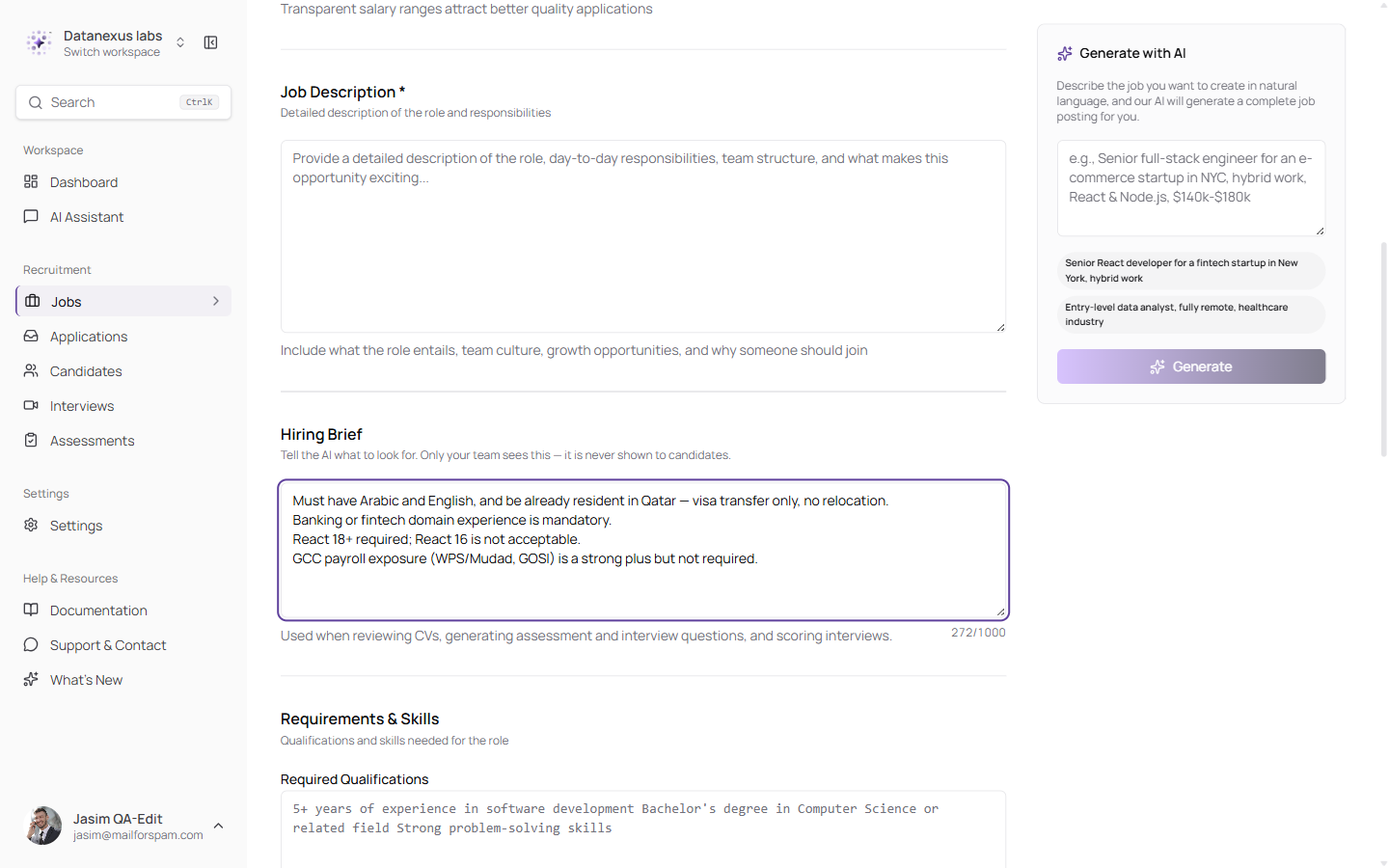
The brief sits under the job description, with a character count and a plain note about where it is used — and that candidates never see it
The AI reads the brief in four places: when it reviews a CV, when it writes assessment questions, when it writes interview questions, and when it scores an interview. So a few lines change what gets looked for, what gets asked, and how the answers are judged — instead of having to be repeated in four different settings screens.
How the brief is interpreted matters as much as the fact that it is read. Anything you state as required is treated as required. Anything you describe as preferred or a bonus is treated as optional, and a candidate who does not have it is not marked down. If the brief is empty, contradicts itself, or has nothing to do with the role, the AI falls back to the job description alone.
Because the brief affects how candidates are scored, two protections are built around it:
- The AI treats the brief as information, never as orders. Text pasted into the brief cannot redirect the AI, change how it scores, or change the way it reports back — however it is worded, and even if it claims to come from us.
- Unlawful criteria are ignored. Anything based on age, gender, race, religion, nationality, marital or family status, disability or pregnancy is disregarded, and the candidate is scored as though it had not been written. A language the job genuinely requires is a normal skill requirement and is not affected. This is a safeguard rather than a guarantee, and it does not replace the responsibility not to write such a criterion in the first place.
Closing a Job Actually Closes It
Every action that would change something is switched off
"Closed" used to be a label and nothing more. The job showed a Closed badge, but everything else carried on working: the candidate row kept its full menu, the invite button still sent emails, statuses still changed, and assessments could still be handed out. A colleague with the page already open saw nothing to stop them moving a candidate forward in a role that had been filled a week earlier.
Now every action that would change a closed job is switched off — and it stays switched off even on a page that has been sitting open for hours.
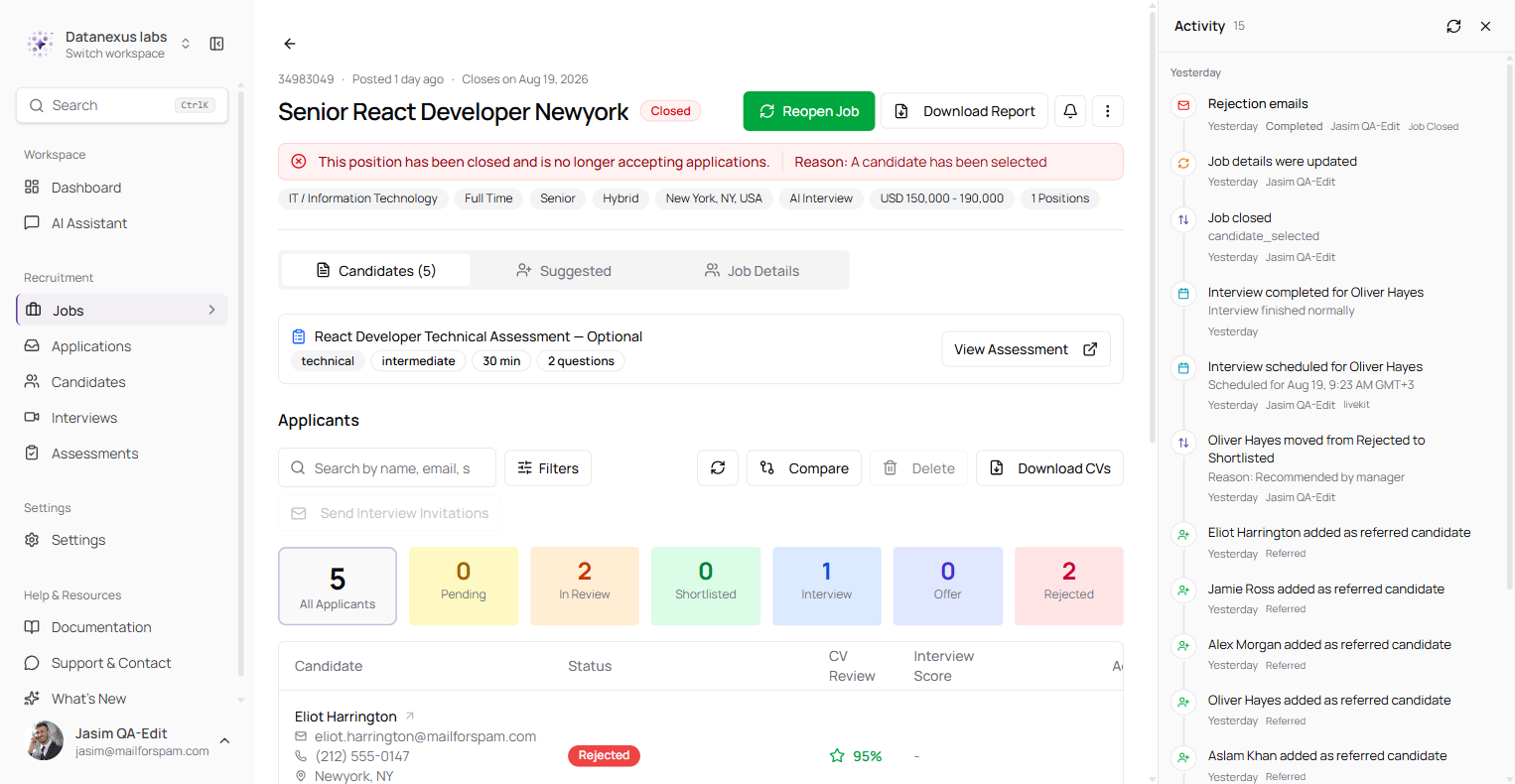
The notice names the reason the job was closed. Send Interview Invitations and Delete are greyed out, every candidate row explains itself when you hover it, and Reopen Job is the one thing still on offer
The same lock reaches the application page, where most of the day's work actually happens.
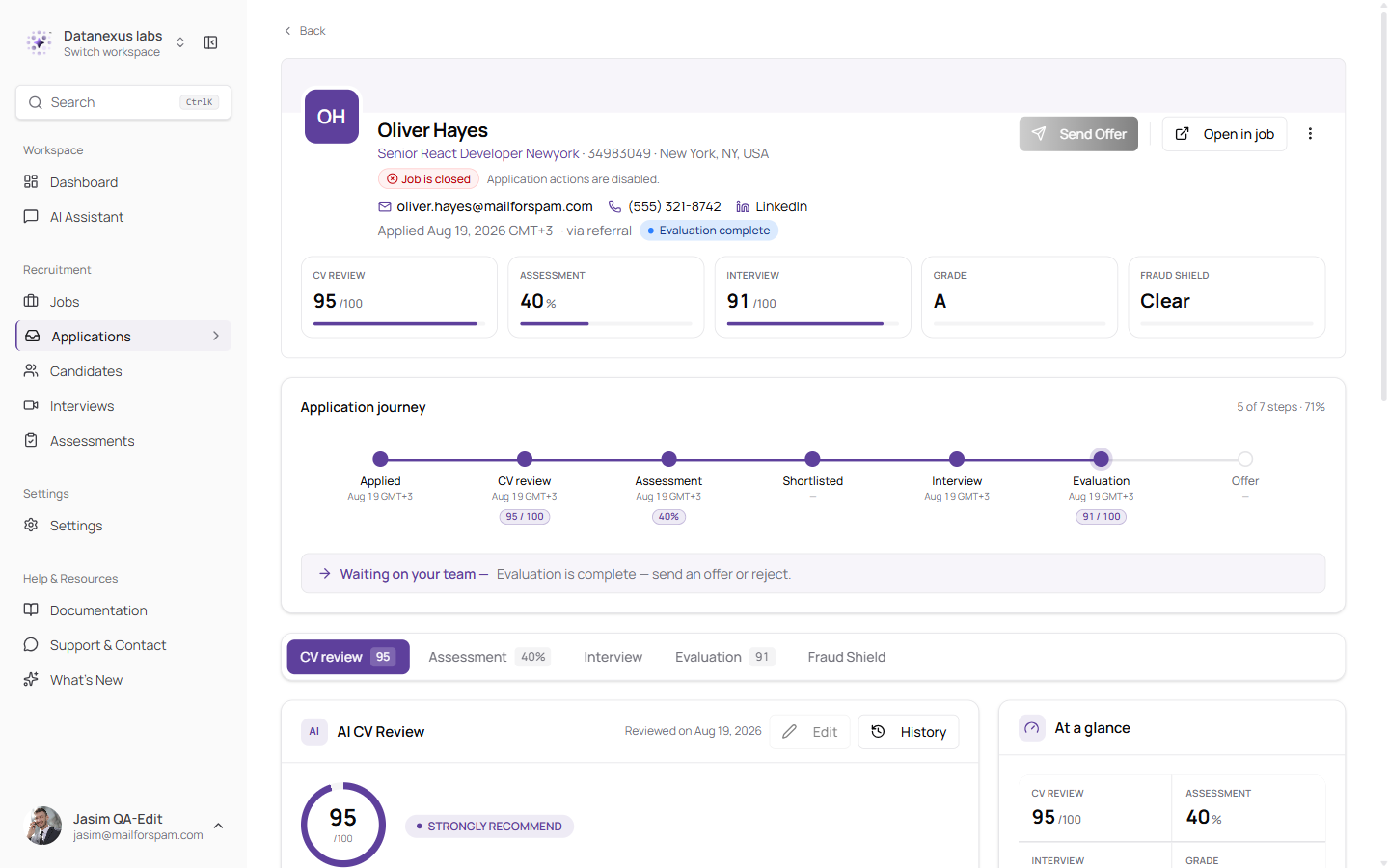
"Job is closed — Application actions are disabled." The scores, the progress and the history stay fully readable; only the buttons that would change something are taken away
The wording has been rewritten to be self-explanatory. Each notice states which job is closed, that actions are switched off, and that reopening the job restores them. Previously there was only a badge, so the only way to find out why an action did nothing was to try it.
Reading a closed job is completely unaffected. The CV review, the assessment results, the interview record, the final score and the whole history are all still there.
Rejection Emails Are a Decision
Chosen when you close, with the consequences written out
Closing a job rejects everyone still in the running. That was already true. What was missing was any say in what those candidates were told — and for a lot of teams, closing the job is the only moment a rejection email is ever sent at all.
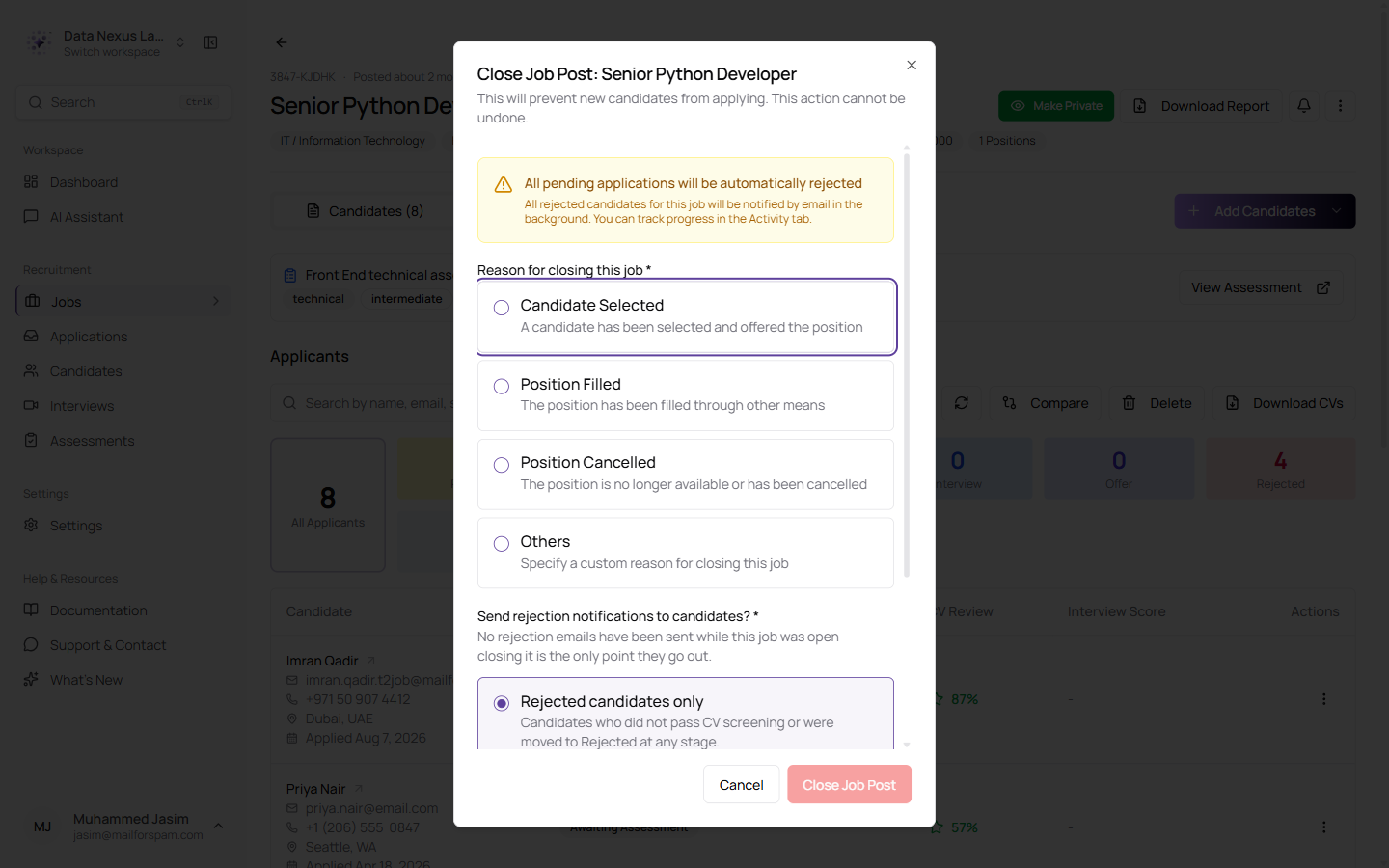
A reason for closing, then a clear choice about who hears about it — with what each option means written underneath
The window now says plainly that no rejection emails have gone out while the job was open, so closing it is the moment they do. You have three choices:
| Option | Who gets an email |
|---|---|
| Rejected candidates only | Anyone who did not pass the CV review, or who was moved to Rejected at any point |
| All non-offered candidates | Those, plus anyone who finished an interview and was never made an offer. These candidates are also marked as rejected |
| Don't send | Nobody. The job simply closes |
The emails are sent in the background, and the job's activity feed records the send as its own entry, so you can confirm that it ran and see how it finished.
Interview Invitations Are Yours to Send
Nothing goes out just because you shortlisted someone
Shortlisting a candidate used to email them an interview invitation straight away. That is a reasonable thing to do right up until it isn't — a shortlist you are still putting together, a candidate you shortlisted to compare against someone else, a role whose interview questions are not written yet. The email had already gone, and the candidate's clock had already started.
Invitations are now something you choose to do. Shortlisting shortlists. Nothing is sent.
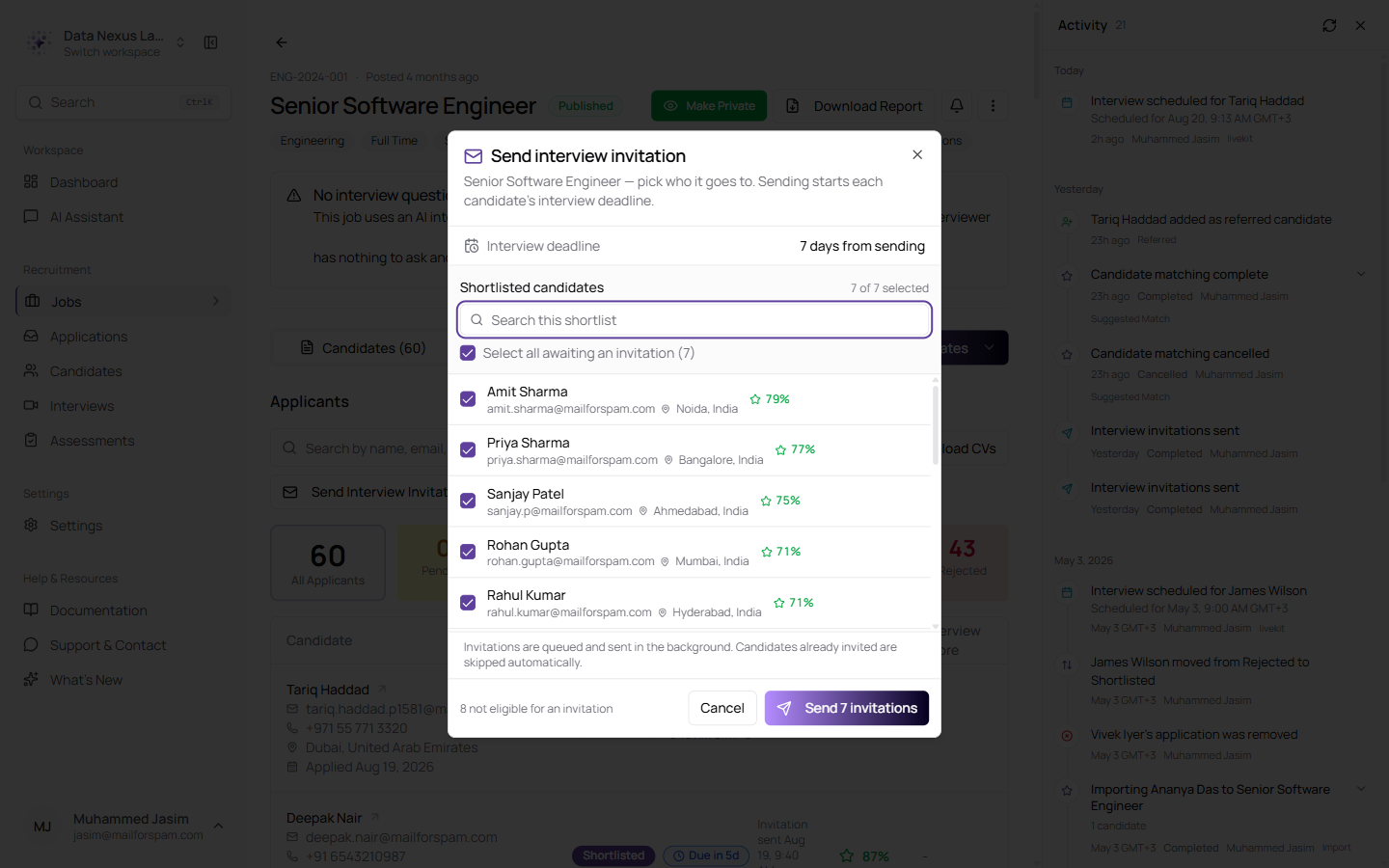
The window is the shortlist: everyone eligible, with their scores, the deadline stated before you send, candidates who have already been invited marked as such, and a count of anyone who is not eligible
One window now covers both ways in. Opening it from a candidate's row ticks that candidate. Opening it from the toolbar ticks everyone eligible. Either way you change the list inside the window, so you can think again about who is included without closing anything and starting over.
The same button also adapts to the kind of interview the job uses. A job that runs AI interviews opens the invitation window, and a job your own team interviews for opens the scheduling window, so there is one control to learn instead of two similar ones.
Because you cannot take an invitation back once it lands — the candidate's countdown starts immediately — the deadline and the number of recipients are shown before you send rather than discovered afterwards. If someone becomes ineligible while you have the window open, because a colleague invited them from another screen, they drop out of the count rather than being promised and then refused.
Every invitation is recorded. The candidate's history shows that an invitation was sent and when, so there is no guessing later about whether they were ever contacted.
The invitation is also offered from the application page itself, which is usually where you are when you decide.
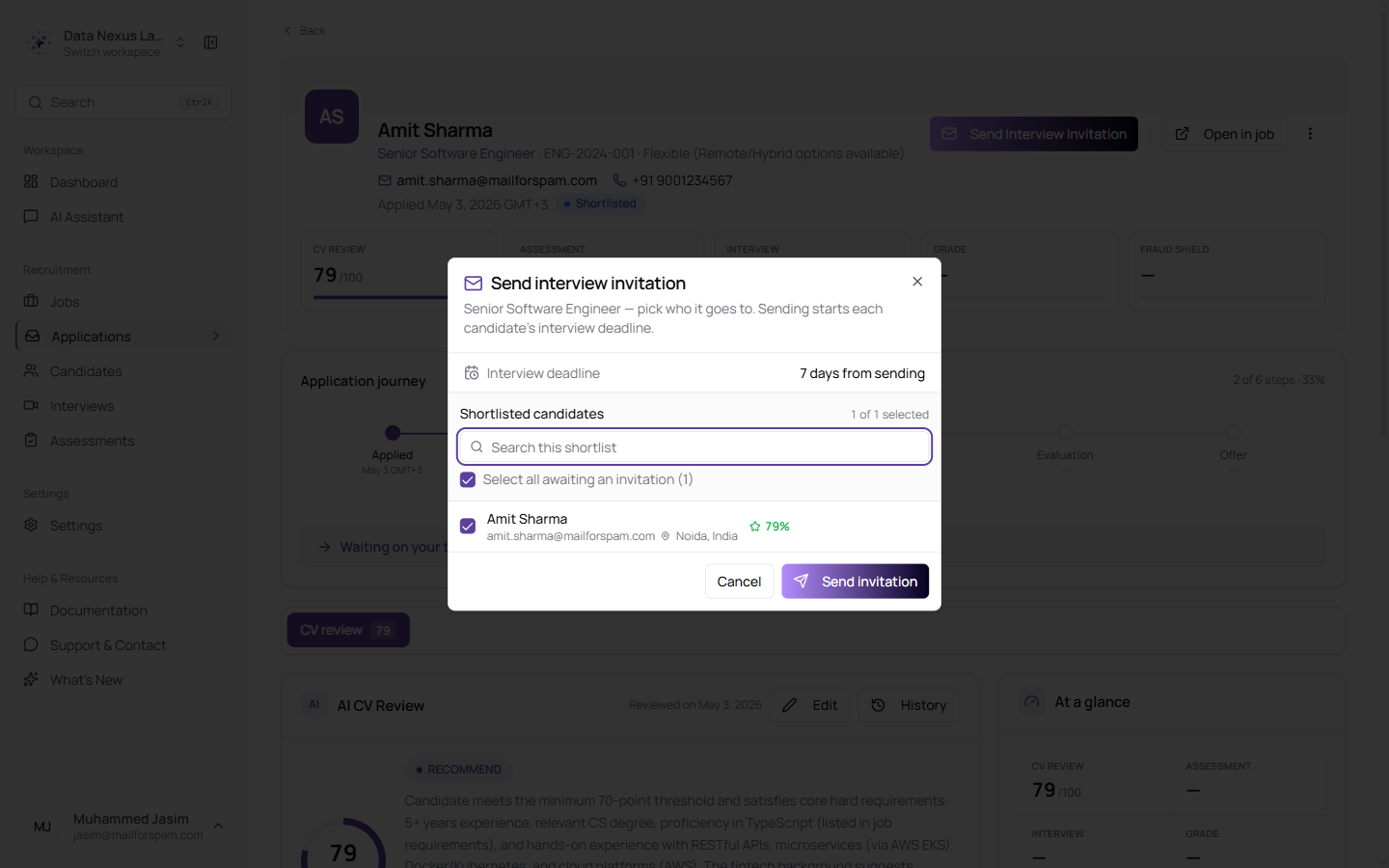
Send Interview Invitation sits at the top of the application, and opens the same window you get from the job — the deadline stated, and the candidate already ticked
Sending to a large group is no longer invisible. Inviting two hundred candidates used to disappear the moment you pressed the button: nowhere to watch it, no way to stop it, no record of what went out. It now appears in the activity feed as its own entry, moving along as it goes, with a Cancel that stops the send and marks it cancelled. It also works through the list in smaller batches than before, so progress moves visibly and cancelling takes effect sooner.
AI Interviews, on Your Terms
The right language, and an honest answer about how long this will take
Two things the AI interviewer was getting wrong, both because the job's own settings never reached it.
Language. A job can now be set to run its AI interview in English or Arabic. You change it on the job page itself rather than opening the full edit form, because this is the interview setting people change most often.
Changing the language does not throw away your interview questions. It flags them as possibly out of date, in exactly the same way editing the job description does, and leaves rewriting them as your decision.
Length. Every interview opened with "about 15 to 20 minutes" no matter what you had set, because the length never reached the interviewer — and automatically created interviews were being stamped with a fixed 30 minutes regardless. Both are fixed. The interviewer is told the real length and says it, in English or Arabic. If for any reason it does not know, it goes back to the old vague range rather than inventing a number.
The interviews list now separates the two kinds of interview.
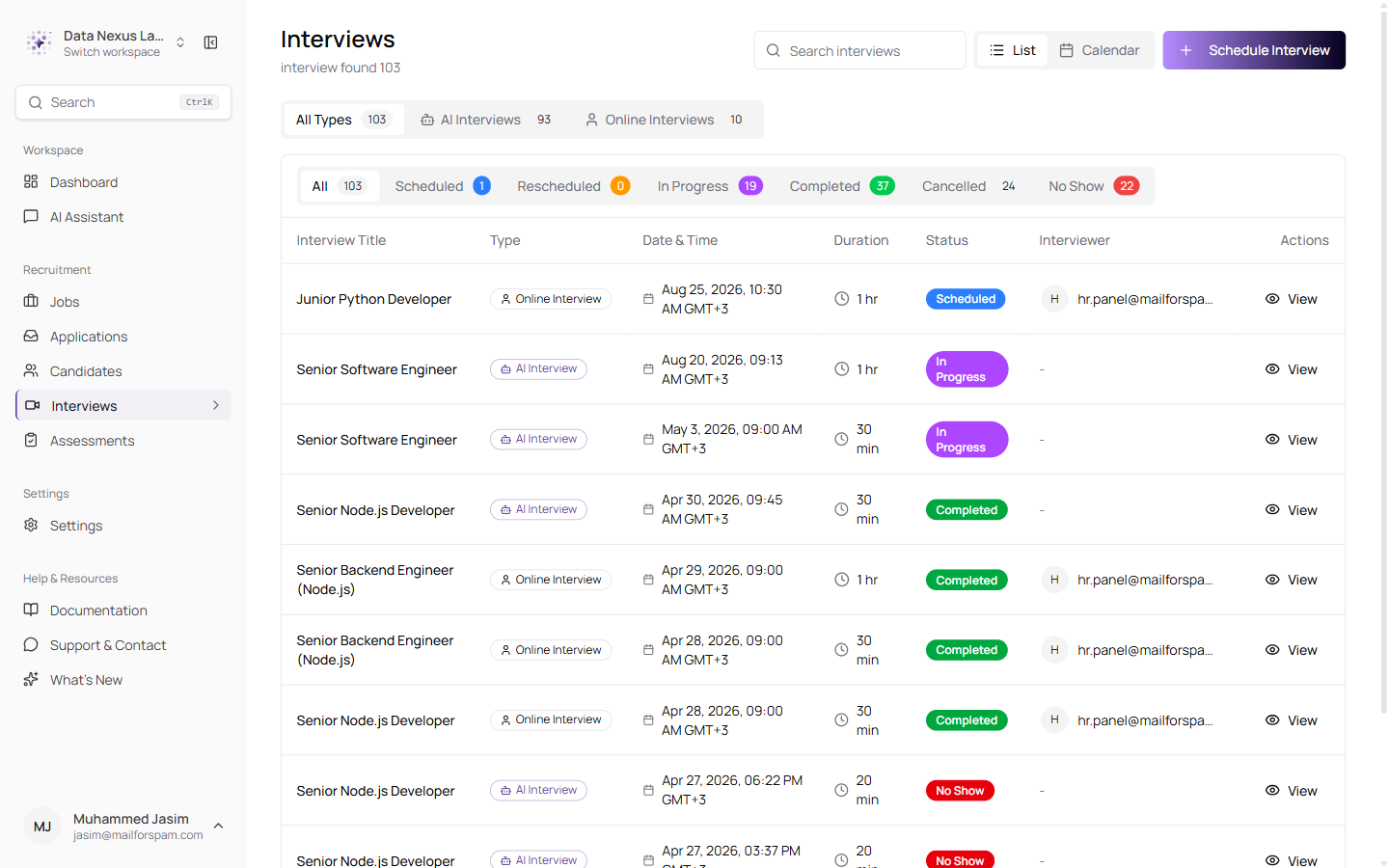
All Types, AI Interviews and Online Interviews with live counts, a Type column, and a badge on every row — the status tabs underneath still work within whichever type you are looking at
A Score That Waits for the Whole Picture
One number, once — instead of one that changes while you read it
An AI interview is scored from what the candidate said and, when there is video, from how they came across. The score used to appear as soon as the first part was done, while the second was still running. That meant recruiters read an incomplete number, which then changed without warning.
Worse, the second half was often never counted at all — the video analysis finished, saved its findings, and nothing ever went back to work the score out again.
Both problems are fixed. The score is now held back until the whole analysis is included in it, and while you wait the page explains what is happening rather than showing a number that is about to change:
- "Analysis in progress" while the interview is being scored
- "Analysis in progress — reviewing the interview video", explaining that the final score includes the video and will appear once that finishes, usually a few minutes
- "Results are taking longer than expected" if it stalls — the page stops checking and asks you to refresh, instead of loading indefinitely
A score left over from an earlier attempt can no longer show up against a newer interview.
Assessments
A result you can read, and pickers that only offer what makes sense
The question-by-question view of a finished assessment has been rebuilt.
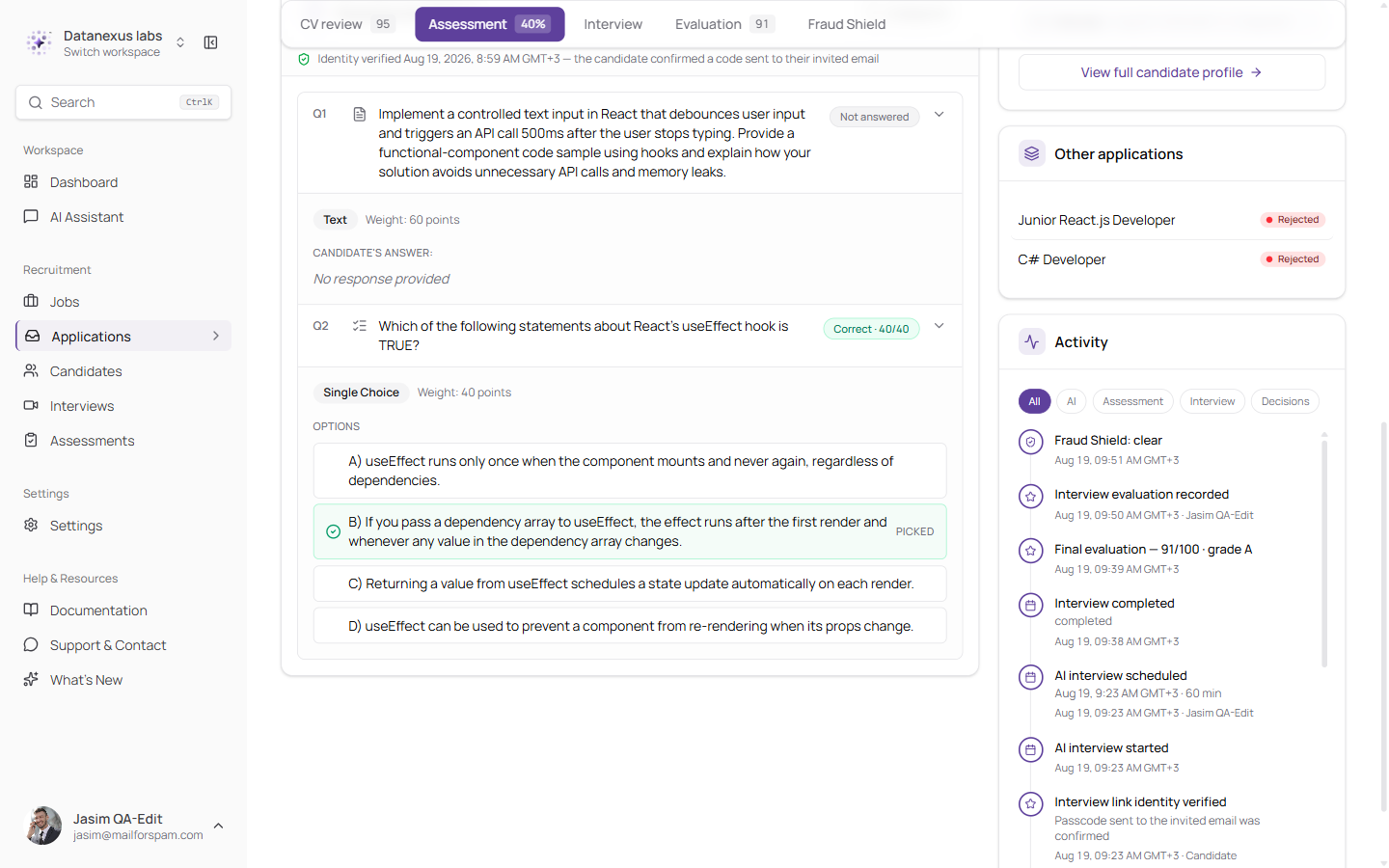
Each question shows what type it was and what it was worth, the candidate's answer in full, and — for multiple choice — every option, with the right one marked and the candidate's pick called out. Expand All opens them all at once
Questions the candidate skipped now say Not answered and "No response provided", instead of an empty space you have to interpret. The line confirming the candidate proved who they were sits above the results, so you can see the attempt was made by the person you invited.
Handing out an assessment got stricter about what it lets you do.
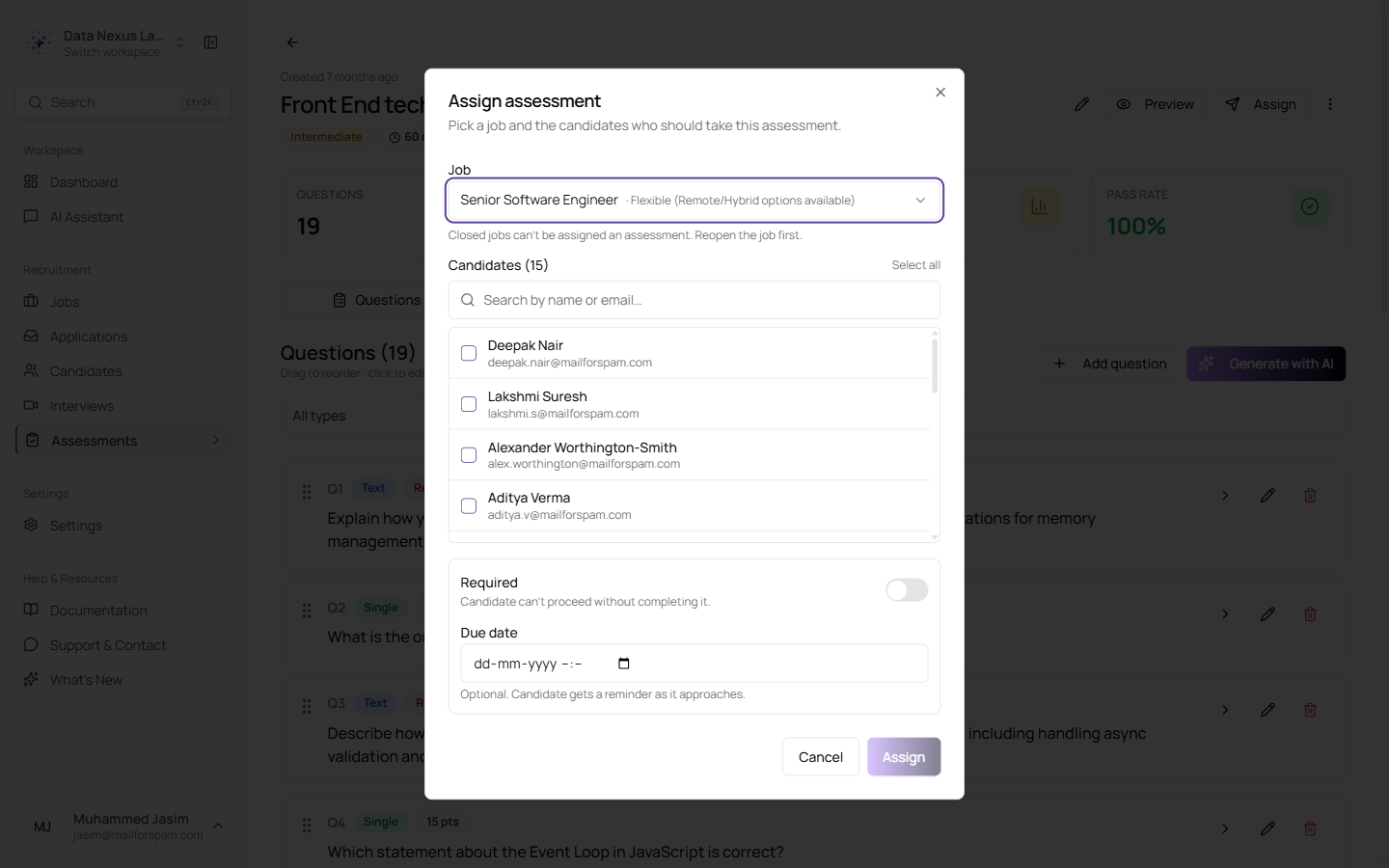
Pick a job, then the candidates — with Assign staying greyed out until you have both
- You cannot create an empty assignment. Assign stays switched off until you have selected both a job and at least one candidate, instead of creating an assignment with nobody in it.
- Only candidates at the assessment stage are listed — shortlisted and awaiting assessment — rather than everyone who ever applied for the job.
- Closed jobs cannot be chosen. They are still listed, marked Closed and greyed out, with a line underneath explaining that a closed job cannot be given an assessment and that reopening it is the fix. They are shown rather than hidden on purpose: a job missing from the list looks like a fault, whereas a job you can see, greyed out, tells you why it is unavailable.
Offer Letters Worth Sending
A proper design, and words you can change before it goes
The offer letter has been rebuilt on a proper, professional design — and, more usefully, the words in it are now yours.
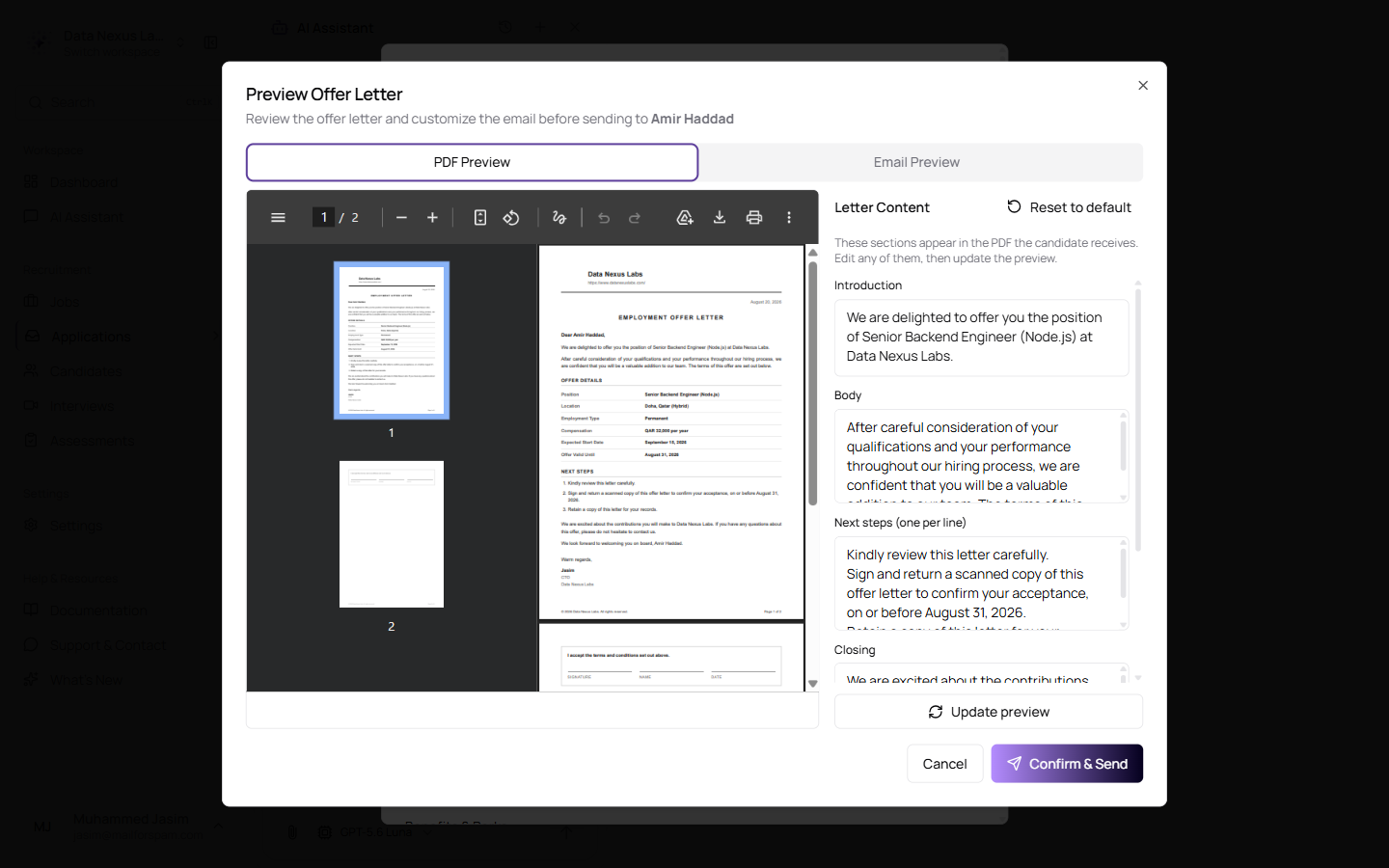
The finished letter on the left, the wording you can change on the right — with Reset to default above it and Update preview beneath. Nothing is sent until Confirm & Send
Five parts of the letter can be rewritten: the opening line under "Dear …", the paragraph before the offer details, the next steps for accepting, the closing paragraph, and the sign-off. The email that carries the letter is editable too — its subject, greeting and message. Everything comes pre-written around the actual offer, so a letter you do not touch still reads properly, and any part can be put back to the original wording in a click.
What you cannot change is the offer itself. The salary, the dates and the employment type come straight from the record, so the letter can never say something different from what your system says was offered.
The preview shows you both things the candidate will get: the letter as a document, and the email exactly as it will arrive, attachment and all. If you make an edit, the preview tells you it is out of date until you refresh it, rather than quietly showing you something you are no longer about to send.
What you sent is kept. Your edited letter and email are stored with the offer, so months later you can read back exactly what the candidate received. For a document of this kind, that record matters.
Rejections Now Carry a Reason
Why, recorded at the moment you decide
Moving a candidate to Rejected or Shortlisted used to record only that it happened. Three weeks later the application said "Rejected" and nothing else, and the AI that had recommended them learned nothing from it.
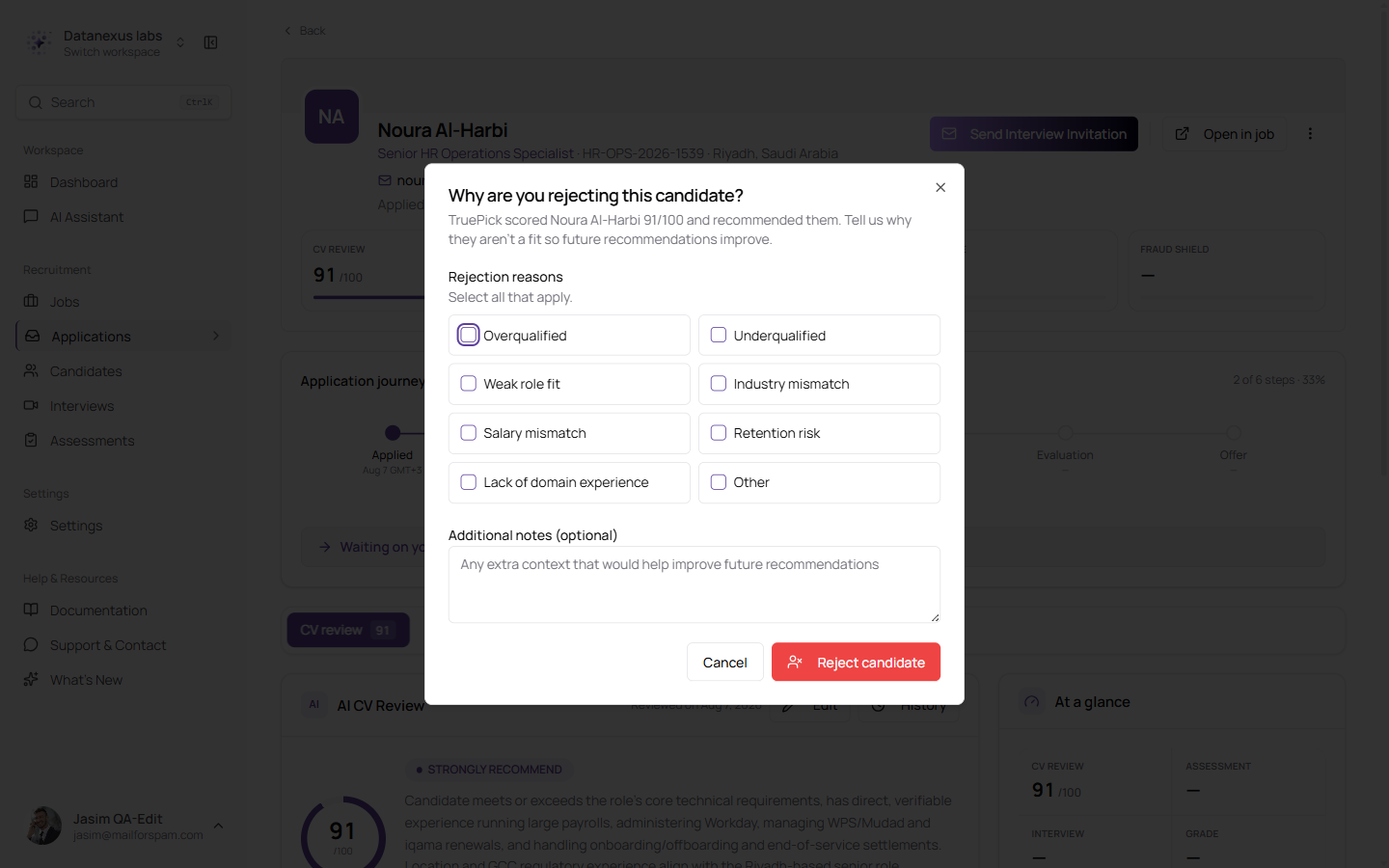
Rejecting a candidate the AI recommended asks why — a short list to pick from, plus a notes box for anything the list does not cover
The window names the score the candidate was given and says plainly what your answer is for: so the recommendations get better. You can tick more than one reason — overqualified, underqualified, weak role fit, industry mismatch, salary mismatch, retention risk, lack of industry experience, or other — and add a note.
The reason then travels with the application. It shows up in the job's activity feed and in the candidate's own history next to the status change, so what a colleague reads later is "Moved to Shortlisted — Reason: Recommended by manager", rather than a move nobody can explain.
A related annoyance is fixed: if you leave the rejection window open and move around the app, it comes back to the candidate it belongs to instead of acting on whoever happens to be on screen.
Candidates and Applications
Where a candidate came from, and what the AI made of them
Candidates brought in through a bulk CV upload are now labelled.
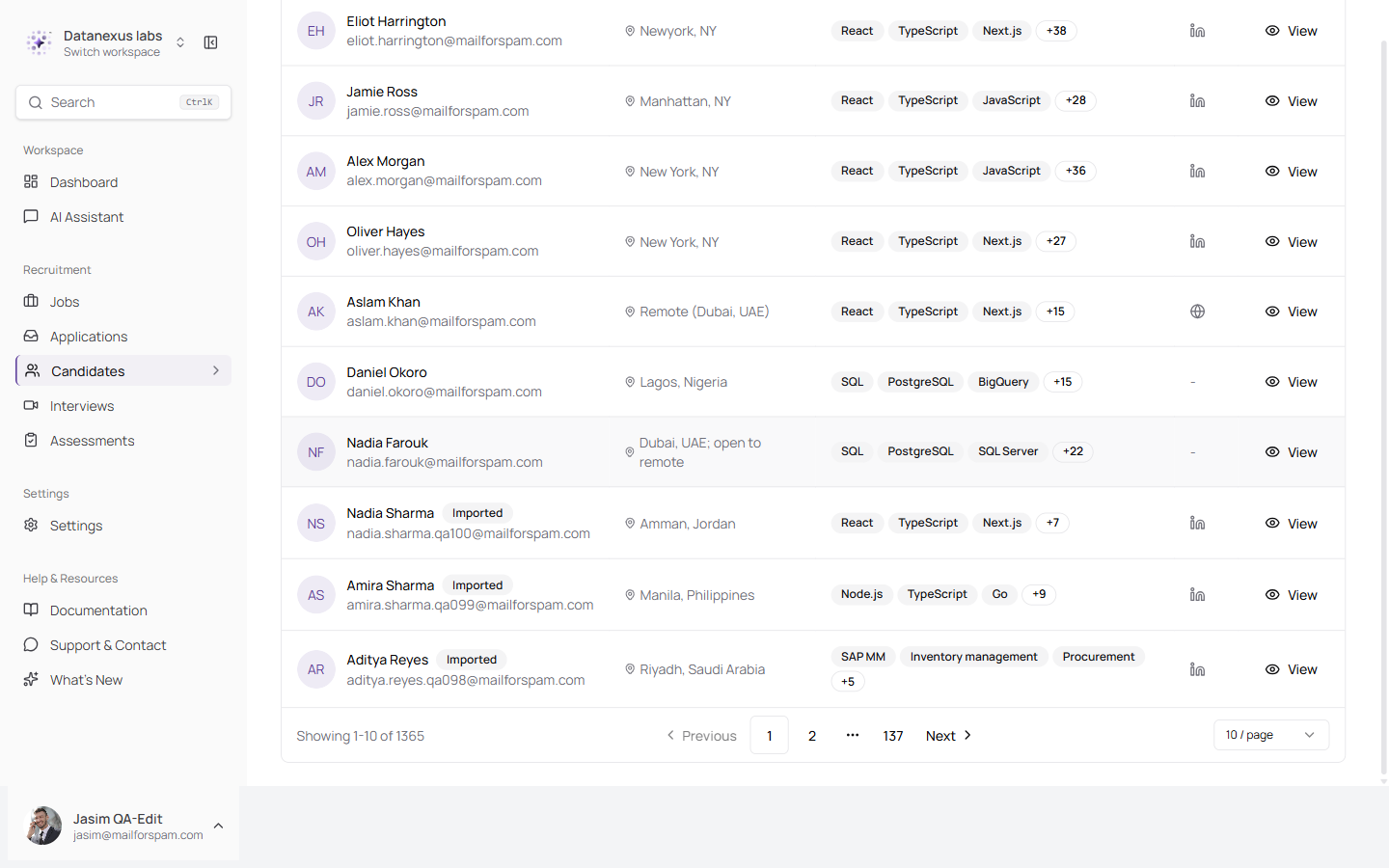
An Imported label sits next to the name of every candidate who arrived through a bulk upload. Candidates you added yourself, or who applied, carry nothing
The distinction is worth making. A candidate who applied chose your role. A candidate taken from a batch of uploaded CVs did not, and their details are only as accurate as the file they came from. The label shows you which is which at a glance, instead of having to open each record to find out.
Two smaller fixes sit alongside it:
- Candidates brought in from the Suggested tab now show the AI's verdict. The review card was leaving a blank where the recommendation should be, because these candidates arrived by a slightly different route. They now read the same as everyone else.
- The Fraud Shield panel has been removed from the candidate page. A CV authenticity check applies to a single application — one CV, checked against one job — rather than to a person, so showing it on the candidate record made it read as a verdict about the candidate themselves. It remains on the application, where there is a specific job to check the CV against.
Each Conversation Keeps Its Own Model
Two chats, two models, neither overwriting the other
Choosing an AI model used to change it everywhere. A conversation you had deliberately started on a fast, cheap model would quietly switch to whatever you last picked somewhere else — and one you had started on a more capable model would quietly be downgraded.
Every conversation now keeps its own.
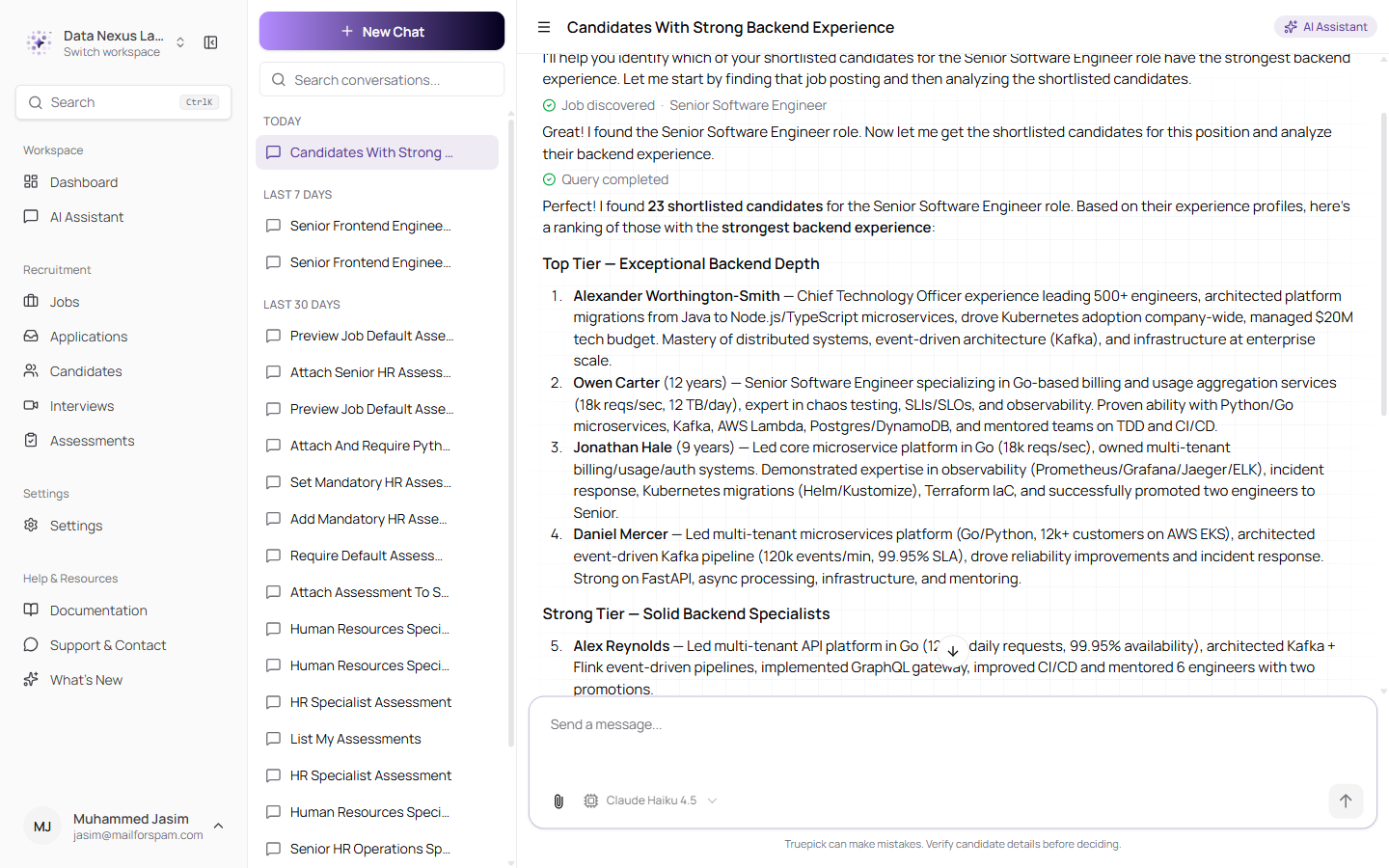
This conversation was started on Claude Haiku 4.5 and comes back on it, whatever any other conversation is using
You choose the model when you start a conversation, and it stays for that conversation's lifetime — the picker is switched off once there are messages, and tells you to start a new chat if you want a different one. That is deliberate. A conversation where half the answers came from one model and half from another is very hard to make sense of afterwards, especially since the earlier half is being read back as context.
Older conversations, started before this change, open on your usual model rather than refusing to open at all.
Improvements
- Candidate tracking times follow your company's timezone. The page a candidate lands on after applying was showing times in UTC while the rest of the app used your company's timezone, so a candidate and a recruiter looking at the same event saw different times. It now uses your company's timezone and says which one it is — and if none has been set, it says UTC plainly rather than showing a time that could mean anything.
- Updating a job's interview settings no longer loses someone else's edit. Changing the interview language from the job page now saves just that, so if a colleague is saving the full job form at the same time, neither change wipes out the other.
- Updates install more reliably. A couple of database updates could fail partway through and then refuse to run again. They can now be re-run safely, so an interrupted upgrade finishes cleanly instead of needing to be unpicked by hand.
- The old way of sending interview emails has been retired. Every invitation now goes through the newer path, which respects closed jobs, keeps a record of what was sent, and knows which candidates are eligible.
Released on August 20, 2026
View all releases