Summary
This release puts you in control of how a job treats candidates whose experience doesn't fit the role.
Every experience level now carries a years range: Entry 0–1, Junior 1–3, Mid 3–5, Senior 5–8, Lead 8–12 and Executive 12+. When a CV is reviewed, the candidate's total experience is checked against the job's range, with a year of room above it. Until now, a candidate outside that range had only one outcome: rejected, however well they scored.
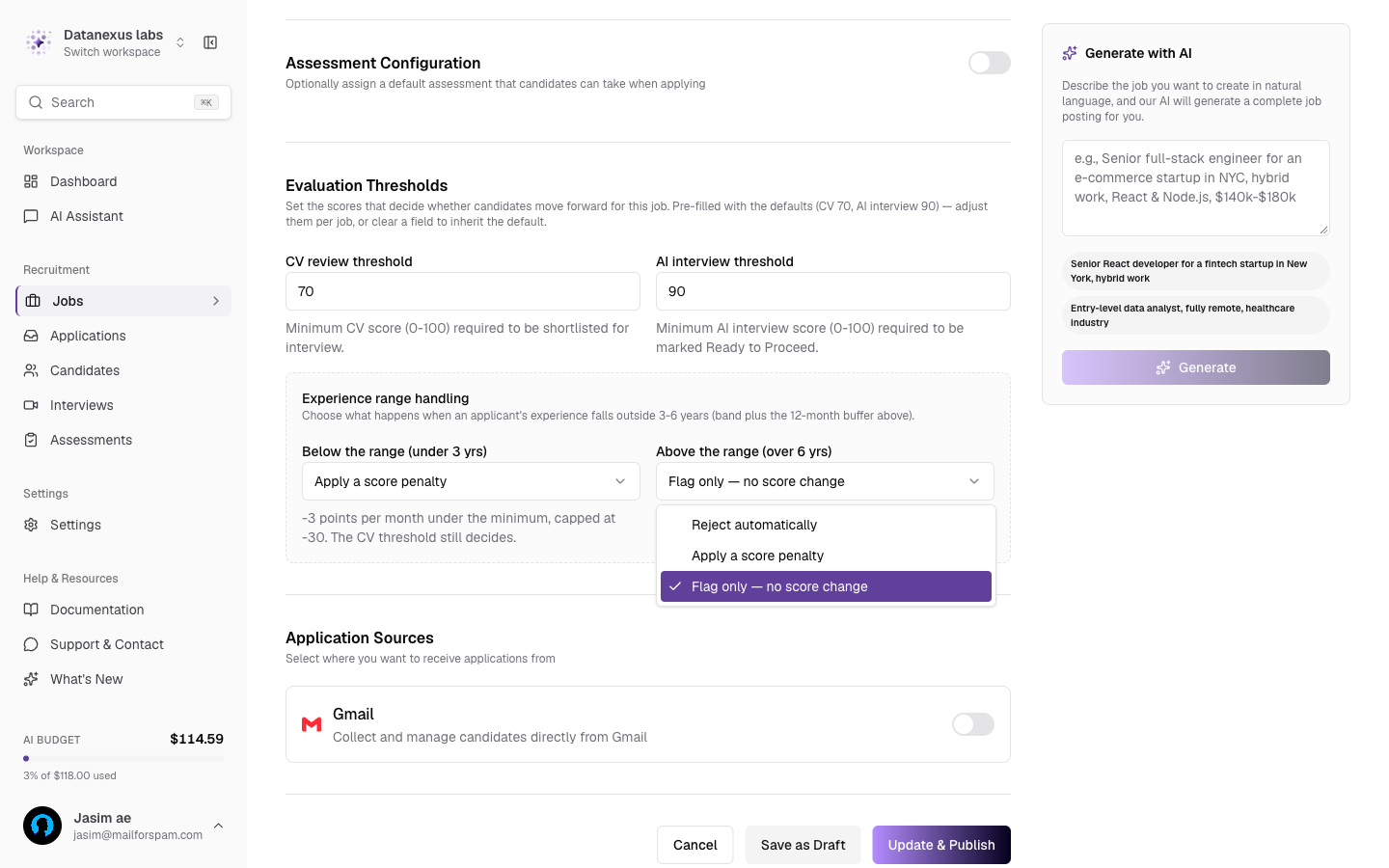
You now decide what happens, per job, in each direction. Below the range and above the range are set separately, and each can reject the candidate, apply a score penalty, or just flag them for you to judge. The applicant list shows a badge on every candidate the range affected, so you can always see why a score is what it is.
Nothing changes unless you change it. Every existing job keeps the strict behaviour it had: candidates outside the range are rejected. The new options apply only to jobs where you pick them.
What's New
Experience range handling: a per-job choice of Reject automatically, Apply a score penalty or Flag only for candidates below and above the role's experience range
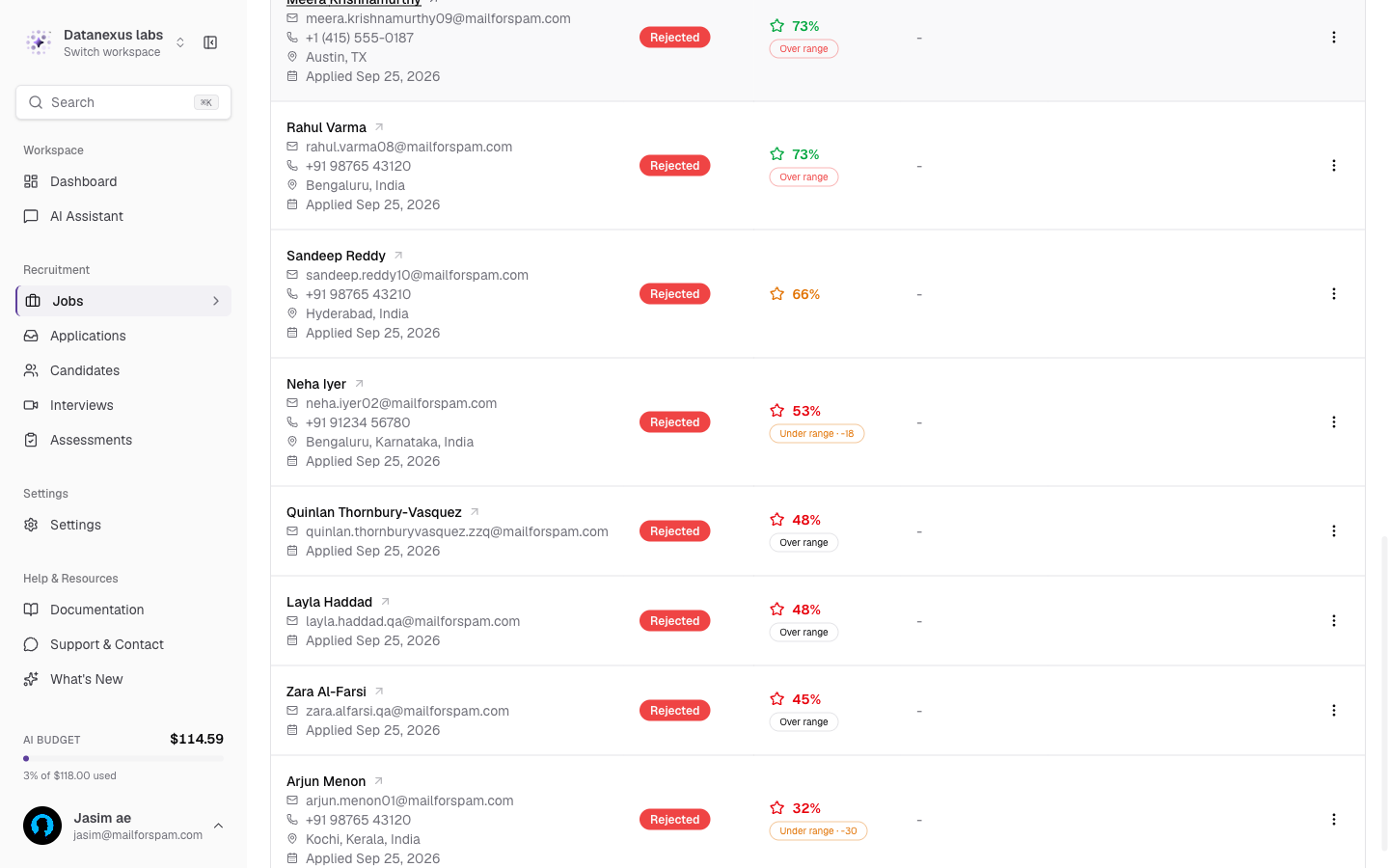
Range badges on the applicant list: Under range and Over range badges on every affected candidate, with the points deducted shown when a penalty was applied
Experience ranges on every level: each experience level shows its range in years, for example "Mid (3–5 years)", in the job form and on the job page
Range settings in the public API: jobs created or updated through the API can set and read the same policies
Improvements
Candidates whose CV lists jobs without dates are no longer treated as having no experience and rejected. Their experience is marked as unknown, and they are never rejected or penalised for it
Changing a job's experience level when it already has applicants now asks whether to rescan them, both in the job form and when you ask the AI assistant to update the job
The job's Activity panel no longer stays stuck at "0% Pending" after a Rescan Applicants run has finished
On a phone, the Activity panel starts closed instead of covering the candidates table, and opens as a full-screen panel you can dismiss
Fraud Shield results now appear for candidates who took an assessment. Before, the lookup rarely found a match, so results were almost never shown
The applicant list now keeps candidates still in your pipeline above rejected and withdrawn ones, each group sorted by score, instead of mixing them by score alone
The Junior level is now accepted everywhere a job can be created or edited, including the public API and AI-generated job postings
Experience Range Handling
Choose what happens when a candidate's experience falls outside the role's range
A Mid-level role expects 3–5 years of experience. Before this release, a candidate with 2 years or with 9 years was rejected at CV review, even with a 90% match. Sometimes that's what you want. Often it isn't: a strong 2-year candidate may be worth a conversation, and a 9-year candidate may be exactly the steady hand the team needs.
Once a job has an experience level, Evaluation Thresholds in the job form shows an Experience range handling panel with two settings: Below the range and Above the range. The panel spells out the range it's working with (for a Mid role, 3–6 years, which is the band plus a 12-month buffer above it).
Each direction has three options:
Reject automatically (the default): the candidate isn't eligible, whatever their score. This is how every job behaved before this release.
Apply a score penalty: the candidate stays eligible, and points are deducted for every month outside the range. Below the range costs 3 points a month, capped at 30. Above the range costs 2 points a month, capped at 25. Your CV threshold then decides, exactly as it does for anyone else.
Flag only: the candidate keeps their full score. You get a badge, and the decision is yours.
Executive roles have no upper limit, so for Executive only the "below the range" setting applies.
Candidates with unknown experience are never penalised. If a CV doesn't include enough dated work history to work out total experience, the range rule doesn't apply to that candidate.
See Why a Score Is What It Is
Range badges on the applicant list
Every candidate the range rule affected carries a badge next to their CV review score:
A red Over range or Under range badge means the job's setting for that direction is Reject automatically
An amber badge with a number, such as Under range · -18, means a penalty was applied, and shows how many points were deducted
A grey badge means Flag only: the score is untouched and the badge is there for your information
Every penalty is also recorded in the job's audit trail, along with the setting that caused it.