

Application detail
One candidate's application: CV review, interview, Fraud Shield, offer and history.
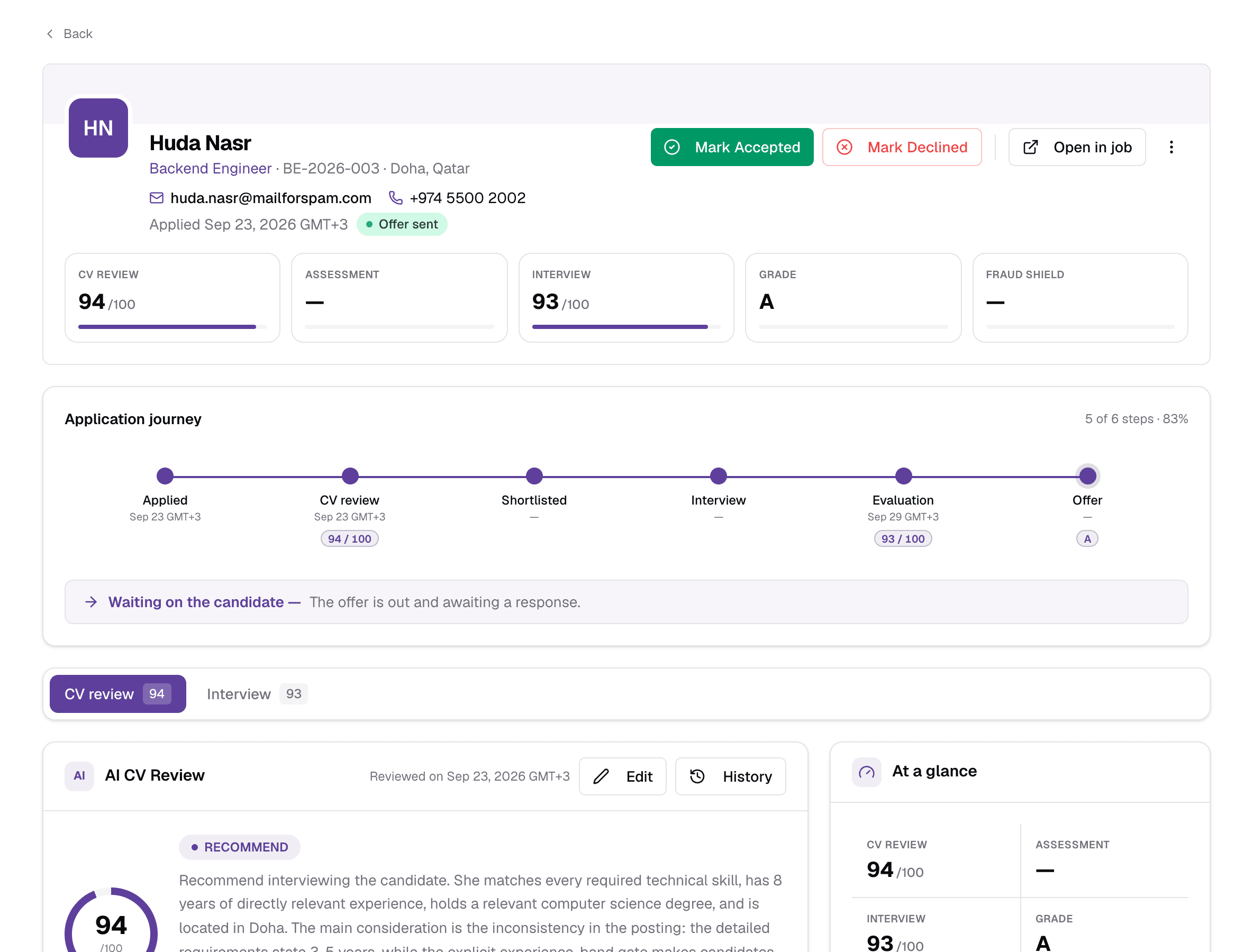
An application is one candidate applying to one job. Its page brings together everything Truepick knows about that application — the AI CV review, assessment, interview, fraud check, offer and full history — and the buttons for the next step. Open it by clicking a candidate in Applications or in a job's applicants list.
Header
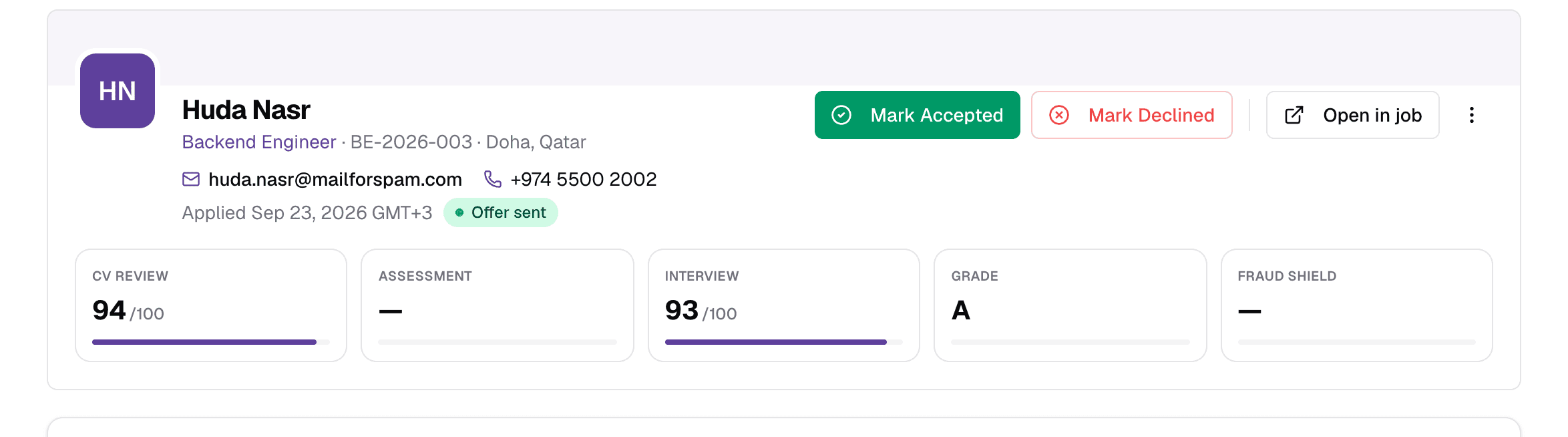
- 1Candidate and job
- The candidate's name, the job they applied to (click it to open the job), the Job Reference and location, then their email, phone and LinkedIn.
- 2Status
- Where the application is now, such as Shortlisted, Evaluation complete or Offer sent.
- 3Next step
- The button for the next step changes with the status — see Next-step buttons. Here the offer is out, so you record the answer.
- 4Open in job
- Go to the job this application belongs to.
- 5More actions (⋮)
- CV, downloads, links, status changes and removal — see More actions.
- 6Score tiles
- CV Review and Interview scores out of 100, and the Assessment percentage. A dash means that step has not happened.
- 7Grade
- The interview grade, from A+ down to F.
- 8Fraud ShieldClear · Worth a look · High risk
- The result of the CV authenticity check, if it has been run.
If the job is closed
Application journey
A timeline of the hiring steps — Applied, CV review, Assessment (only when the job has one), Shortlisted, Interview, Evaluation and Offer — with the date and score under each completed step.
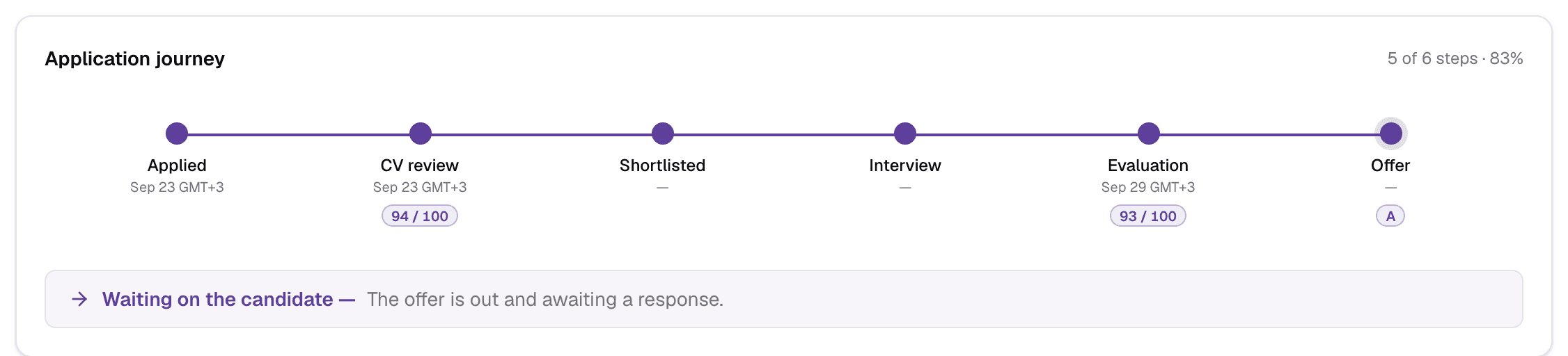
- 1Progress
- How many steps are done. When the application ends, this shows the outcome instead — Hired, Not selected, Withdrew or Offer declined.
- 2Next action
- Who the application is waiting on and why — for example “Waiting on your team — Evaluation is complete — send an offer or reject.”
CV review
The first tab is the AI's review of the CV against the job. The tabs above it — CV review, Assessment, Interview, Fraud Shield — appear only once that step has data, each with its score.
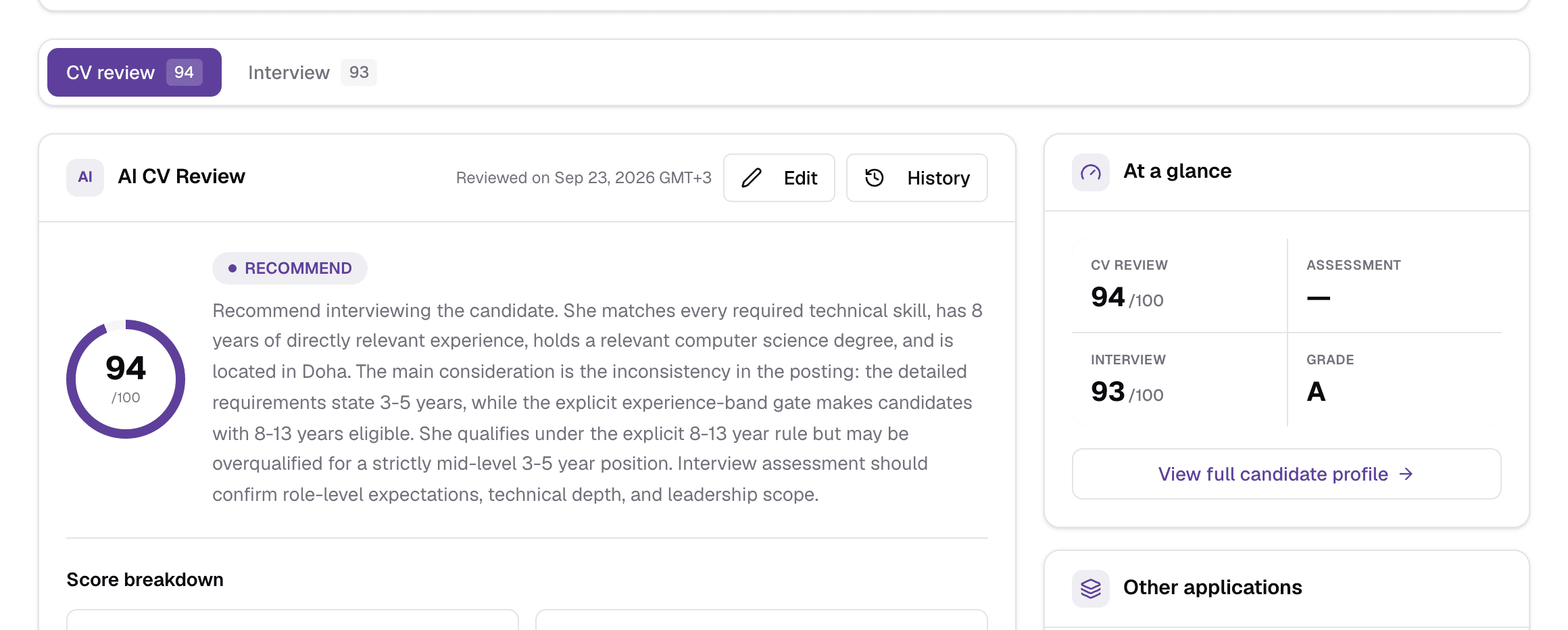
- 1CV review tab
- The AI CV review — open by default.
- 2Other tabs
- Interview, Assessment and Fraud Shield, when they exist.
- 3Edit
- Adjust the AI's overall score, recommendation, strengths and concerns. Every change is logged. Not available once an offer has been sent.
- 4History
- Every edit made to the review, with who and when.
- 5Verdict and reasoning
- The AI's recommendation — such as Recommend, Maybe or Not recommend — with the score out of 100 and a paragraph explaining why.
How the CV score is built
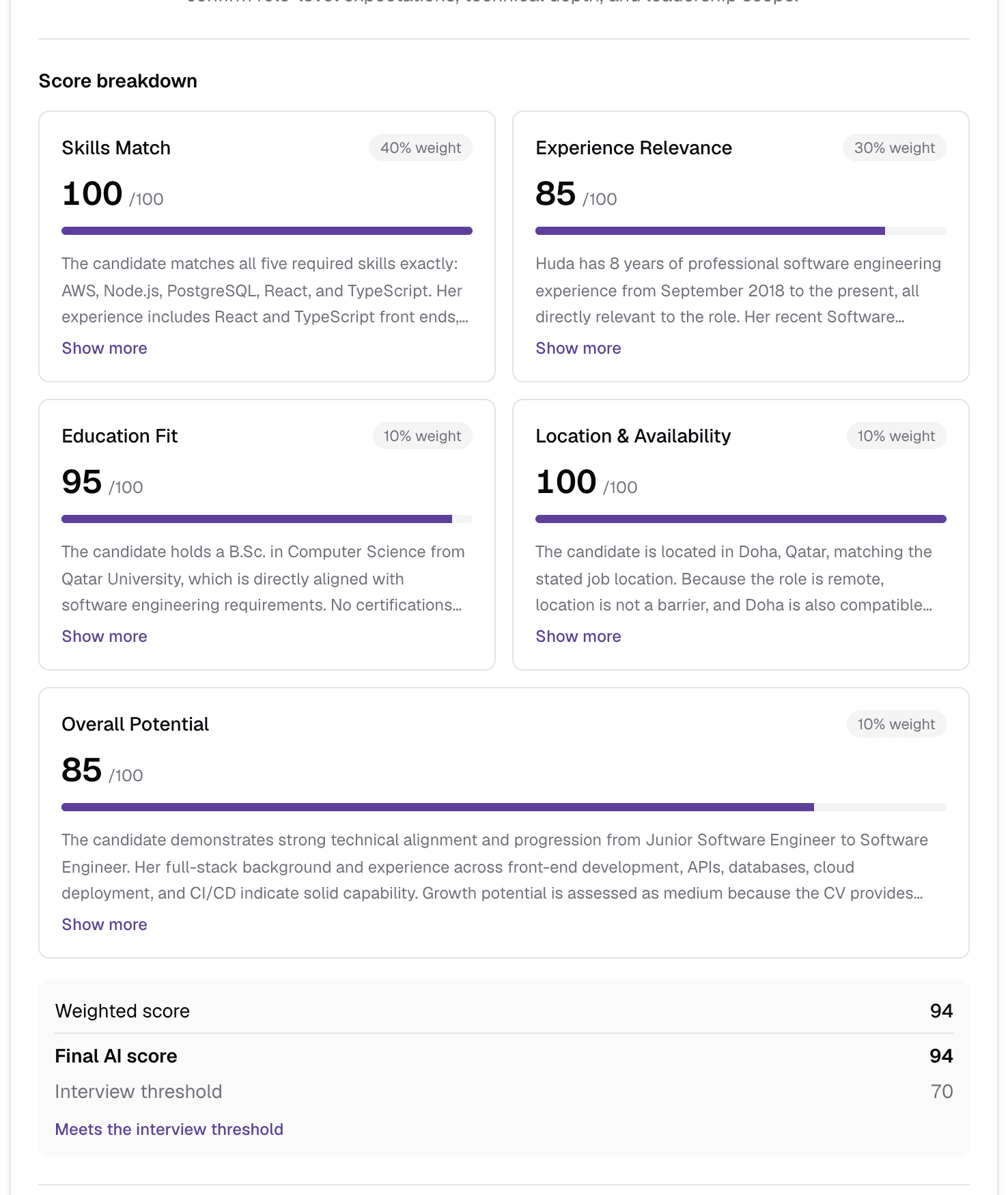
- 1Dimensions
- Five scores out of 100, each with the AI's reasoning (Show more expands it): Skills Match, Experience Relevance, Education Fit, Location & Availability and Overall Potential.
- 2Weight
- How much each dimension counts: Skills 40%, Experience 30%, and 10% each for Education, Location and Potential.
- 3Final AI score
- The weighted score, minus any penalties — location mismatch, missing required skills, or being outside the experience range — compared with the job's CV threshold.
- 4Outcome
- Meets the interview threshold, Below the interview threshold, or Outside the job's experience range — not eligible regardless of score.
If someone edits the score, a note shows the change (for example 82 → 88); the breakdown keeps the AI's original scoring. An Over range or Under range badge next to the score explains why a high score can still be rejected.
Strengths, concerns and the CV
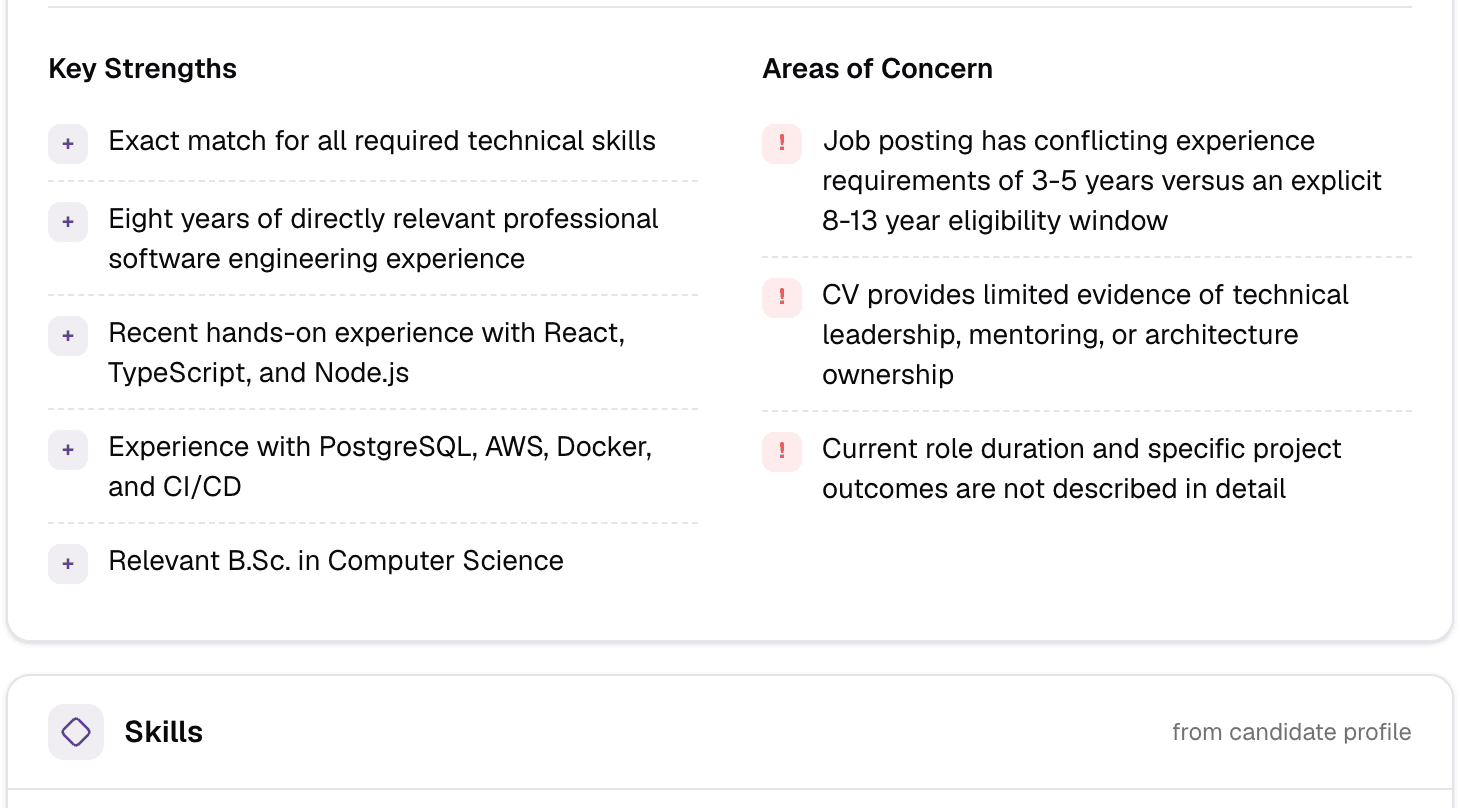
- Key Strengths and Areas of Concern — what to build on and what to probe in the interview.
- Skills — the skills found on the candidate's profile.
- The cover letter, if one was submitted, and CV as submitted — the CV text exactly as received. It cannot be changed.
- If a recruiter rejected the candidate with reasons, a Rejection feedback card shows them.
Side panel
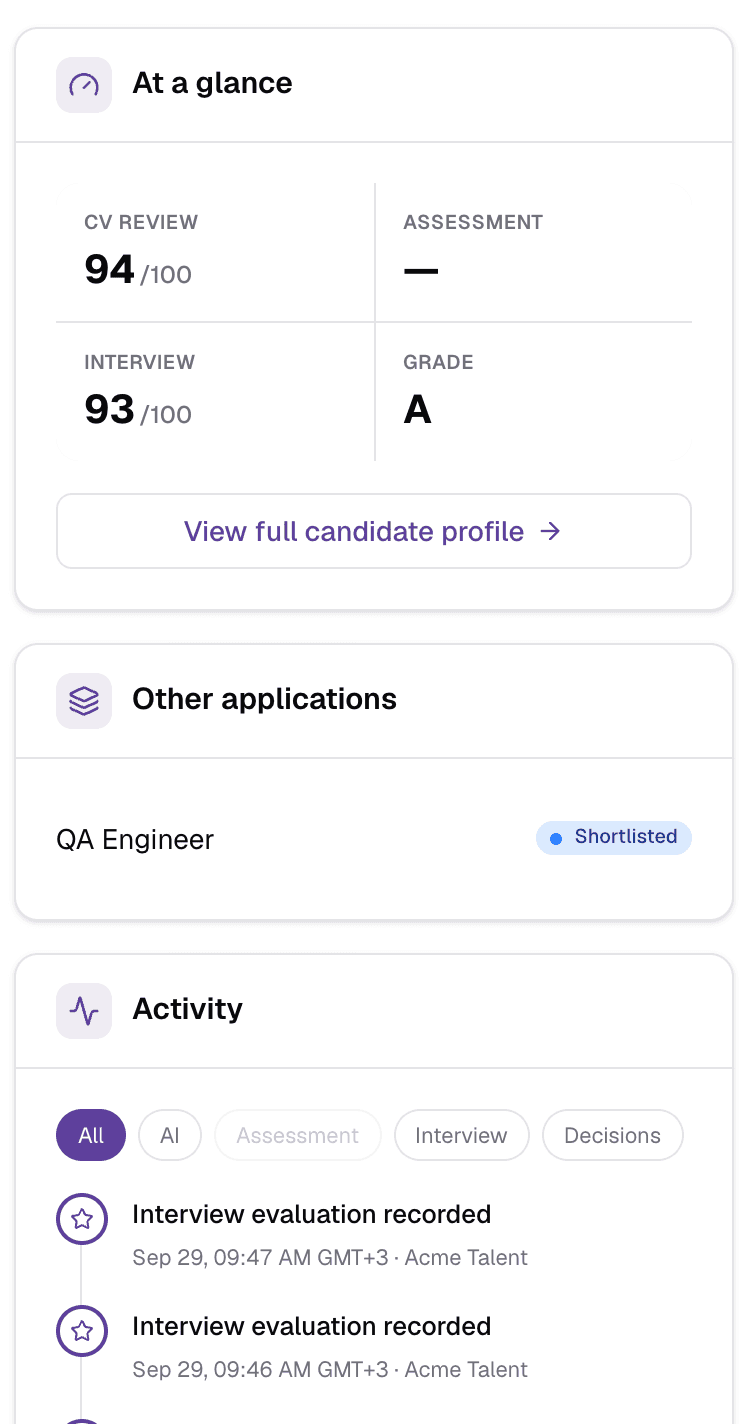
- 1At a glance
- The four scores again, and any assessment or interview deadline with the days left (or late).
- 2View full candidate profile
- Open the candidate's own profile page.
- 3Other applications
- Other jobs this candidate has applied to, with their status.
- 4ActivityAll · AI · Assessment · Interview · Decisions
- Everything that happened on this application, newest first: reviews, status changes with reasons, invitations, interviews, evaluations, offers and edits. Filter with the chips; Show older loads more.
Interview
The Interview tab has two views once both exist: Interview evaluation (the scoring) and Interview details (what happened).
Interview evaluation
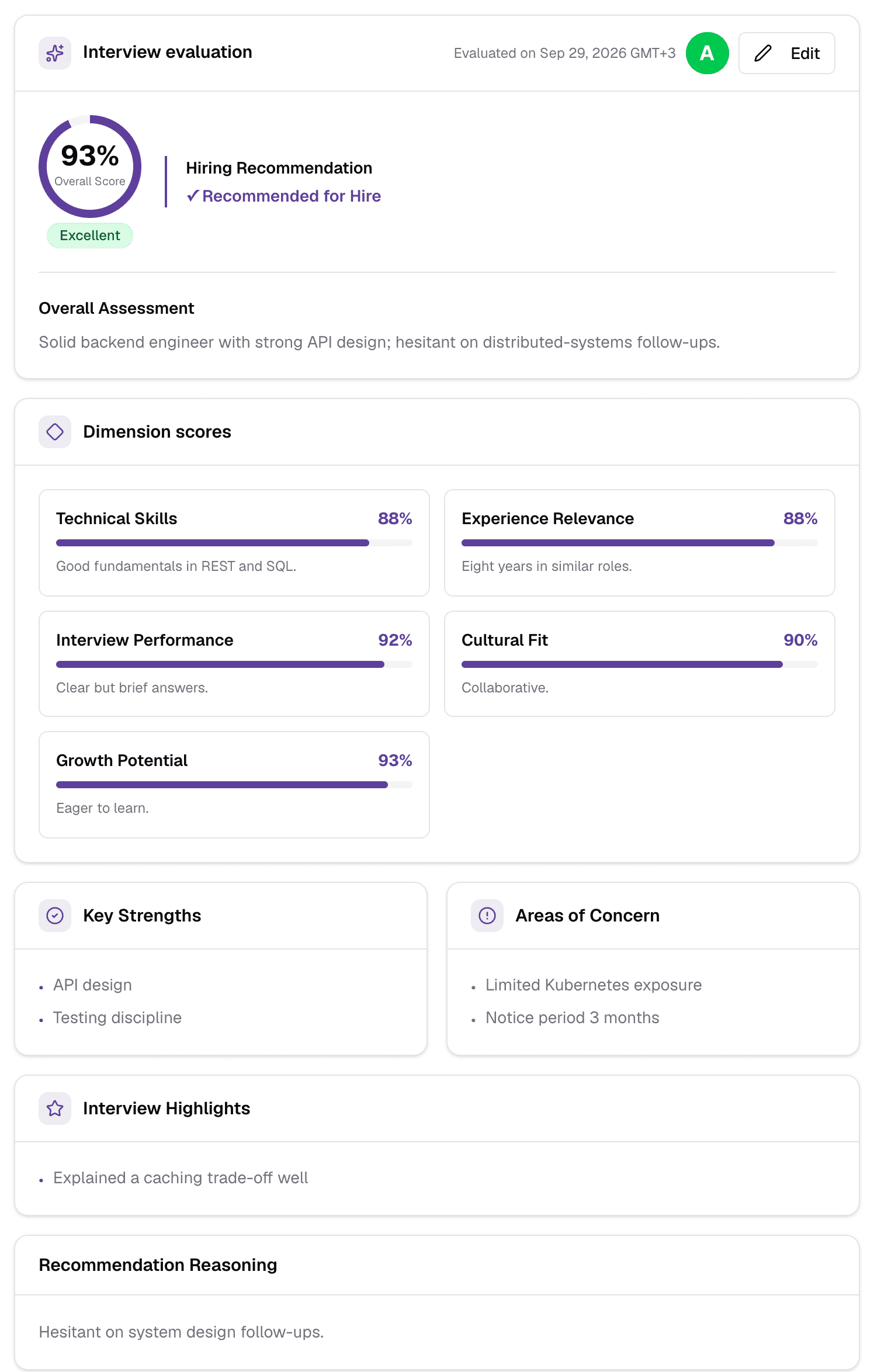
- Overall Score out of 100, rated Excellent (90+), Good (70+), Acceptable (50+) or Poor, and the letter grade.
- Hiring Recommendation: Recommended for Hire when the score reaches the job's AI interview threshold (90 by default), Maybe Hire - Further Review Needed from 70, and Not Recommended below that.
- Dimension scores — Technical Skills, Experience Relevance, Interview Performance, Cultural Fit and Growth Potential — each with a short explanation.
- Key Strengths, Areas of Concern, Interview Highlights and the reasoning behind the recommendation.
- For video interviews, an Interview Integrity Analysis — eye contact, reading behaviour, environment and whether anyone else appeared to help — with frame evidence when something is flagged.
- Edit lets your team correct the score, grade, recommendation or notes.
While the AI is analysing
Interview details
- Date, time, duration, platform (AI video or voice interviewer, Google Meet, Teams, Zoom or in person), interviewers, and Join meeting while it is upcoming.
- Copy interview link for an AI interview the candidate has not finished yet.
- The Recording, a Summary, Key highlights (topics, action items, notes) and the full Transcript.
- If there were several rounds, pick one from the round chips.
Face-to-face interviews
After your team's interview, click Complete Interview. Optionally upload the transcript (PDF, Word or text, up to 25 MB) to fill the form automatically, then score each criterion out of 100, add strengths, concerns and notes, and save. Then use Evaluate Candidate to produce the evaluation.
Assessment
- While it is out: whether the candidate has started, is taking it, or missed the deadline, and View Assessment Link.
- When it is done: the score, Passed or Failed against the pass threshold, when it was submitted and evaluated, whether the candidate's identity was verified, and a Question breakdown with every answer.
Fraud Shield
Fraud Shield checks a CV for signs it is not genuine. Run it from ⋮ → Verify CV authenticity if it has not run yet; it works in the background and uses AI credit.
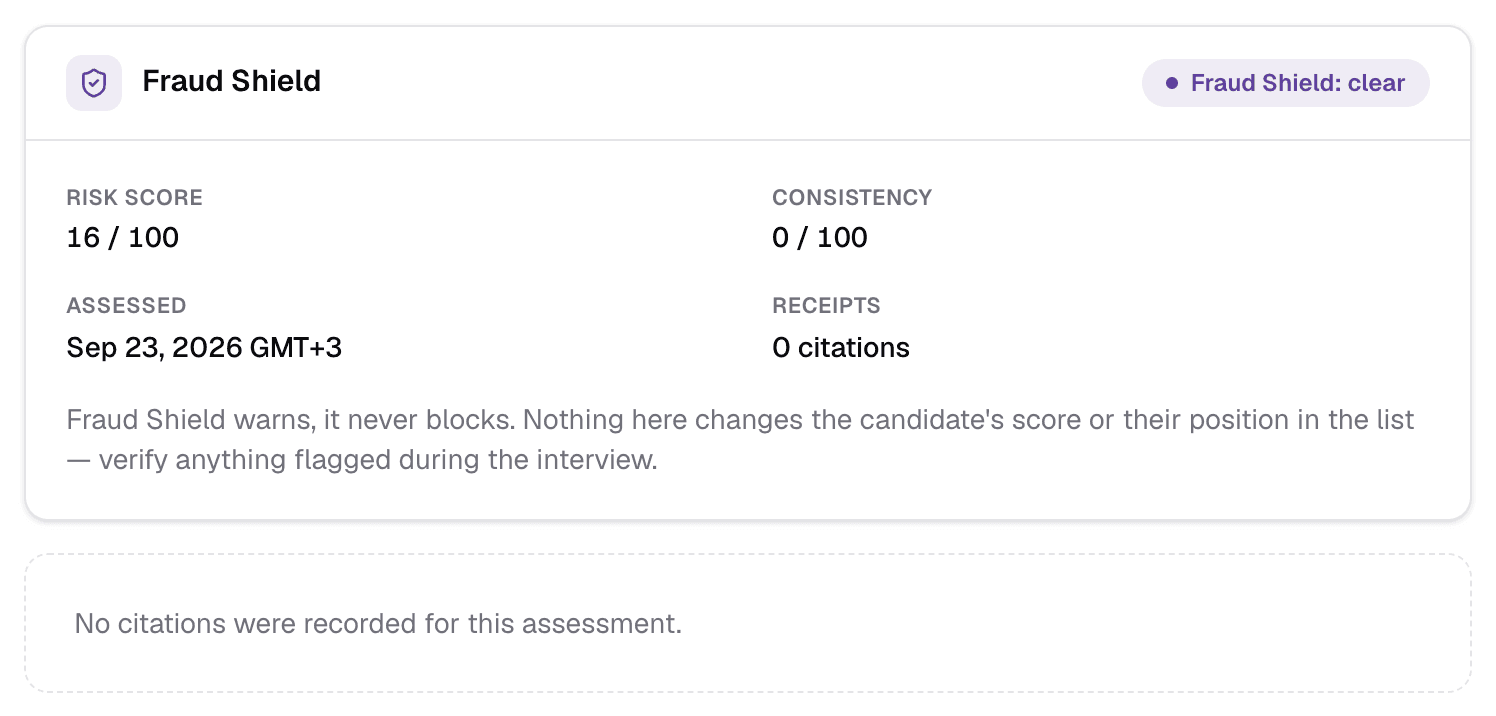
- The result — Clear, Worth a look or High risk — with a risk score and a consistency score.
- Receipts: the evidence, each quoted from the CV — text mirrored from the job description, unsupported or contradicted claims, tailoring patterns and timeline contradictions.
It warns, it never blocks
Next-step buttons
The header shows the one button that moves this application on:
Sending an offer
- Amount, Currency, FrequencyRequiredPer hour · day · week · month · year
- The pay. Currency defaults to QAR.
- Employment TypeRequiredPermanent · Contract
- For contracts you also set a Contract End Date; reminders go out 30, 14 and 7 days before it ends.
- Start DateRequired
- When the candidate starts.
- Offer Expiry DateRequired
- The deadline for the candidate to accept.
- Benefits & Perks, Custom MessageOptional
- Added to the offer letter.
Preview & Send shows the offer letter as a PDF and the email the candidate will receive. You can edit both, then Confirm & Send emails it. When the candidate answers, record it with Mark Accepted (the candidate gets a confirmation email) or Mark Declined (with an optional reason).
More actions (⋮)
The menu shows only what applies to the application right now — an offered application has a short menu:
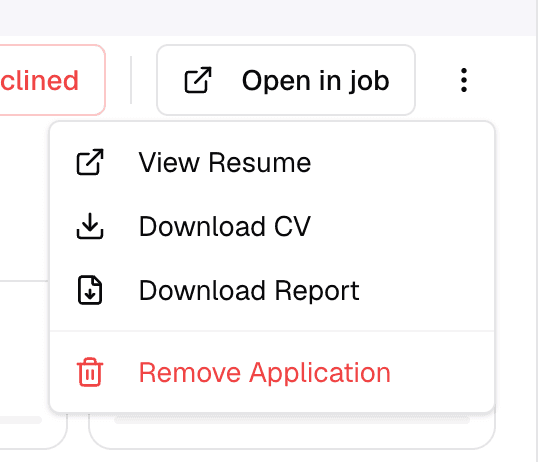
- View Resume / Download CV
- Open or download the CV file.
- Cancel processing / Retry processing
- For a CV that is stuck or failed to process.
- Verify CV authenticity
- Run Fraud Shield. Uses AI credit.
- Copy Interview Link / Copy Assessment Link
- The candidate's personal link, to resend yourself.
- Regenerate Interview Link
- Archive the current AI interview and return the candidate to Shortlisted so you can invite them again. No email is sent.
- Re-upload CV & Re-evaluate
- Replace the CV and run the AI review again. The old review is kept in View history.
- View history
- Earlier CV reviews, kept when the CV was re-uploaded.
- Download Offer Letter / Transcript / Report / Recording
- Files for this application, when they exist. Report is a PDF summary of the candidate.
- View Interview / View Recording
- Open the interview page or recording.
- Change StatusMove to Shortlisted · Move to Rejected
- Override the AI. You give a reason, saved to the history with your name and the time.
- Remove Application
- Remove this application. It cannot be undone, and is not possible once an offer letter exists.
When candidates are emailed
Sharing the AI review
Every application with an AI review has a read-only review page at /applications/<id>/ai-review, showing the score, recommendation, strengths, concerns, category scores and suggested interview focus. Anyone with the link can open it without signing in, so share it only with people who should see the candidate's review. The job PDF report links to it as View Full AI Review.
- Recruiters cannot add free-form notes on this page; reasons you give when changing status or editing a review are kept in Activity.
Still have questions?
Pick a question — ChatGPT reads this page and answers it for you.