

Face-to-face interviews
Schedule interviews your team runs, with emails, reminders and an AI note-taker.
Face-to-face interviews are run by your team — in person, by phone or on Google Meet, Microsoft Teams or Zoom. They are used for jobs whose Interview Type is Face-to-Face Interview, and only for shortlisted candidates. They do not use AI credit.
Schedule an interview
Click Send Interview Invitation on a shortlisted candidate (on the job or the application), or Schedule Interview on the Interviews page.
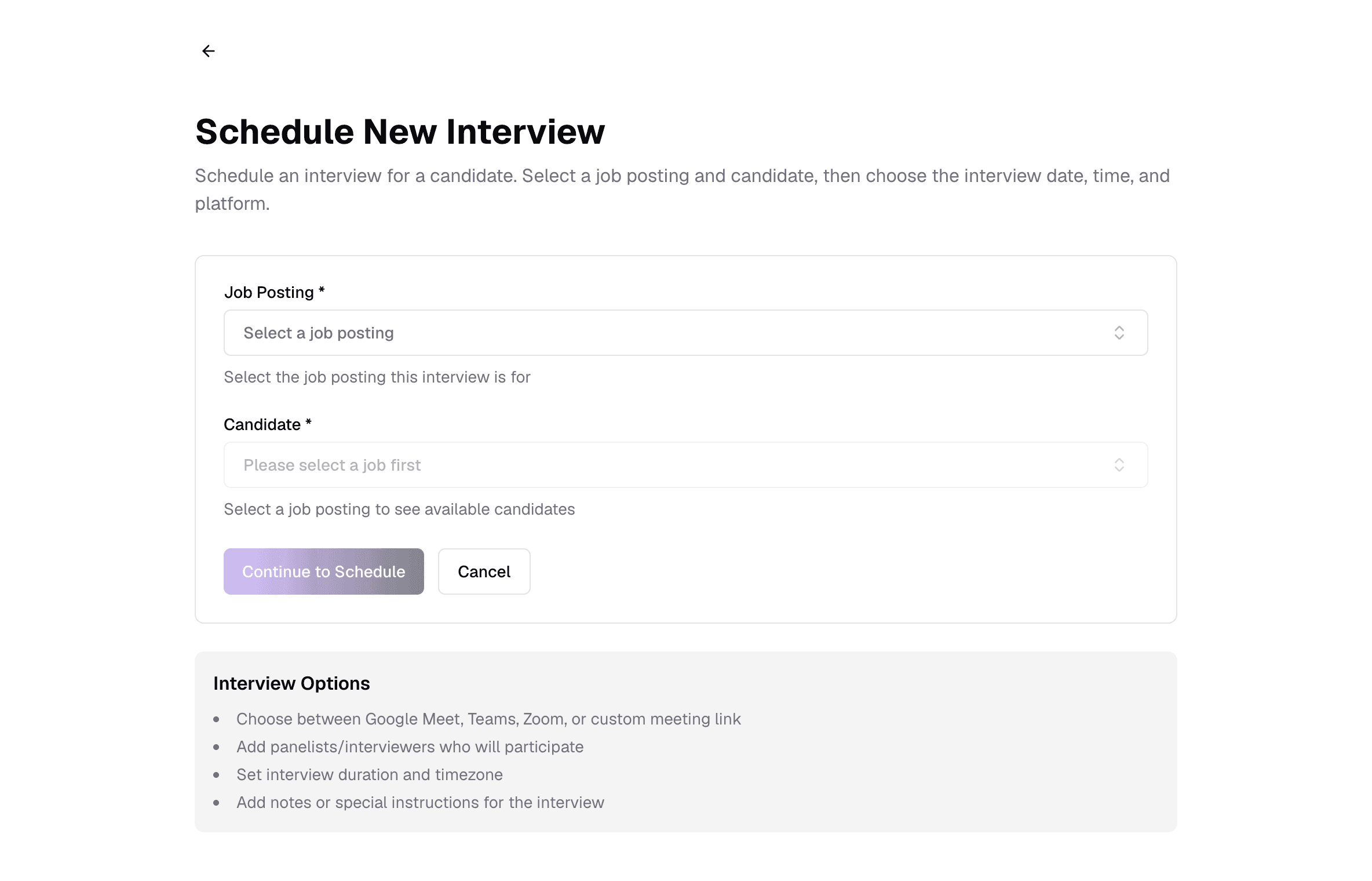
Pick the job and candidate
From Schedule Interview, choose the job, then one of its shortlisted candidates, and click Continue to Schedule. Only open face-to-face jobs are listed.Fill in the details
See the fields below.Schedule
Click Schedule Interview. The candidate moves to Interview Scheduled and everyone is emailed.
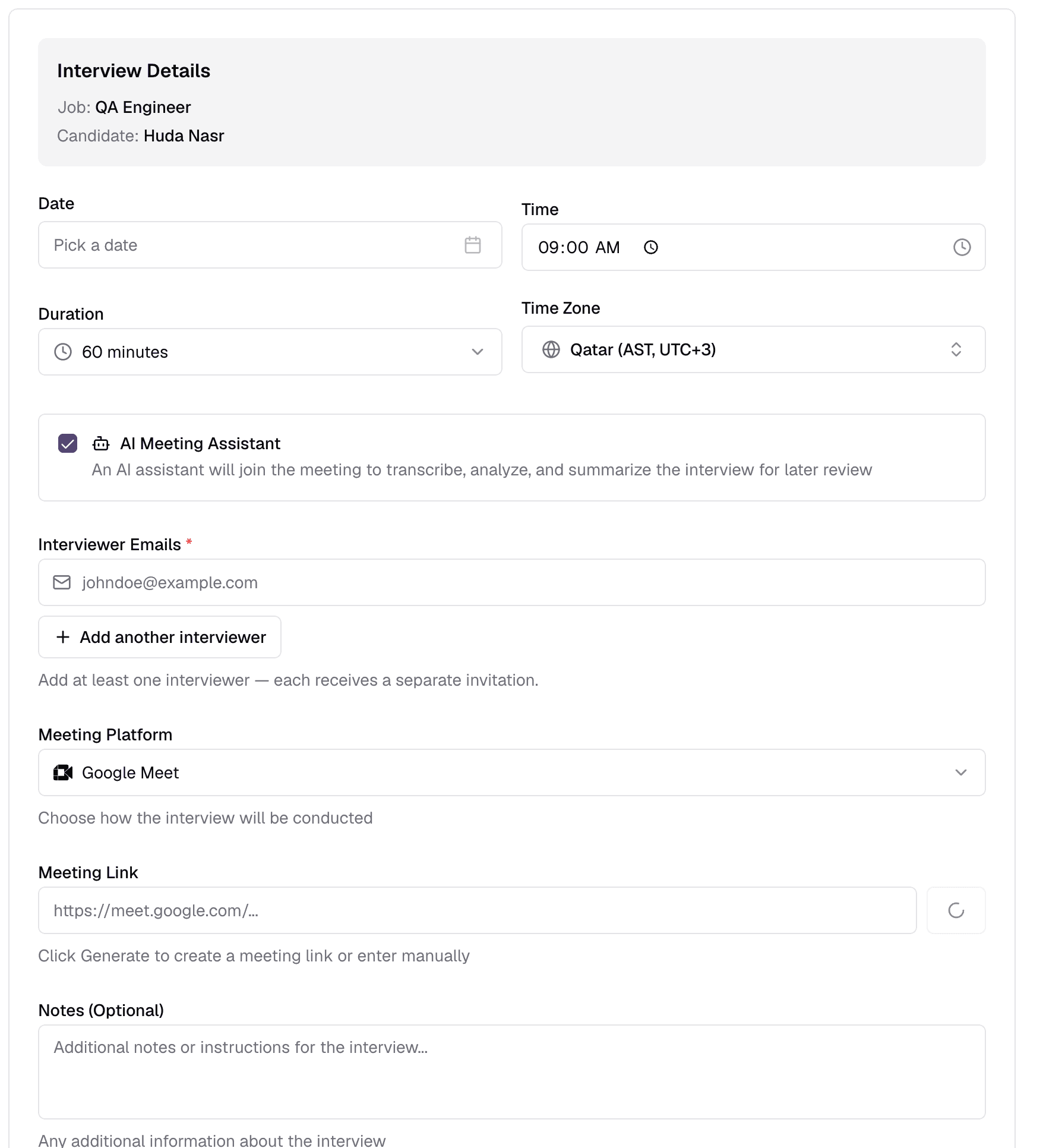
- 1DateRequired
- The interview day.
- 2TimeRequiredDefault 09:00
- Start time, in the time zone below.
- 3DurationOptional15–300 minutes
- How long to block. The choices come from your interview settings.
- 4Time ZoneOptional
- Shown on the invitations, so everyone sees the right local time.
- 5AI Meeting AssistantOptionalCheckbox
- An AI note-taker joins the meeting a minute before it starts, then transcribes and summarises it. It needs a meeting link, so it does not work for in-person interviews.
- 6Interviewer EmailsRequired
- Who runs the interview. Add as many as you need — each gets their own invitation with the candidate's CV.
- 7Meeting PlatformOptionalGoogle Meet · Microsoft Teams · Zoom · In-Person · Phone
- How the interview happens. The default comes from your settings.
- 8Meeting LinkOptional
- Required for video platforms and must start with https. Generate creates one if the platform is connected in Settings → Connections; otherwise paste your own. For In-Person or Phone, add a Location instead.
- 9NotesOptional
- Instructions for the candidate and interviewers.
Emails and reminders
- The candidate gets an invitation with a calendar file (.ics) to add it to their calendar.
- Each interviewer gets one too, with the candidate's CV.
- Reminders go out 24 hours, 1 hour and/or 15 minutes before — set in your interview settings — optionally to interviewers as well.
- Changing the time or cancelling sends updated emails and resets the reminders.
After the interview
On the candidate's application, click Complete Interview:
- Interview TranscriptOptionalPDF · Word · TXT · up to 25 MB
- Optional. Upload it and the scores are filled in from it for you to check.
- Evaluation CriteriaOptional0–100 each
- Technical Skills, Experience Relevance, Interview Performance, Cultural Fit and Growth Potential, each with details. They combine into the Overall Score.
- Candidate Strengths, Areas of Concern, Additional NotesOptional
- Your observations.
Then use Evaluate Candidate for the final evaluation, and add remarks on the interview page if you like.
If nobody records an outcome
Still have questions?
Pick a question — ChatGPT reads this page and answers it for you.