

Create a job
Every field on the job form, what it does, and when to use it.
A job is where hiring starts. Everything you enter on the job form is used twice: it is what candidates read on the public job page, and it is what Truepick scores every CV and interview against. The clearer the requirements, the better the ranking.
Open the job form
Go to Jobs
Select Jobs in the left sidebar.Start a new job
Click Create Job at the top right of the Job Postings page. You can also ask the AI Assistant to draft the job for you.Fill in the form
Work through the sections below. Only four fields are required: Job Title, Job Reference, Interview Type and Job Description.Save or publish
Save as Draft keeps the job private while you work on it. Publish Job makes it live and starts accepting applicants.
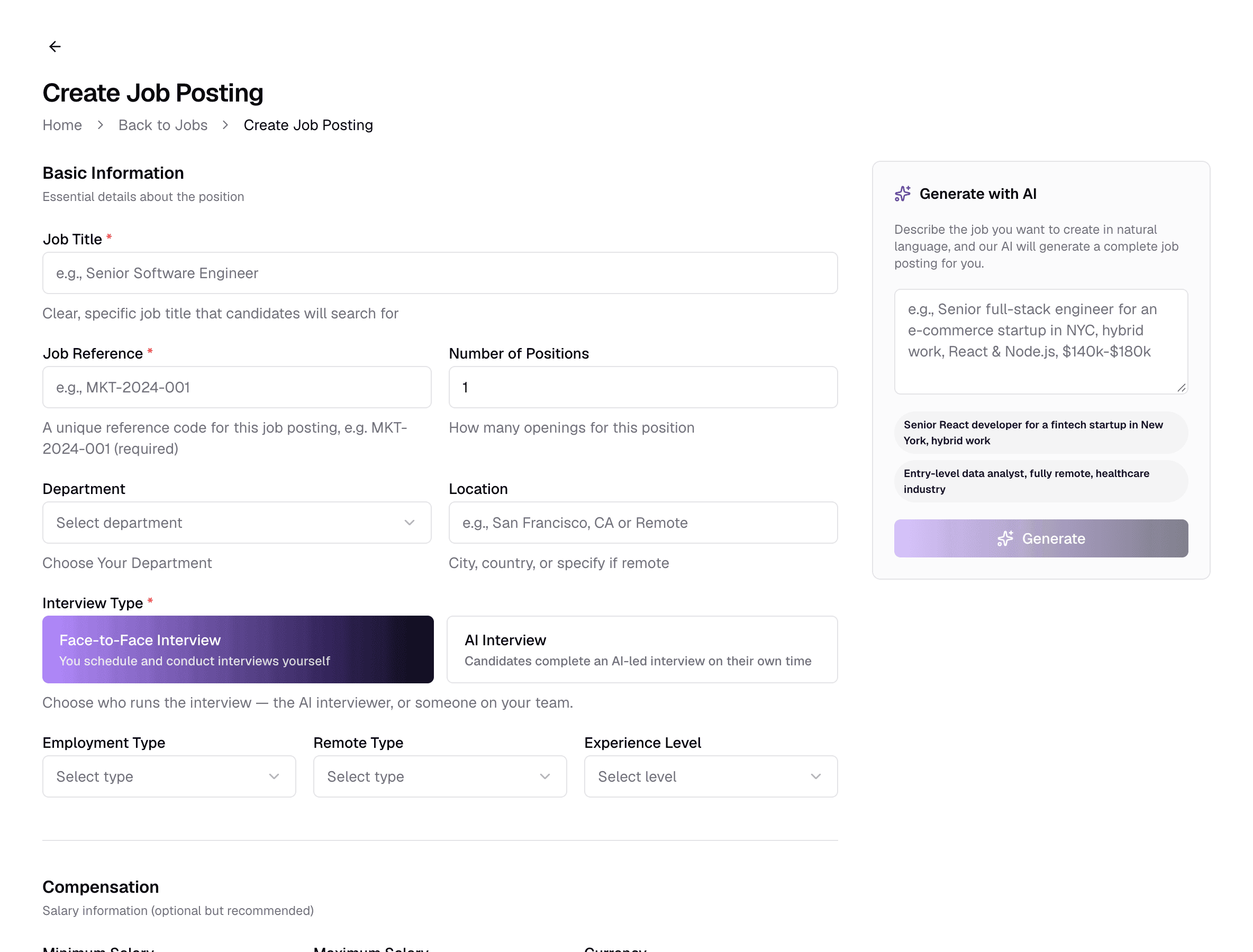
Basic Information
The essentials of the position: what it is called, where it is, who runs the interview and what kind of contract it is.
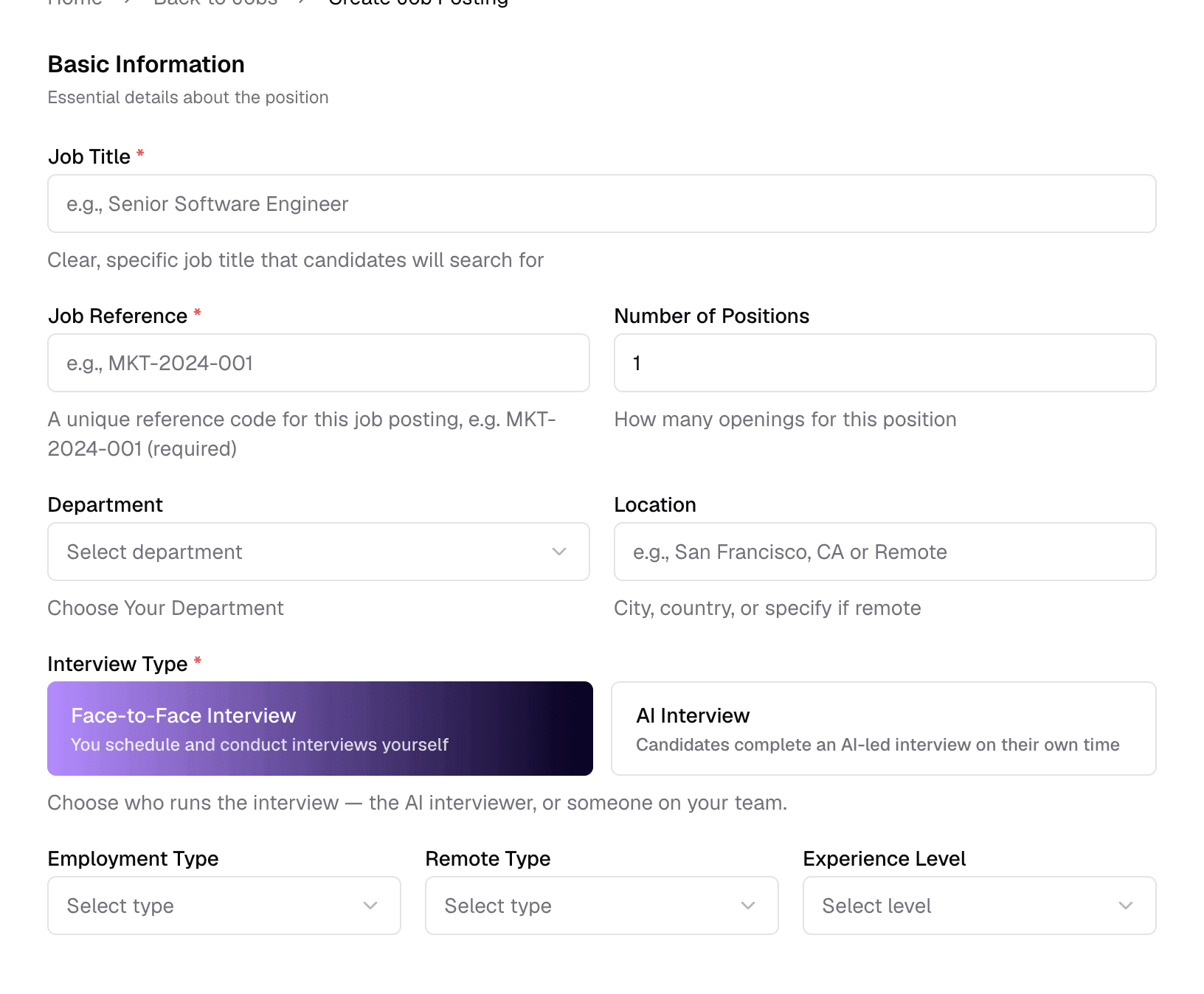
- 1Job TitleRequiredText · 3–100 characters
- The title candidates search for and see first, and the role the AI scores CVs against. Use the title people in the field actually use — “Senior Accountant”, not “Finance Ninja”. If you already have a job with exactly this title, Truepick asks you to confirm before creating another one.
- 2Job ReferenceRequiredText · up to 50 characters
- Your internal code for this opening, such as MKT-2024-001. It must be unique within your company, which keeps jobs with the same title apart in reports. Candidates never see it.
- 3Number of PositionsOptionalNumber · default 1
- How many people you plan to hire. It is shown on the job page and in the job report for your team; it does not close the job automatically.
- 4DepartmentOptionalDropdown
- The team the role belongs to, for your own organisation. Choose Other to type a name in the Custom Department Name field that appears.
- 5LocationOptionalText
- City and country of the role, or “Remote”. Shown on the job page and given to the AI when it reviews CVs.
- 6Interview TypeRequiredFace-to-Face · AI Interview
- Who runs the interview for this job. Choosing AI Interview reveals extra settings — see Interview Type.
- 7Employment TypeOptionalFull Time · Part Time · Contract · Internship
- The kind of contract. Shown on the job page.
- 8Remote TypeOptionalOnsite · Remote · Hybrid
- Where the work happens. For Onsite and Hybrid jobs, a candidate the AI judges unable to work at the Location gets a lower CV score.
- 9Experience LevelOptionalEntry · Junior · Mid · Senior · Lead · Executive
- The seniority you are hiring for. Each level is a range of years — Entry 0–1, Junior 1–3, Mid 3–5, Senior 5–8, Lead 8–12, Executive 12+ — and Truepick accepts up to 12 months above it. What happens to candidates outside the range is set in Evaluation Thresholds.
Interview Type
Every job uses one of two interview types. You can change it later, but it shapes what happens after a candidate is shortlisted.
Face-to-Face Interview
Someone on your team runs the interview — in person, by phone or on a video call. From the job page you schedule it (date, time, platform and interviewers), Truepick emails the invitations, and your interviewer records the result afterwards.
AI Interview
The AI interviewer runs a video interview the candidate takes on their own time. You send the invitation from the job page; the candidate joins from the link in their email, answers questions generated from your job, and is evaluated and scored when they finish. Choosing it shows the AI Interview Behavior settings:
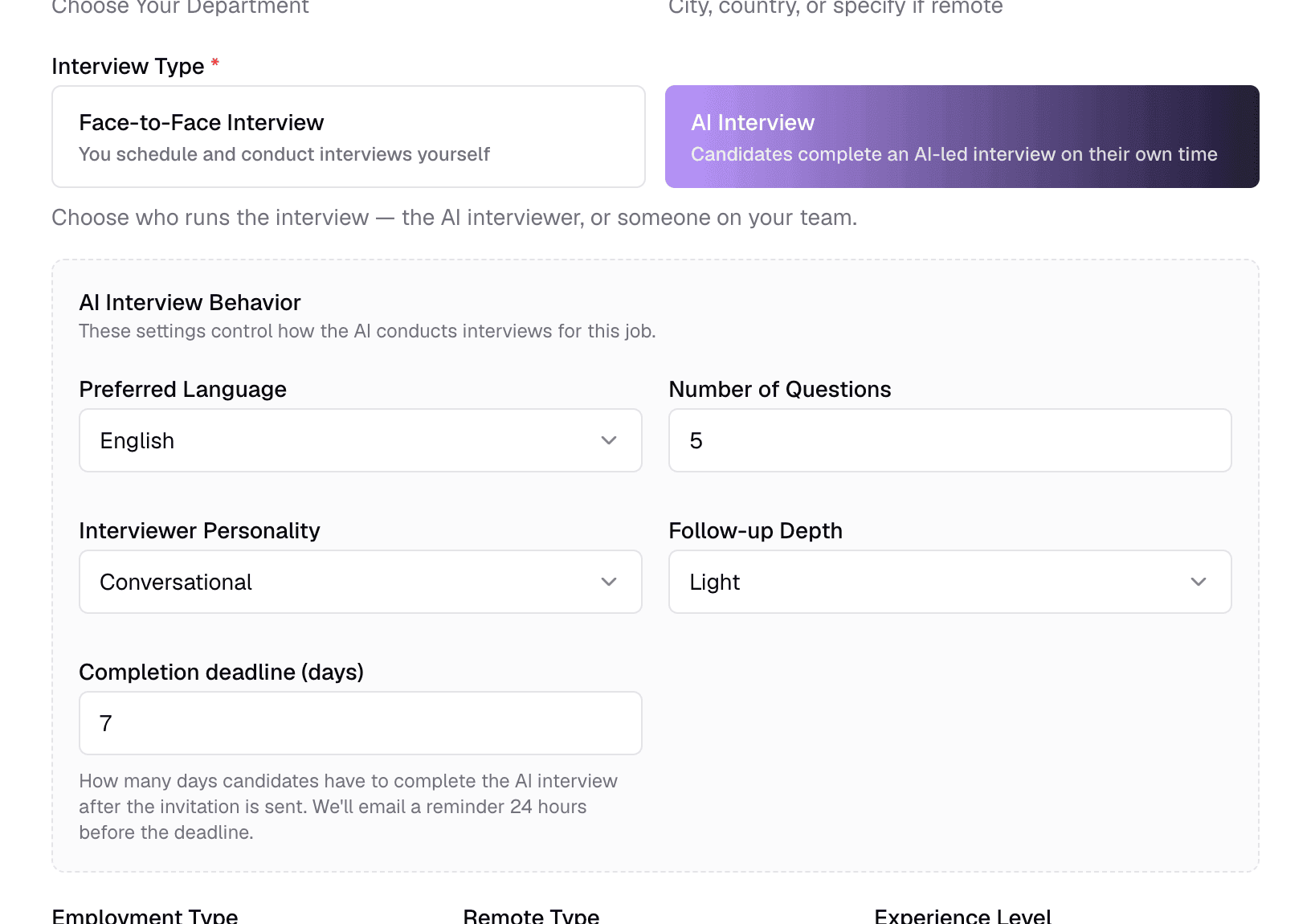
- 1Preferred LanguageOptionalEnglish · Arabic
- The language of the interview questions and of the live interview.
- 2Number of QuestionsOptionalNumber · 1–50 · default 5
- How many main questions the AI asks in each interview. Truepick prepares a larger pool of questions from your job and draws on it during the interview.
- 3Interviewer PersonalityOptionalFormal · Conversational · Technical · Friendly
- The interviewer's tone. Conversational suits most roles; Technical keeps it focused on skills.
- 4Follow-up DepthOptionalNo follow-ups · Light · Deep
- How much the AI probes an answer before moving on. Deep gives richer evidence but longer interviews.
- 5Completion deadline (days)OptionalNumber · 1–60 · default 7
- Days a candidate has to finish the interview after you send the invitation. Truepick emails a reminder 24 hours before the deadline.
Which one should I choose?
Compensation
Optional, but transparent salary ranges attract better applications. The range is shown on the job page; it is not used in scoring.
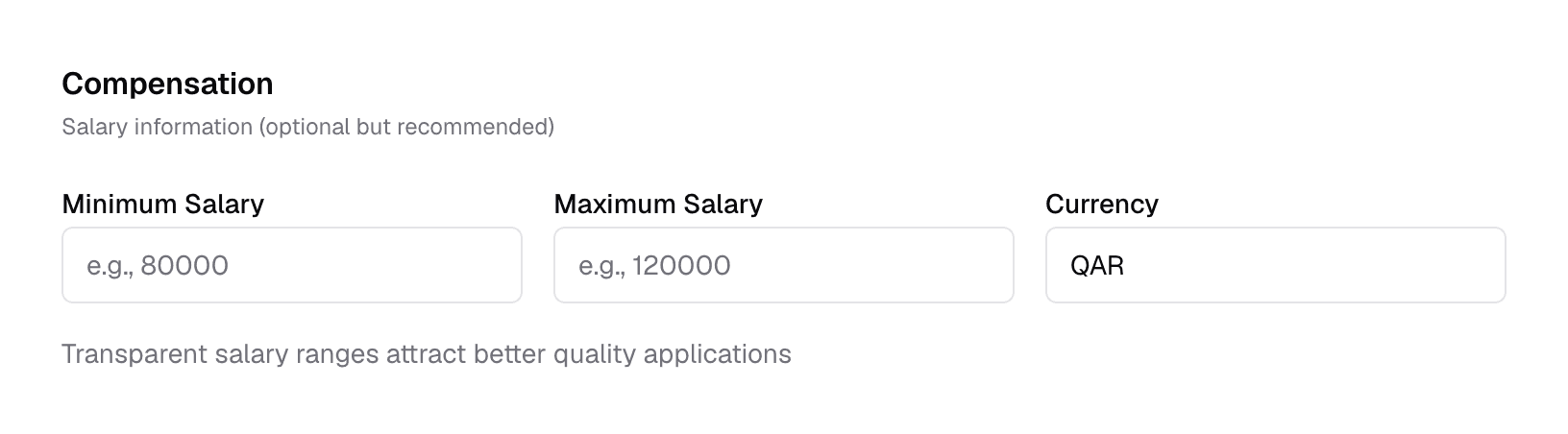
- 1Minimum SalaryOptionalNumber
- The bottom of the pay range.
- 2Maximum SalaryOptionalNumber
- The top of the pay range. It must be equal to or higher than the minimum.
- 3CurrencyOptionalText · default QAR
- Type the currency code, such as QAR, SAR, AED or USD. Check it after using Generate with AI, which fills in USD when the description names no currency.
Job Description and Hiring Brief
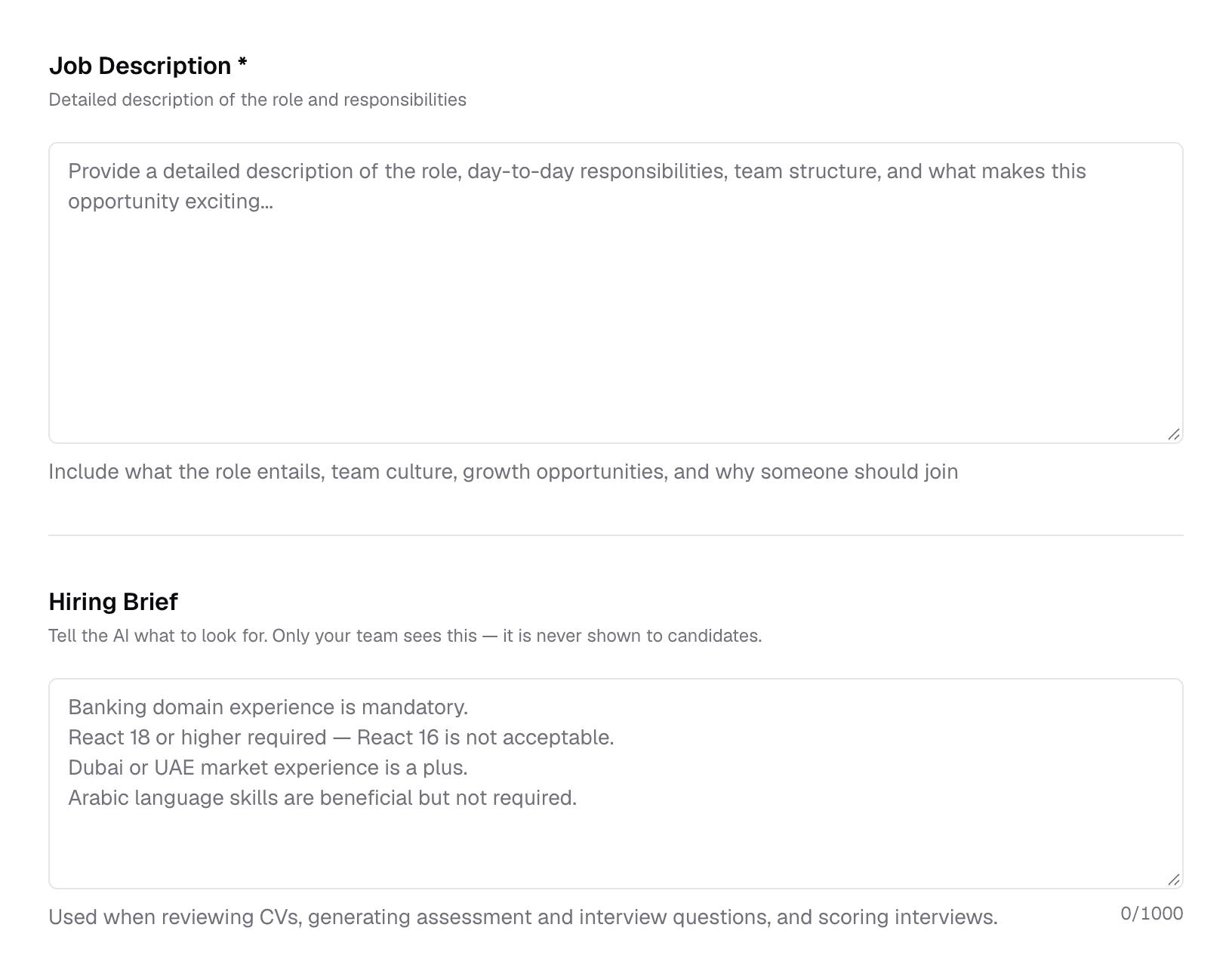
- 1Job DescriptionRequiredLong text · at least 50 characters
- The role in your own words: responsibilities, the team, and why someone should join. Candidates read it on the job page, and the AI uses it to review CVs, write interview and assessment questions, and evaluate interviews.
- 2Hiring BriefOptionalLong text · up to 1,000 characters
- Private instructions for the AI — what really matters for this hire. Never shown to candidates. See below.
- 3Character counterOptional
- How much of the 1,000-character brief you have used.
What is the hiring brief?
The hiring brief is where you tell the AI what you would tell a recruiter in a briefing: the deal-breakers, the nice-to-haves, and the details a job ad does not say out loud. Only your team sees it. The AI uses it in four places:
- Reviewing and scoring each CV.
- Writing the AI interview questions.
- Writing assessment questions.
- Evaluating and scoring the finished interview.
Write one point per line and say how strict each is. Items you mark as mandatory are treated as hard requirements; “preferred” or “a plus” items count in the candidate's favour without ruling anyone out.
IFRS 9 reporting experience required.
Big Four audit background is a plus.
Arabic is beneficial but not required.
Fair by design
Requirements, Skills and Benefits
Enter one item per line. Each line becomes a bullet on the job page.
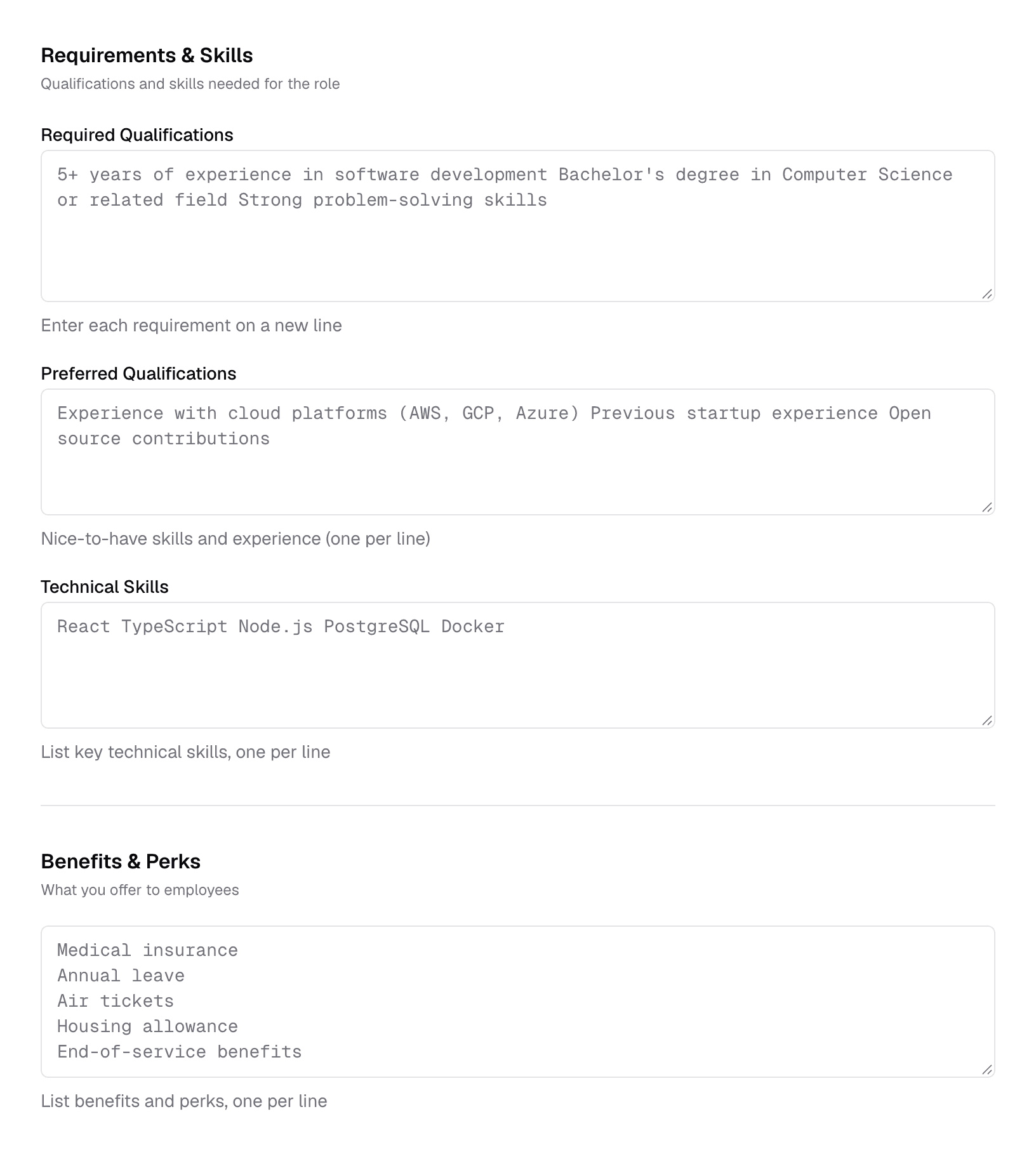
- 1Required QualificationsOptionalOne per line
- What a candidate must have — degrees, years in a field, certifications. The AI checks every CV against this list.
- 2Preferred QualificationsOptionalOne per line
- Nice-to-haves. They lift a candidate's score but do not rule anyone out.
- 3Technical SkillsOptionalOne per line
- The key skills for the role. Each skill the AI finds missing from a CV lowers its score by 5 points, up to 10 points in total — so list only the skills that really matter.
- 4Benefits & PerksOptionalOne per line
- What you offer, such as medical insurance or housing allowance. Shown on the job page only.
Assessment Configuration
Optionally attach a skills test from your Assessments library. When an assessment is attached, a candidate whose CV passes moves to Awaiting Assessment and is emailed the test automatically, instead of going straight to the shortlist.
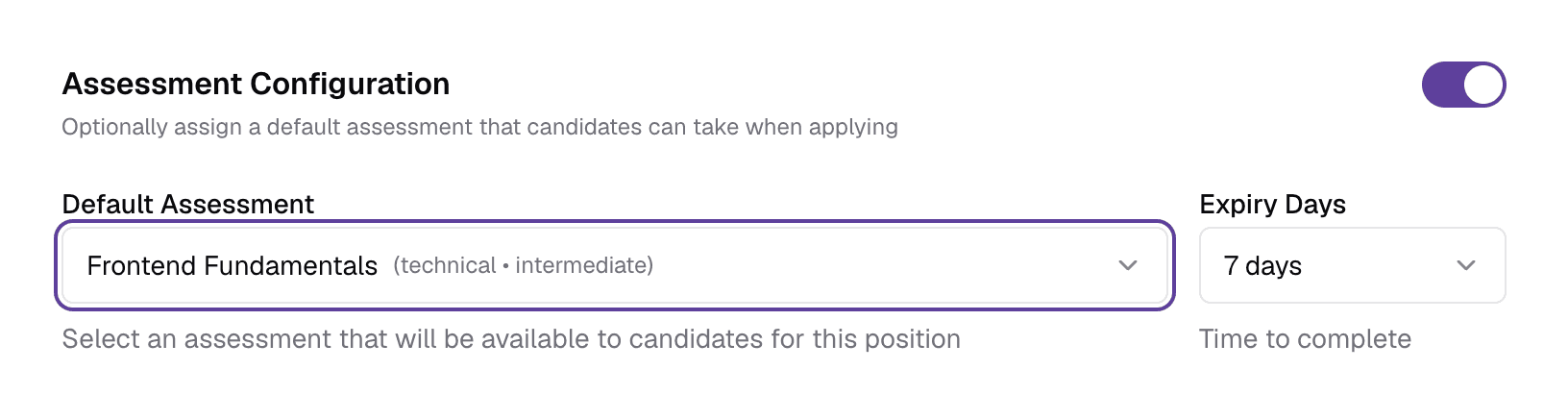
- 1Enable assessmentOptionalSwitch · off by default
- Turn on to attach an assessment. Turning it off removes the assessment from the job.
- 2Default AssessmentOptionalDropdown
- The assessment candidates take. Create assessments first under Assessments in the sidebar.
- 3Expiry DaysOptional1 · 3 · 7 · 30 days
- How long a candidate has to complete the assessment once it is sent.
Evaluation Thresholds
The pass marks for this job. They decide who moves forward automatically.
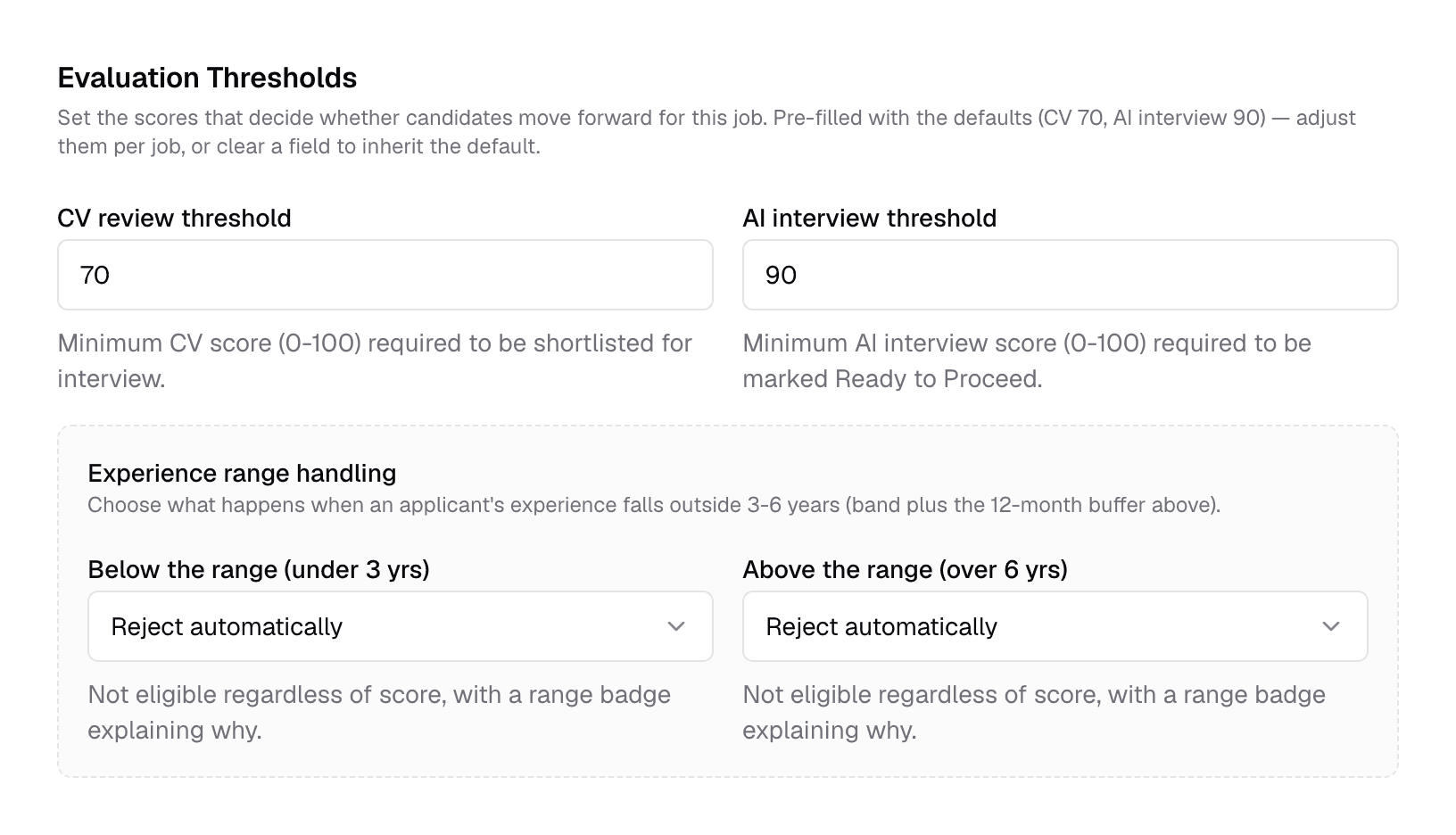
- 1CV review thresholdOptional0–100
- The minimum CV score to be shortlisted. Below it, the candidate is rejected. Pre-filled with your company's setting (70 if you have not set one); clear it to always follow the company setting.
- 2AI interview thresholdOptional0–100 · default 90
- The minimum AI interview score to be marked Ready to Proceed. Scores from 70 up to the threshold are a “maybe”; below 70 is not recommended.
- 3Below the rangeOptionalReject · Penalty · Flag
- What happens when a candidate has less experience than the level allows. Reject rules them out; Penalty takes 3 points per month short (up to 30) and lets the threshold decide; Flag keeps the score and shows a badge.
- 4Above the rangeOptionalReject · Penalty · Flag
- The same choice for candidates with more experience than the range — Penalty takes 2 points per month over (up to 25). Not shown for Executive, which has no upper limit.
Application Sources and saving
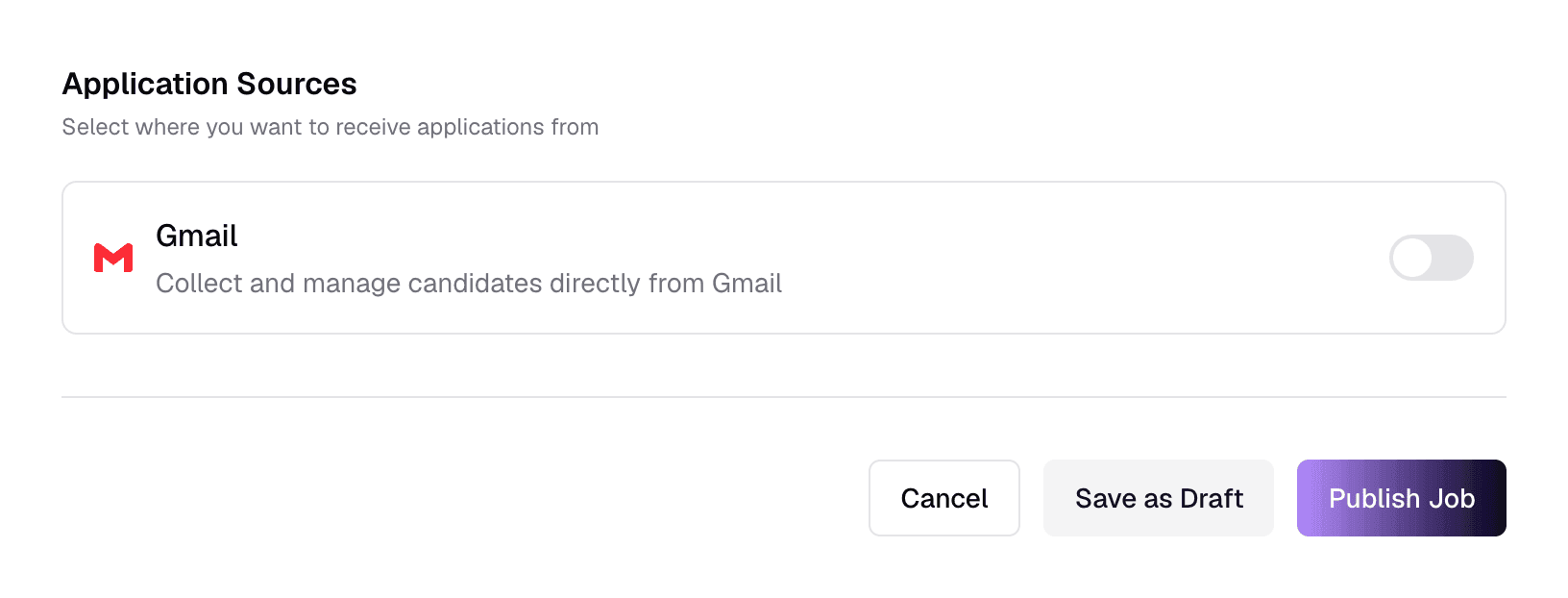
- 1GmailSwitch
- Also collect applications that arrive by email in your connected Gmail. If Gmail is not connected yet, a Connect Gmail link appears.
- 2Cancel
- Leave without saving.
- 3Save as Draft
- Save the job without publishing it. Drafts are not visible to candidates.
- 4Publish Job
- Save and publish. The job goes live on its public page and starts accepting applicants.
Generate with AI
Describe the job in one sentence and the AI fills in the form for you. On smaller screens the panel opens from a Generate with AI button at the top of the page.
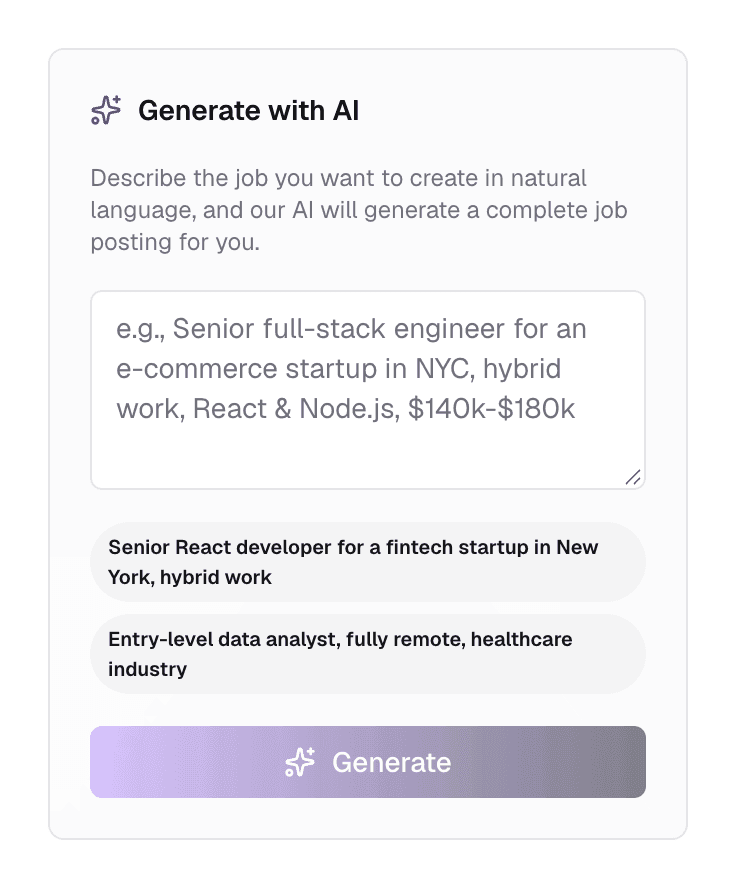
- 1Description boxText
- The role, seniority, location, work style, key skills and salary — the more you include, the less you edit afterwards.
- 2Examples
- Click one to try it.
- 3Generate
- Fills in the title, location, contract details, salary, description, requirements, skills and benefits. It uses AI credit, and it overwrites those fields.
Review before you publish
What happens next
- You land on the new job's page.
- For AI Interview jobs, Truepick generates the interview questions in the background. Review and edit them on the Job Details tab.
- Add candidates — share the link, upload CVs or import from your pool. See Job detail.
Still have questions?
Pick a question — ChatGPT reads this page and answers it for you.
- What is the hiring brief and what should I write in it?
- What is the difference between an AI interview and a face-to-face interview?
- What do the AI interview settings do?
- How do the CV and AI interview thresholds work?
- What happens to candidates outside the experience range?
- Which fields affect how CVs are scored?